EasyManua.ls Logo

Technics SX-KN650 - Page 51

Technics SX-KN650
86 pages
Print Icon
To Next Page IconTo Next Page
To Previous Page IconTo Previous Page
Loading...
owes
Part
V
Song
memory
Loading
the
recorded
contents
SONG
LOAD
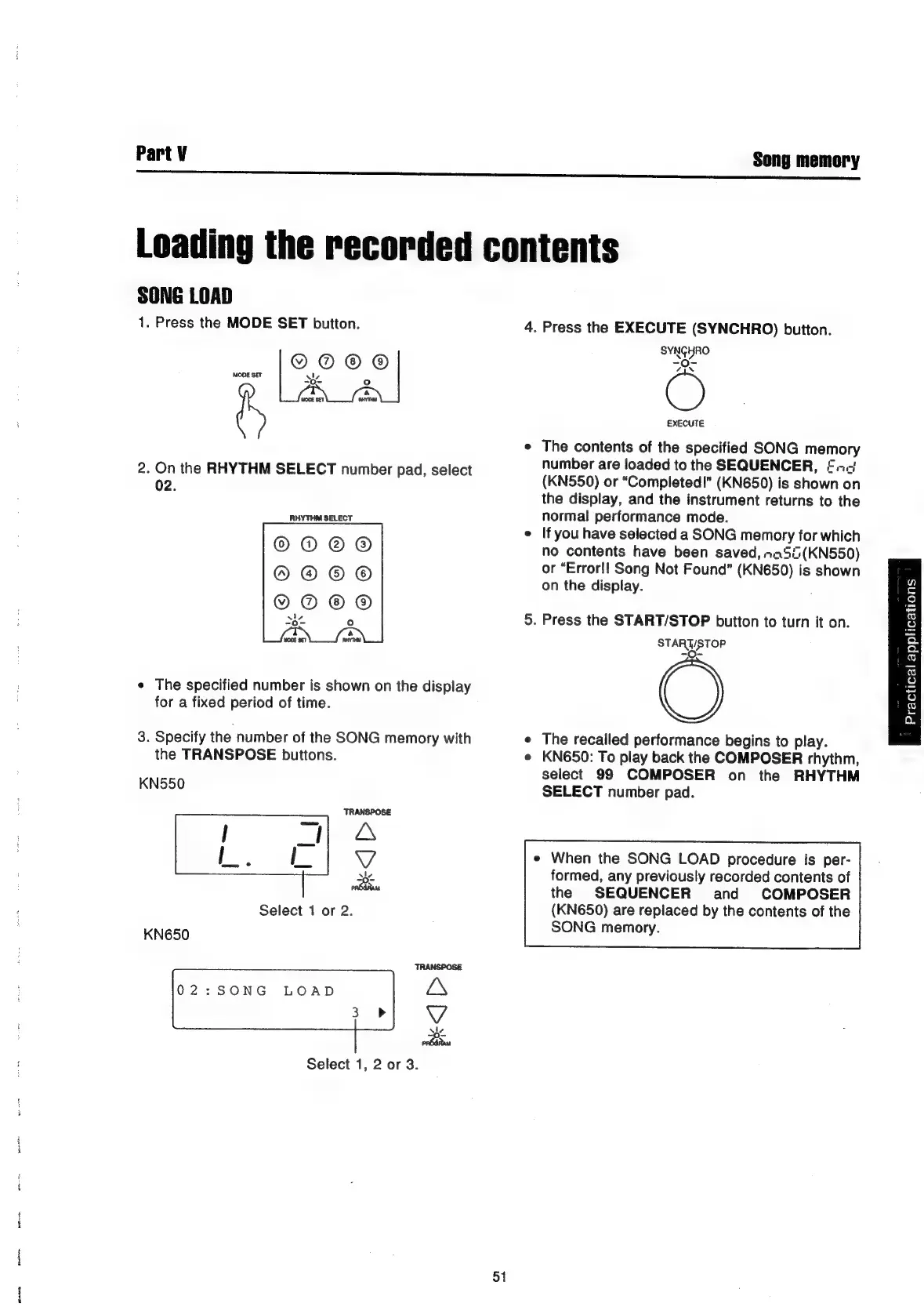
1.
Press
the
MODE
SET
button.
4.
Press
the
EXECUTE
(SYNCHRO)
button.
SYNGHRO
/IN
MODE
SET
s
4
7
°
ry
WOUE
SET
aAYTIN
EXECUTE
e
The
contents
of
the
specified
SONG
memory
number
are
loaded
to
the
SEQUENCER,
©.-.-'
2.
the
RHYTHM
SELECT
number
pad,
select
(KN550)
or
“Completed!”
(KN650)
is
shown
on
:
the
display,
and
the
instrument
returns
to
the
RHYTHM
SELECT
normal
performance
mode.
e
If
you
have
selected
a
SONG
memory
for
which
no
contents
have
been
saved,
na5i(KN550)
or
“Error!!
Song
Not
Found”
(KN650)
is
shown
on
the
display.
5.
Press
the
START/STOP
button
to
turn
it
on.
STARUSTOP
e
The
specified
number
is
shown
on
the
display
for
a
fixed
period
of
time.
3.
Specify
the
number
of
the
SONG
memory
with
e
The
recalled
performance
begins
to
play.
the
TRANSPOSE
buttons.
e
KN650:
To
play
back
the
COMPOSER
rhythm,
select
99
COMPOSER
on
the
RHYTHM
KNSSO
SELECT
number
pad.
TRANSPOSE
A
V
e
When
the
SONG
LOAD
procedure
is
per-
se
formed,
any
previously
recorded
contents
of
rb
the
SEQUENCER
and
COMPOSER
Select
1
or
2.
(KN650)
are
replaced
by
the
contents
of
the
KN650
SONG
memory.
TRANSPOSE
02:SONG
LOAD
ZS
Vv
nba
Select
1,
2
or
3.
51
wn
c
fo)
‘-
©
o
Q.
Q.
S)
6
S)
a)
o
~—
ou

Related product manuals