Unit 11 / 18 Hinkler Court, Brendale Qld 4500 Ph 061 7 3205 9066
Diagnostic
How to use diagnostic screen. Warning; Fan motors may start without warning when oven is in diagnostic
mode. Isolate power to oven before accessing working parts.
• Press ‘settings’ Password “2906”
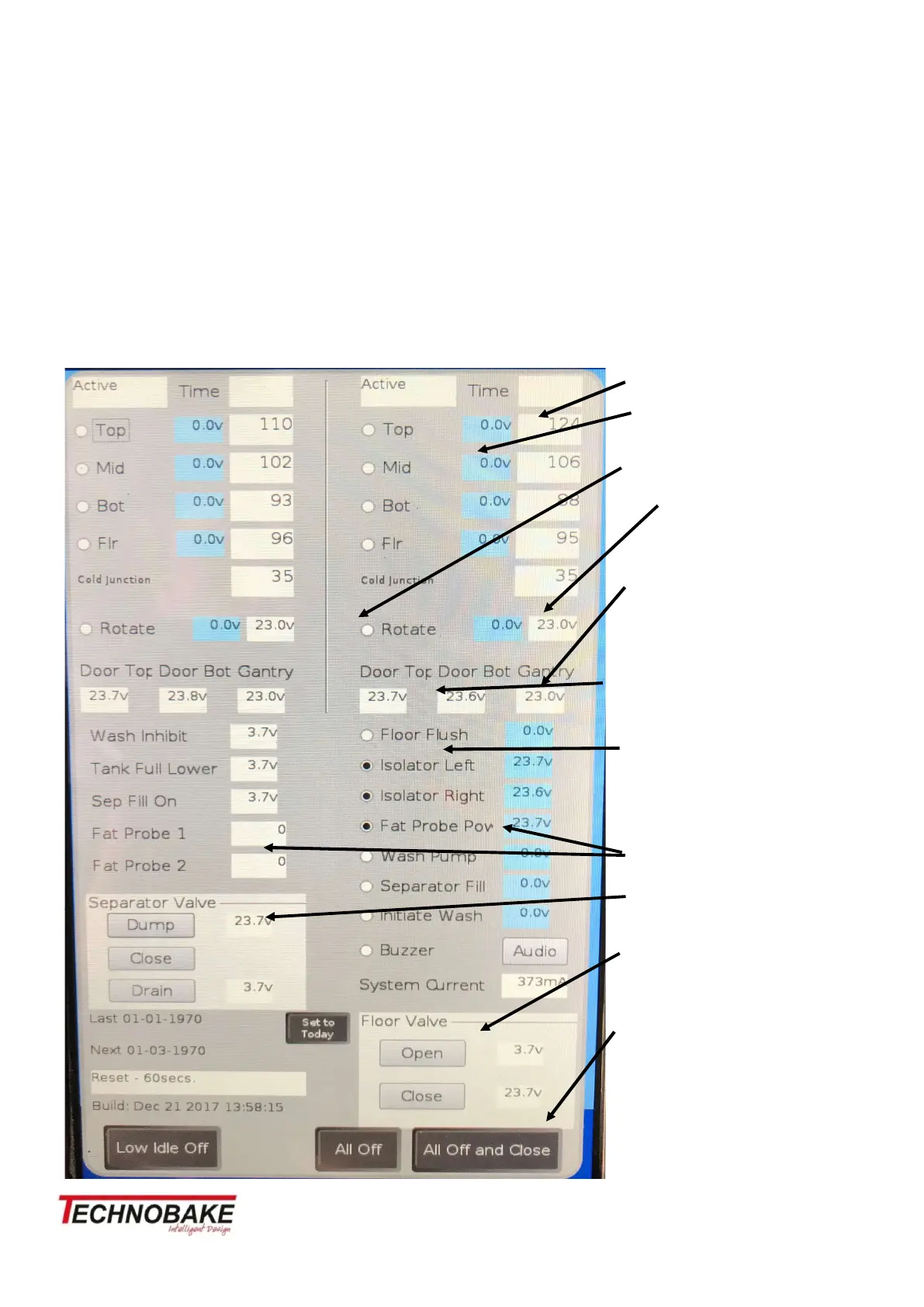
From here you can manually run functions of the oven, it will also help quickly diagnose faults. Example;
You can test a proximity switch by watching the voltage while using the function if it stays at 0-3.7v its not
reading.
All components are shown here and can turn them on individually, to turn on simply press the circle next
it. It's on when the circle turns black.
Temperature shown here
Voltage shown here – power to
contactor only.
Fan Motors on/off
Voltage shown here – coil volt-
age to contactor only.
Proximity switches shown here
Gantry reads is tray/wishbones
are in or out
2 Door switches at bottom of
door - top and bottom
Run oven functions here, floor
flush, wash pump, speaker, sep-
arator fill.
If old style separator fitted
probe -Power and readings here
Separator valve, voltage shows
valve position.
Drain chamber floor open/close
All of and close returns to home
screen.


 To Next Page
 Loading...