EN |
VULCANO
| User and Maintenance Manual
34
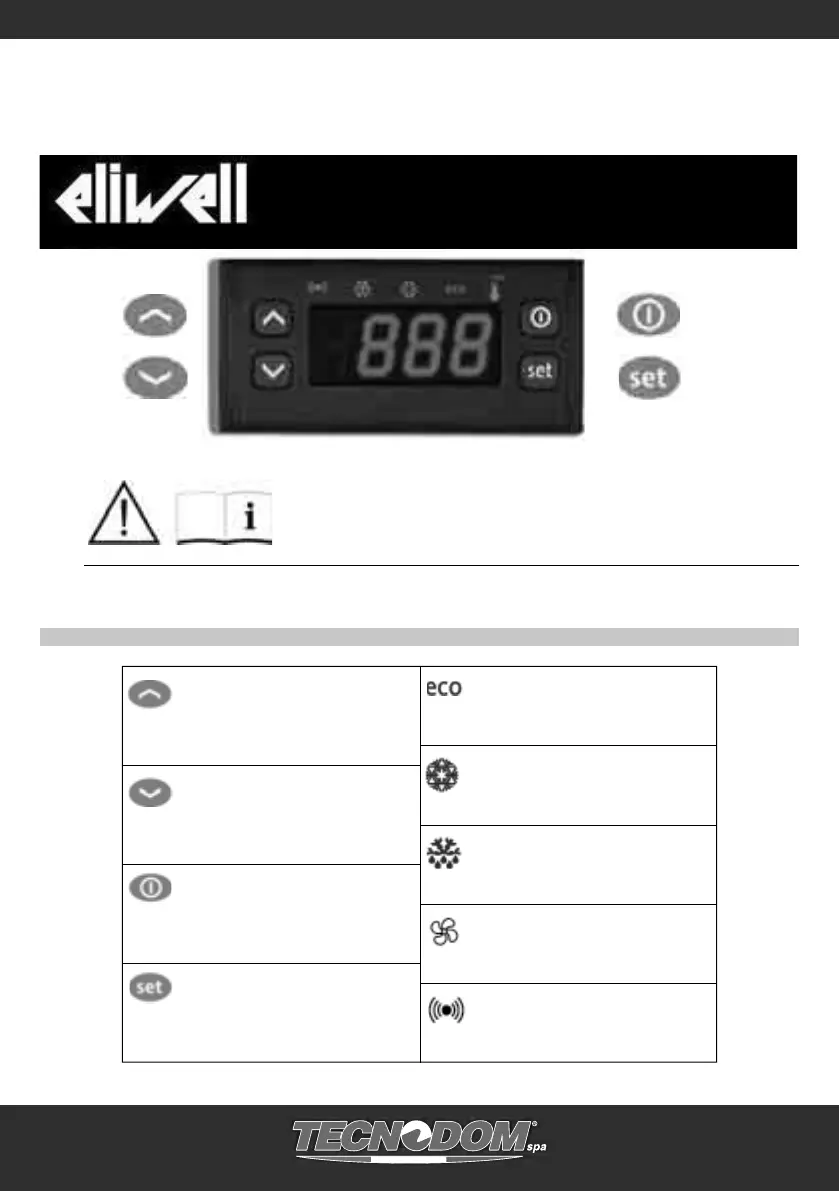
KEYS AND LEDs
STAND-BY (ESC)
Press and release
Returns to the previous menu level
Confi rm parameter value
Press for at least 5 secs
Activates the Stand-by function
(when outside the menus)
UP
Press and release
Scrolls through menu items
Increases values
Press for at least 5 secs
Activates the Manual Defrost function
DOWN
Press and release
Scrolls through menu items
Decreases values
Press for at least 5 secs
Confi gurable function by user (par. H32)
SET (ENTER)
Press and release
Displays alarms (if active)
Opens the Machine Status menu
Press for at least 5 secs
Opens the Programming menu
Confi rms commands
SET / Reduced SET LED
Flashing: reduced set active
Quick fl ashing: access to level 2 parameters
Off: otherwise
Compressor LED
Permanently on: compressor active
Flashing: delay, protection or
blocked start-up
Off: otherwise
Defrost LED
Permanently on: defrost active
Flashing: manual or D.I. activation
Off: otherwise
Fan LED
Permanently on: fans active
Off: otherwise
Alarm LED
Permanently on: alarm on
Flashing: alarm acknowledged
Off: otherwise
ATTENTION ! READ INSTRUCTIONS
Before the start-up, pay attention to the following instructions and safety norms!
6 CONTROL PANEL
EW 961 - EW 794


 To Next Page