The output OUT2 is activated during the counting phase and
remains activated to the reset command.
off
OUT2
START
(ex. F1=1)
RESET
OUT1
ON
ON off
off
t1
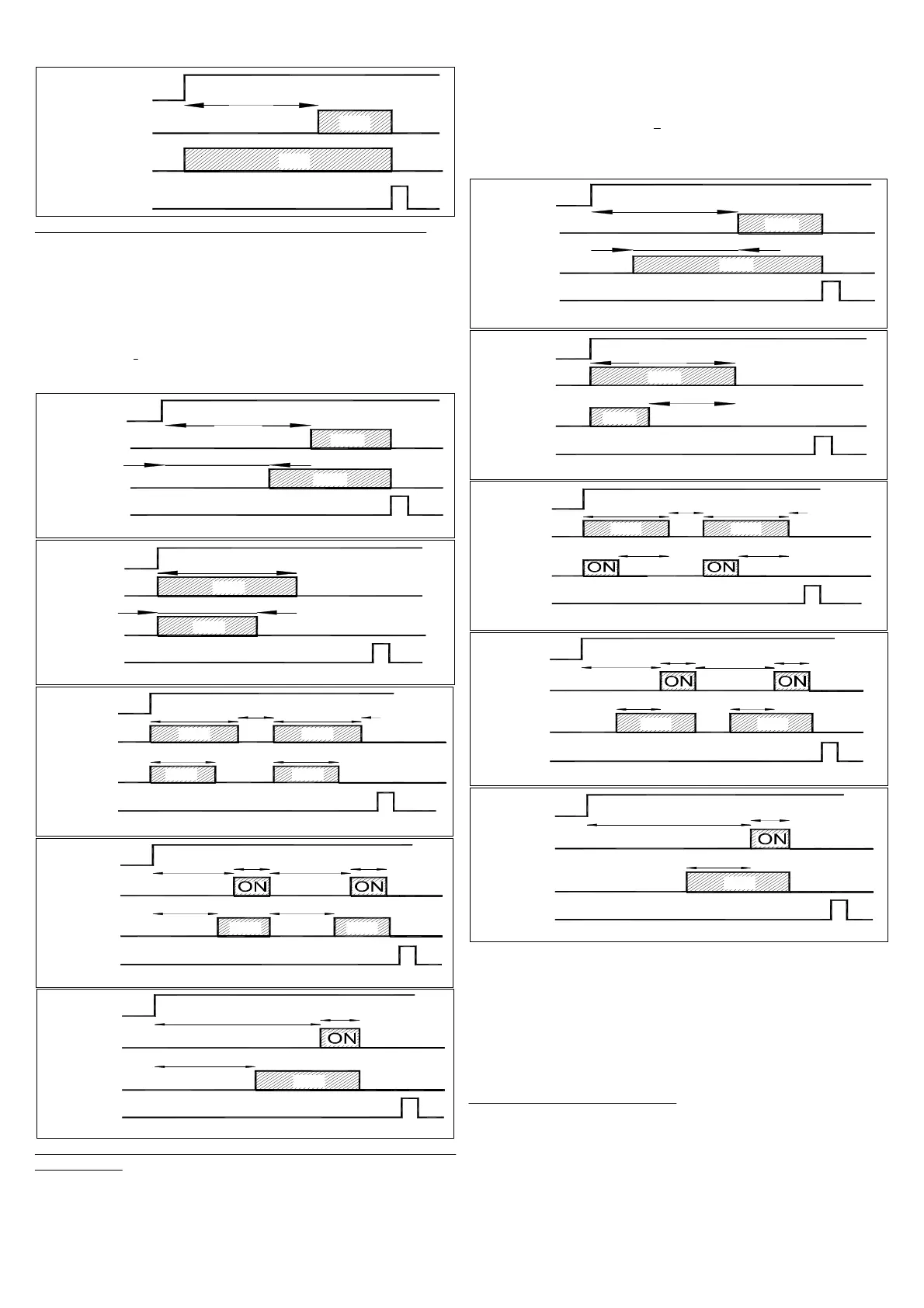
F2 = 3 - Same function of OUT1 (time t1) with time t3 absolute:
The choice of this mode of operation enable the set "t3" that it has
the same range time "S1" and cannot be higher of "t1."
Received the start signal the instrument begins the counting and
exactly operating on the output OUT 2 in the same way with which
it operates the function F1 on the output OUT1.
If F1 = 1, 4 or 5 the output OUT 2 operate with the function of delay
with the time "t3" while if F1 = 2 or 3 the output OUT 2 operate with
the feedthrough
function always with the time "t3."
In the programming mode of the time "t3" the display shows "t3 i"
to indicate that the time t3 is independent.
F 1 = 1 , F 2 = 3
OUT1
OUT2
START
RESET
off
off
ON
ON
off
off
t1
t3 i
ON
ON
F1 = 2 , F2 = 3
RESET
OUT2
OUT1
START
off
off
t1
t3 i
ON
F1 = 3 , F2 = 3
OUT2
RESET
ON
START
OUT1
t3 i
t1
off O N off
ON
t1
t3 i
off
t2
off
F1 = 4
F2 = 3
OUT2
OUT1
RESET
t3 i
off
off
START
t1
ON
t3 i
off
off
ON off
off
t2
t1
t2
F1 = 5 , F2 = 3
t3 i
OUT1
START
OUT2
RESET
off
off
t2
ON
t1
off
off
F2 = 4 - Same function of OUT1 (time t1) with time t3 relative to t1
(in advance) : The choice of this mode of operation enable the set
"t3" that it has the same range time "S1" and cannot be higher of
"t1."
Received the start signal the instrument begins the counting and
exactly operating on the output OUT 2 in the same way with which
it operates the function F1 on the output OUT1.
If F1 = 1, 4 or 5 the output OUT 2 operate with the function of delay
with the time [”t1” - "t3"] while if F1 = 2 or 3 the output OUT 2
operate with the feedthrough
function always with the time [”t1” -
"t3"].
In the programming mode of the time "t3" the display shows "t3 d"
to indicate that the time t3 is dependent.
off
RESET
OUT2
OUT1
START
off
off
F1 = 1 , F2 = 4
off
ON
ON
t1
t3 d
RESET
OUT2
OUT1
START
F1 = 2 , F2 = 4
off
t3 d
ON
ON off
t1
RESET
OUT2
F1 = 3 , F2 = 4
off off
OUT1
START
t3 d
ON
t1
off
t2
t3 d
ON
t1
off
off
RESET
OUT1
OUT2
START
offoff
F 1 = 4 , F 2 = 4
t3 d
ON
off
ON
t3 d
off
t1
t2
t1
t2
off
F1 = 5 , F2 = 4
START
RESET
OUT2
OUT1
ON
t3 d
off
t1
off
off
t2
off
If “F2” = 0 the output OUT 2 is always disabled.
4.5 - CNT EN INPUT OPERATING MODE
The start signal can be given by the frontal key U programmed as
START/STOP function (“t”=1 or 2), which normally has bistable
functioning, or by the CNT EN input count enable.
As regards the CNT EN input, which enables time counting, the
instrument can be programmed to operate in any of the following 4
modes:
E = 1 -
BISTABLE START/STOP:
After resetting the timer using the RESET input, close the CNT EN
contact to start the timer. Now release the contact.
When the contact is closed again, the timer stops on the current
counting value.
The timer starts again following another impulse to the CNT EN
input port.
TECNOLOGIC spa - TT 34 - OPERATING INSTRUCTIONS - Vr. 01 - ISTR 06086 - PAG. 4


 To Next Page
 Loading...