5
2. Use this H-U26 to record audio with your Phones
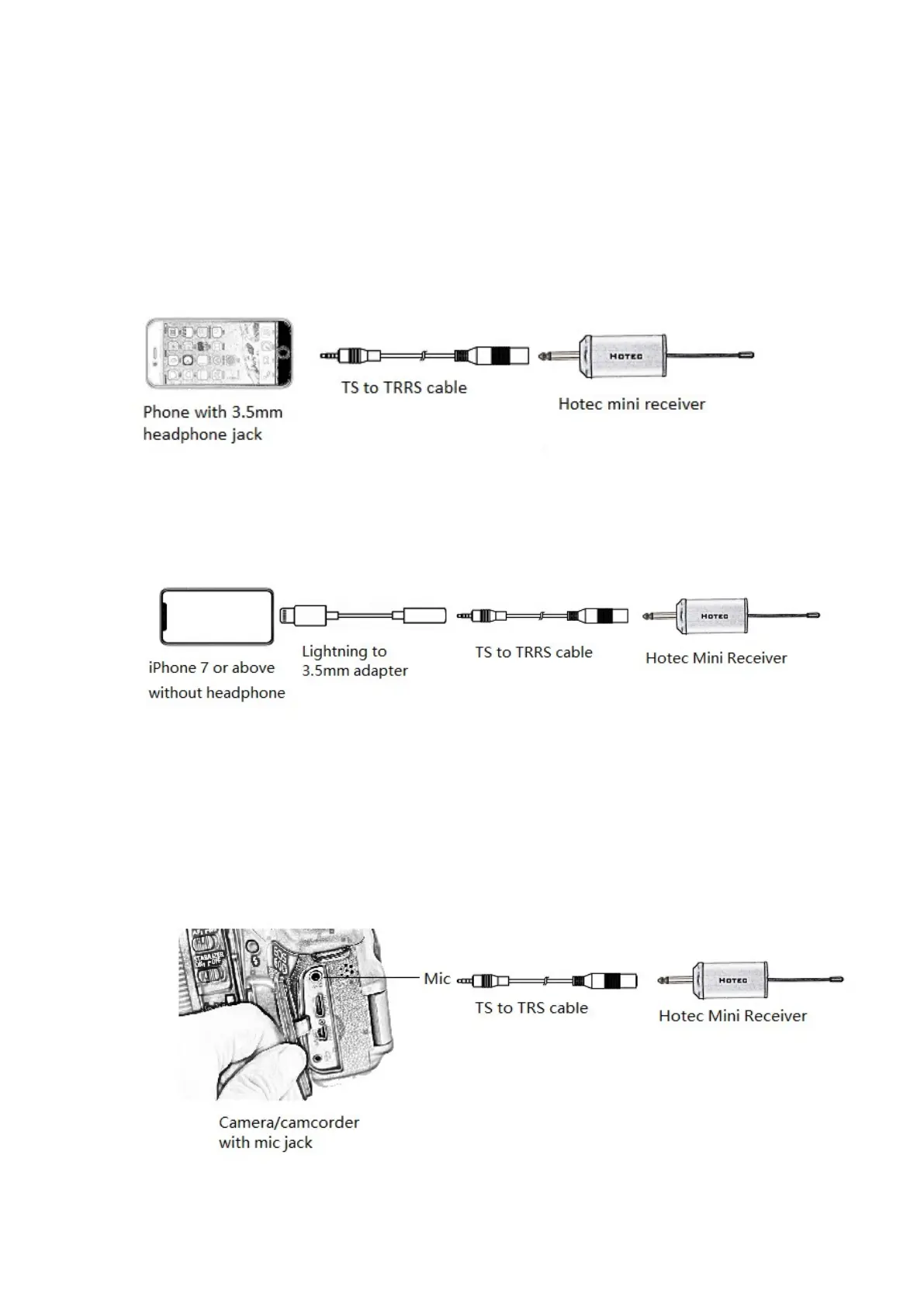
Step 1: Connect the TS to TRRS cable to the mini Receiver;
Step 2: Connect the TS to TRRS cable to the headphone jack of you
phone.
Step 3: Power on the hand held microphone and Receiver. When you see
the RF indicator at the right color, you are ready to use.
See Figure 1.
Note 1: if you are using iPhone 7 or newer version without 3.5mm
headphone jack, you will need to use the original lightning to 3.5mm
adapter (NOT included in the box). See Figure 2.
3. Use this H-U26 to record audio with camera (See Figure 3)
Step 1: Please make sure your camera has mic input.
Step 2: Connect the TS to TRS adapter to the mini Receiver.
Step 3: Connect the TS to TRS adapter to the mic input of the camera.
Step 4: Turn on the mini Receiver and hand held microphone. You are
ready to use when you see the correct RF/AF indicator color.
Figure 1
Figure 4
Figure 3


 To Next Page