Quick set up
TeeH0
Programming Instructions
Parts illstrations
ITEM
Battery
(Using only new and
non—rechagerable Alkaline
betteries for the best results.)
The default master code is 12345678. It's required that you
change it to a code of your own before programming.
How to use?
Unlock the door from outside
o
Master/User
code
Lock the door from outside
Auto re—lock mode
The default master code is 12345678. It's required that you
change it to a code Of your own before programming.
When setting is unsuccessful, the indicator light will flash red.
Unlock the door from inside
SPECIFICATIONS
AA alkaline battery x4
(Operation
REMARKS
Last up to one year
(10 times open/close per day)
TCCHO
Exterior assembly
Change
master code
Add
user code
Delete
user code
Silent mode
eoeeo
Definitions
Master Code
Mufti—function
button
Keypad
-Cy inder
interior assembly
Auto Lock
In auto re lock mode, the bolt wil extend out
automatical y in 30 seconds after unlock'ng.
Manual mode
Press any of the buttons on
keypad for 2 seconds.
123
Auto ock
RES
Information and safety warnings
• Protect your user codes and master code.
Battery cover
- Reset button
- Tumpiece
Rotate the turn piece to unlock position.
Lock the door from inside
Auto re—lock mode
n autore Ock mode, the bolt will extend out
automatical y in 30 seconds after unlocking.
Manual mode
Rotate the turn piece to
Ock position.
FACTORY DEFAUIt
1 2345678
Disabled
Disabled
10 times
3 mins
Disabled
Set auto Ock
time de ay
Add
one—time code
Vacation mode
TOCHO
Tea HO
TaaH0
Tauo
TecH0
TaaH0
TCCHO
TechO
TecH0
TCCHO
-recH0
Tauo
TOCHO
TaaH0
TecH0
TCCHO
Master,+
code
Master,+
code
Master
code
Master
code
Master
code
Master
code
Master,+
code
Master,+
code
TCCHO
TeeH0
Tauo
Tauo
•reeH0
TeeH0
TceH0
TCCHO
Wait for long green light
Wait for long green light
Wait for long green light
Wait for long green light
Wait for long green light
Wait for long green light
Wait for long green light
Wait for long green light
Answers
press
press
press
pressO _
Press
Press -
PressO
pressO
Wait for green light flash
New
: mastercode
New
user code
Unwanted
user code
• Press +
Press +
PressO +
. Press +
T euo
T COHO
T acH0
T COHO
T eeH0
Wait for green light flash
Wait for green light flash
Succeed green light flash
New master code
T euo
New user code
T ceH0
'Enter new duration'
time(1 0-99)
TeeH0
Silent mode disabled green light flash
Silent mode enabled green light flash
Auto lock enabled green light flash
Auto lock disabled green light flash
Succeed green light flash
New
user code
T eeH0
Wait for green light flash
Newuser code :+
Succeed green light flash
Succeed green light flash
Succeed green light flash
press
TCCHO
Vacation mode enabled green light flash
Do not load batteries until lock
is completely installed.
• Restrict access to your ock's interior assemb y and routinely check your settings to ensure they
have not been altered without your knowledge.
• This ockset is designed to provide the highest standard of product quality and performance.Care
should be taken to ensure a ong asting finish. When cleaning is required use a soft and damp
cloth. using acquer thinner, caustic soaps, abrasive cleaners or polishes could damage the coating
and result in tarnishing.
1. Master PINCode (4-10 digits): The default master pin code is "12345678", It's required that
you change it to a code of your own before programming.
2. User PIN Code (4-10 total of 20 user codes(and one temporary one time user code)
may be programmed.
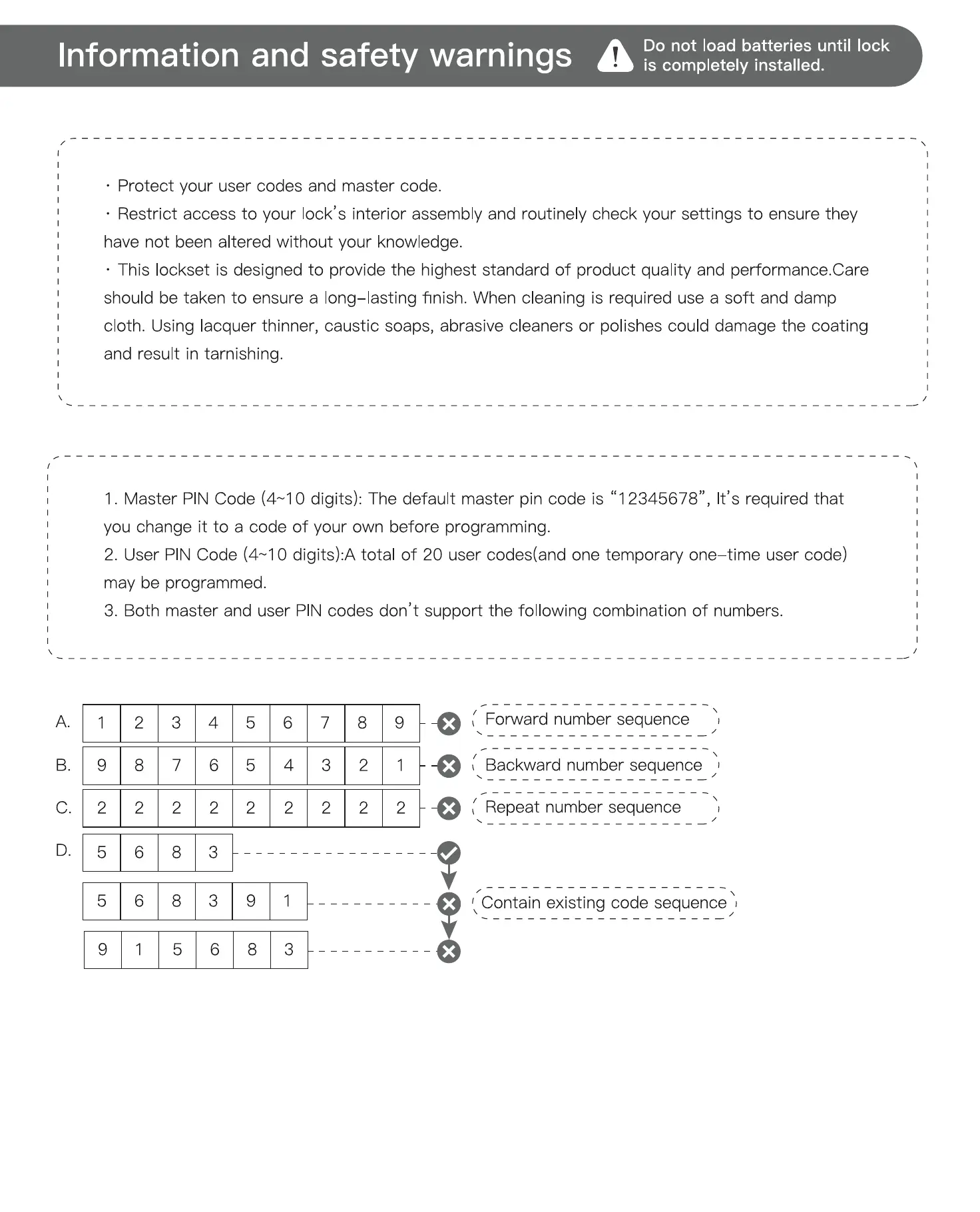
3. Both master and user PINcodes don't support the fol owing combination of numbers.
Required for programming and feature
settings. Master code can be used to
unlock the door under vacation mode.
The default master code needs to be
changed before programming.
Property owner/manager should keep
this information confidential.
Wrong Entry Limit
After 10 unsuccessful attempts at
entering a invalid PIN code, the unit
will shut down for 3 minutes.
Vacation Mode
This is a security feature for you when
you are leaving your home for vacation
or long trip. Enabling vacation mode
will restrict all user codes until master
code is entered on keypad. If the lock
is unlocked by thumb turn, the lock
will sound an alarm.
Unlock with Fake Code
Automatically locks the deadbolt 30
seconds after unlocking. This feature is
off by default. You can set the Auto
Lock time delay between 10 and 99
seconds.
Silent Mode
The beep sounds when pressing
keypad can be muted. But you will still
hear low battery and system alerts.
One Time User Code
This code can only be used once and
is automatically deleted when used.
Factory default settings
SETTINGS
Master code
Auto lock
Silent mode
Wrong code entry limit
Shutdown time
Vacation mode
Troubleshooting
Operation
Questions
Battery indicator keeps
flashing.
Keypad not responding.
Master Code can not
be changed.
What should I do if wrong
code was entered?
forgot my Master
Codes.
Can not add a new
Lockset is not able to
unlock / lock by
keypad.
Lockset is unable to
reset.
How to operate the
lockset in darkness?
The red indicator is stil on
after setting is completed.
The lockset locks when I
enter my code and
unlocks when I press the
Tee HO
I cannot remove my key
unless it is in the locked
position.
C]
C]
C]
C]
Restore factory default settings
This procedure will delete all user codes which
associated with the lock.
1. Keep the door opening and unlocking;
2. Press and hold the reset button, taking out one battery and then place it back at the same time;
3. Keep ho ding the reset button for 3 seconds until you hear the sound of "BEEP"
Troubleshooting
B.
c.
9
2
2
2
3
7
2
4
6
2
5
5
2
6
4
2
7
3
2
8
2
2
9
2
-O ( Forwardnumbersequence
( Backwardnumbersequence
( Repeat numbersequence
Contain existing code sequence
Installation
Questions
The latch does not
operate correctly after
installation.
Feel a bump while
turning the thumb turn
or the key?
Fail to set up the lock.
Answers
Make sure the backset on the latch is set to the proper length. Refer to
Installation Instructions
Make sure prior to installation latch bolt is retracted and key is not in
lockset when installing the deadbolt. Refer to Installation Instructions
Please restore to factory setting and enter the default Master Code to
set up the lock. Refer to Programming Instructions
Check if the length of mounting screws is appropriate.
Check if the turn piece is in vertical position.
Please make sure the lock is installed correctly.
Please install fresh batteries and make sure the cable is connected correct y.
After installation, restore the lock to complete the bolt direction setting.
user Code.
"Auto lock"
function.
User can prevent pin code exposure from strangers by entering random digits before or after pin code.
83618 137192 14710
PASSWORD
-RANDOM DIGITS
does not
The batteries are getting low, please replace with four new batteries for
the best performance (alkaline batteries only).
Make sure the batteries are installed properly.
The batteries are getting low if the battery indicator keeps flashing.
Please replace with four new batteries for the best performance
(alkaline batteries only).
Make sure the cable is well—connected to the port, and was not
damaged during installation.
Please make sure the lock has been set up and complete the bolt
direction determination.
Please refer to Programming Instructions to restore factory settings and
reprogram all codes.
button once and continue to input code according to
Press
T egH0
regular procedures.
Perform a reset in order to erase all passcodes. Once the reset is
complete, all passcodes will be erased and the Master code will return
to the default master code 12345678.
Make sure the whole code entering process is completed within 10
seconds, otherwise the unit will time out.
Make sure the Master Code has been entered correctly.
The new User Code will not be accepted when the capacity is full. Try to
delete any or some existing User Codes and then add new one(s) again.
A User Code must be at least 4 to 10 digits.
The batteries are low on power if the battery indicator keeps flashing.
Please replace with four new batteries for the best performance
(alkaline batteries only).
Please refer to Programming Instructions to enable the Auto—Lock
function.
Make sure you have entered the correct user Code.
The battery is low if the battery indicator light keeps flashing. Please
rep ace with four new batteries.
Make sure the cable is firmly connected.
Check the cable for any damage that may have occurred during
installation.
Make sure the batteries are properly installed. (Alkaline batteries only.)
Check the strike plate to make sure it is properly aligned and clear so
the bolt can freely move in the hole.
Please refer to Programming Instructions to restore factory settings and
reprogram all codes.
The battery is low if the battery indicator light keeps flashing. Please
replace with four new batteries.
Press any button to activate the lockset back light.
Check if you entered correct user codes.
Re-install the batteries.
On—install the interior and exterior assemblies.
Before re—installation, please follow these guidelines: Refer to
Installation Instructions
1) Make sure the bolt is in the retracted position.
2) DOnot have any key in the cylinder durring installation.
3) Make sure the turn piece is inserted horizontally.
Reset the unit to factory settings and reprogram the Master Code and
user Codes.
Un—install the interior and exterior assemblies.
Before re—installation, please follow these guidelines: Refer to
Installation Instructions
1) Make sure the bolt is in the retracted position.
2) DOnot have any key in lock cylinder.
3) Make sure the turn piece is inserted horizontally.
If the lock appears to be damaged or does not operate properly, please contact customer service for
further assistance.
V4.o


 To Next Page
 Loading...