Adjustment Procedure-2225 Service
accomplish
a
complete Adjustment Procedure. At
the beginning of each subsection there is an
equipment-required list showing only the test
equipment necessary for performing the steps in
that subsection. In this list, the item number
following each piece of equipment corresponds to
the item number listed in Table
4-1.
Before performing this procedure, do not preset any
internal adjustments and do not change the
-8.6
V
power-supply adjustment. Altering this adjustment
may necessitate a complete readjustment of the
instrument, whereas only a partial adjustment might
otherwise be required. Only change an internal
adjustment setting if a Performance Characteristic
cannot be met with the original setting.
Before performing any procedure in this section, set
I
the POWER switch to
ON'
and allow a 20-minute
warm-up period.
The most accurate display adjustments are made
with a stable, well-focused, low-intensity display.
Unless otherwise noted, adjust the INTENSITY,
FOCUS,
and Trigger LEVEL controls as needed to
view the display.
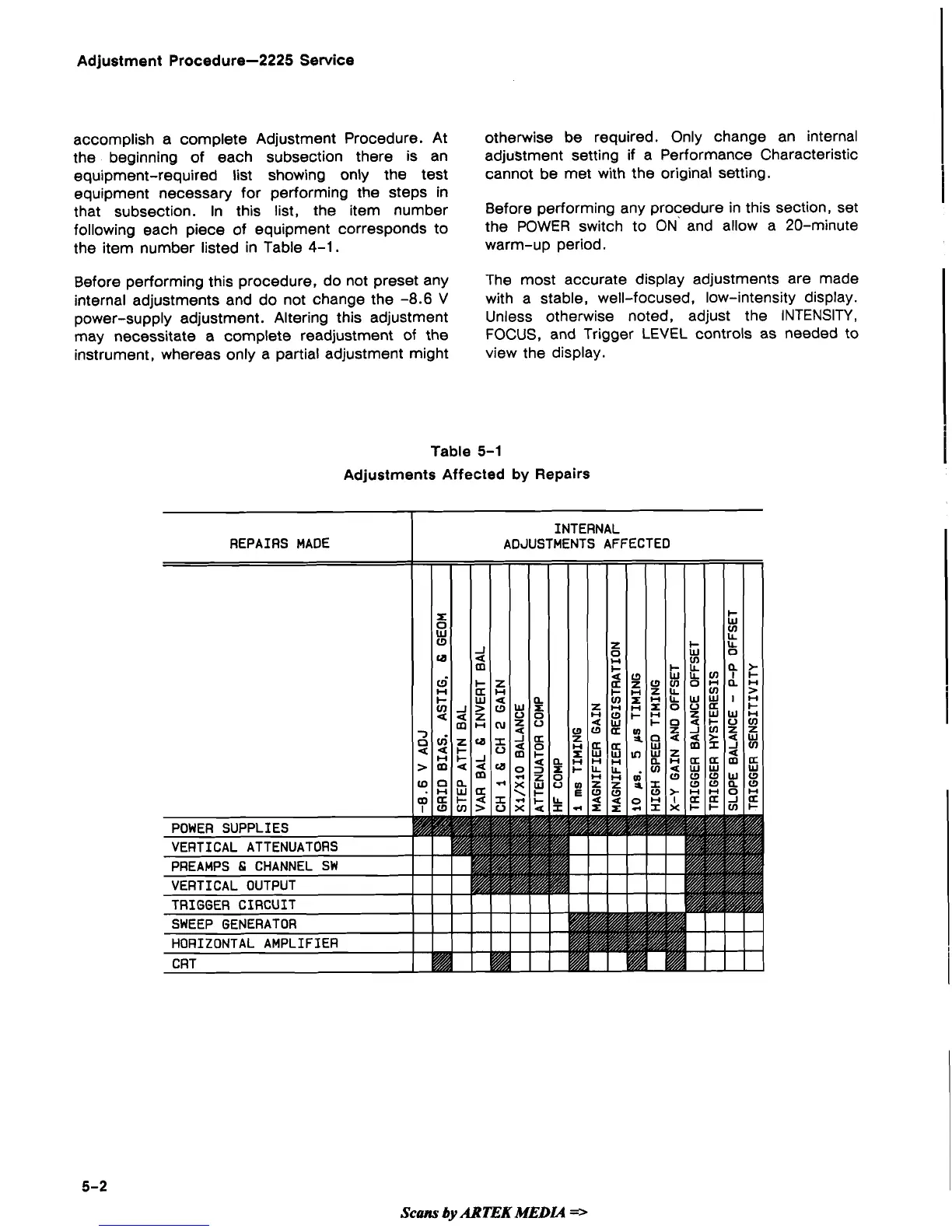
Table
5-1
Adjustments Affected
by
Repairs
Scans
by
ARTEK
MEDIA
==-


 To Next Page
 Loading...