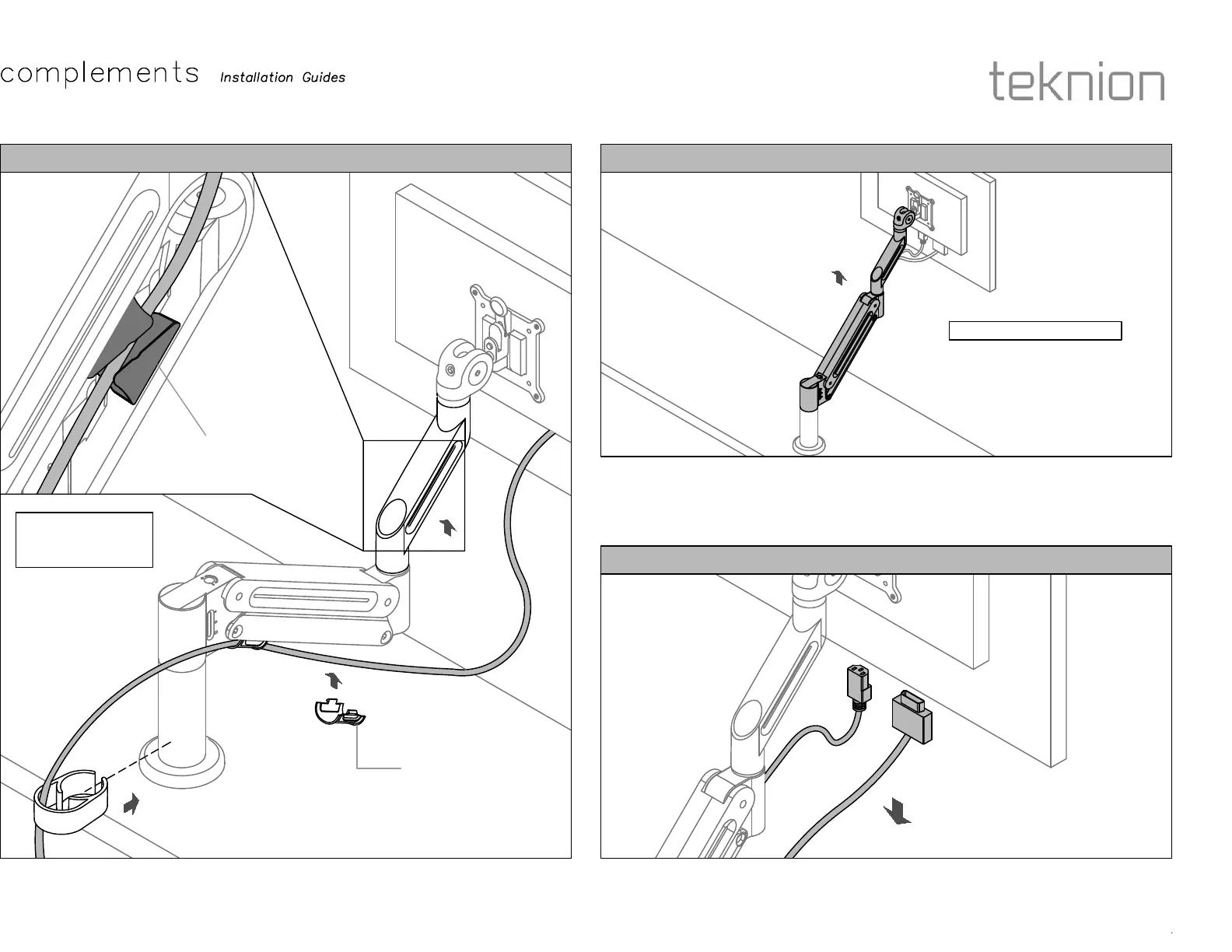
STEP 9: Insert Cable in Arm Wire Clip located under Dynamic Arm. Squeeze Cable
management Clip on both sides to release it, drop cable on it then put it back. Lead cables into
Stanchion Clip, then insert it to the back of Stanchion.
STEP 1: Move monitor to the highest position and make sure the arm is fully extended.
STEP 2: Disconnect/unplug all cables connected to the monitor.
Section:
Description:
Page No:
Date:
CABLE MANAGEMENT EXTEND DYNAMIC ARM (MONITOR REMOVAL)
UNPLUG CABLES (MONITOR REMOVAL)
COM_210a
6 of 7
Sep 2021
Descriptions
ERGONOMICS AND ACCESSORIES
NOTE: Lead cables
into the Clip before
clipping to Stanchion.
Arm Wire Clip
Cable Management
Clip
Underside View
MONITOR REMOVAL



 To Next Page