DC-390U2B/W SCSI Adapter Quick Reference Guide (rev 5.00)
Tekram Technology Co., Ltd
2
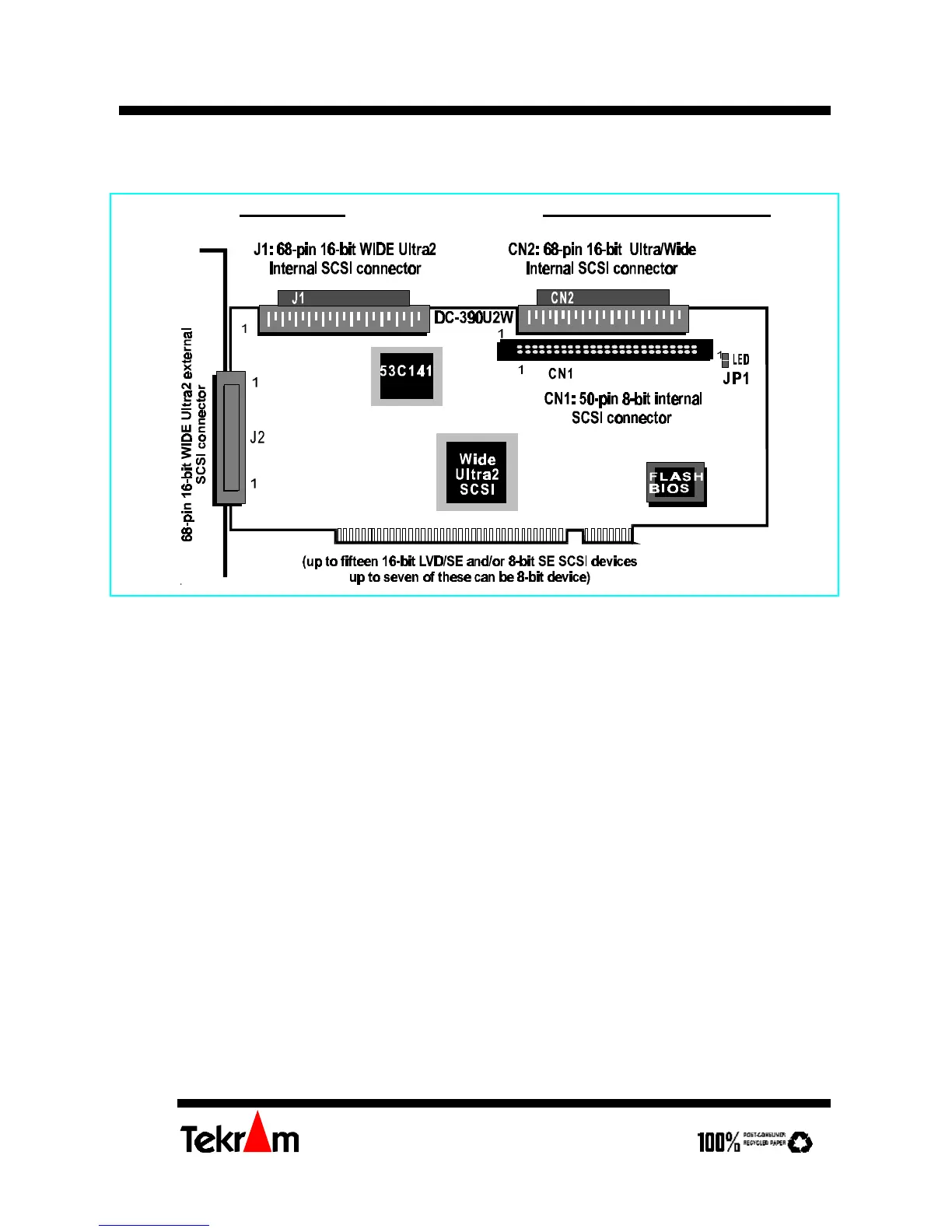
DC-390U2W Wide Ultra2 SCSI adapter
Installing the Adapter
Important: Handle circuit boards by the edges or bracket. Touch the bare metal of your
computer case before handling any circuit boards to prevent static discharge damage.
1. Power OFF and unplug your system.
2. Remove the computer cover. Refer to your system user’s manual for instructions.
3. Align the gold-fingered edge on your card with an empty PCI expansion slot and gently
insert it into place. You may need to remove the cover from the rear of the PCI
expansion slot that you selected.
4. Replace the screws to secure the card retaining bracket in place.
Setting the SCSI IDs
Each SCSI device attached to the SCSI card, as well as the card itself, must be assigned a
unique SCSI ID number. SCSI ID 7 is preset to the SCSI card, giving it the highest priority
on the SCSI bus.
The SCSI IDs of your peripheral devices are usually set with jumpers or with a switch on
the peripheral. Refer to the peripheral‘s manual to determine the ID and how to change it.



 To Next Page