PAG. 8 Afstandsbediening EVO/NOON - Handleiding Rev. 06/20
Kantelbare lamellen - Adjustable blades - Lames réglables - Ausrichtbaren Lamellen
A5
107
210
ON
1 2 3 4 5 6
CTS
L3
DIP SWITCH
P1 P2
× 11
2
3
5
14
15
13
12
8
7
11
10
9
O
N
O
F
F
1
4
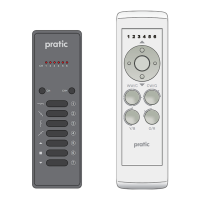
Een Green Mouse-zender opslaan
1 open de bedieningseenheid van de lamellen
2 druk elf (11) keer op de toets die bij de motor hoort (P1 voor motor 1 enz.) en houd deze ingedrukt
3 de zoemer laat bij elke druk een pieptoon horen en vervolgens een continu geluid
4 druk tijdens het continue geluid op een kanaal van het te onthouden paar (∆ ∇)
5 snelle pieptonen geven aan dat het gelukt is
Alle andere knoppen op de afstandsbediening worden automatisch onthouden
Memorisation of Green Mouse transmitter
1 open the blades control unit
2 press eleven (11) times the push button associated to the motors (P1 for Motor1 etc.), and hold it down
3 the buzzer will make two beeps and then sound continuously
4 during the sound press any button of the pair to memorize (∆ ∇)
5 the memorization is indicated by the intermittently sound of the buzzer
All the push-buttons of the transmitter are automatically memorized
Mémoriser un émetteur Green Mouse
1 ouvrir l’unité de contrôle des Lames
2 appuyer onze (11) fois sur la touche associé au moteur (P1 pour moteur 1 etc) et garder l’appuyé
3 l’avertisseur sonore émet un bip à chaque appui et puis un son continu
4 au cours de son appuyer sur le bouton de l’émetteur concernant le code à mémoriser (∆ ∇)
5 la mémorisation est signalée par le son intermittent rapide de l’avertisseur sonore
Tous les autres boutons de l’émetteur sont mémorisé automatiquement
Speicherung eines Green Mouse Senders
1 steuergerät zur Kontrolle der Lamellen öffnen
2 drücken Sie elfmal (11) die Taste in Bezug auf den Motor (P1 für Motor 1, usw.) und halten Sie sie gedrückt
3
das Gerät quittiert jeden Druck mit einem Ton und geht dann in
Dauerton über
4 die Taste des Senders drücken, die dem zu speichernden Code entspricht (∆ ∇)
5 die erfolgreiche Speicherung wird durch schnelle Töne angezeigt
Alle anderen Senderkanäle werden automatisch eingespeichert


 To Next Page
 Loading...