9
1.11.1
1.11.1
1.1
How to use the manualHow to use the manual
How to use the manualHow to use the manual
How to use the manual
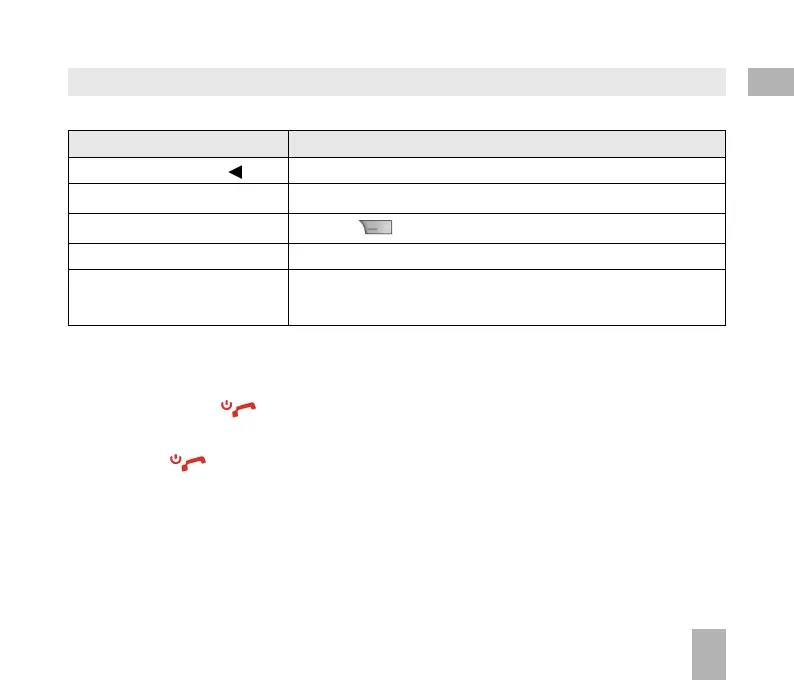
The following instructional format is used in the manual:The following instructional format is used in the manual:
The following instructional format is used in the manual:The following instructional format is used in the manual:
The following instructional format is used in the manual:
InstructionInstruction
InstructionInstruction
Instruction
DescriptionDescription
DescriptionDescription
Description
Press the
Left Left
Left Left
Left
ArrArr
ArrArr
Arr
owow
owow
ow Press the left directional key on the four way navigation controller
Press
OKOK
OKOK
OK Press the
OKOK
OKOK
OK key in the centre of the four way navigation controller
Press the
Right Soft KeyRight Soft Key
Right Soft KeyRight Soft Key
Right Soft Key Press the key just below the screen
Long pressLong press
Long pressLong press
Long press Press and hold the key for 2 seconds
MenMen
MenMen
Men
u u
u u
u >
TT
TT
T
oolsools
oolsools
ools Go to the
Main MenMain Men
Main MenMain Men
Main Men
uu
uu
u (press
OKOK
OKOK
OK) select
TT
TT
T
ools ools
ools ools
ools and press
OKOK
OKOK
OK to open
• The functions for the
OKOK
OKOK
OK and
SoSo
SoSo
So
ft keft ke
ft keft ke
ft ke
ysys
ysys
ys change depending on where you are in the menu. The
functions are described at the bottom of the handset display.
• The
End End
End End
End or
Exit Exit
Exit Exit
Exit key is used to exit the menus,
EndEnd
EndEnd
End a Call and switch the phone
OnOn
OnOn
On or
OffOff
OffOff
Off. From
within a sub-menu the
ExitExit
ExitExit
Exit key goes to the main menu
• Long press
to switch the handset
OnOn
OnOn
On and
OffOff
OffOff
Off.
• The
C keyC key
C keyC key
C key is used to step back in menus and to clear text in text modes. In text edit mode press once
for backspace, press and hold to clear all the text.
• Menu and setting choices on the handset are shown in
bold bold
bold bold
bold text in the manual. Quickly find the
answer by checking the front
ContentsContents
ContentsContents
Contents or the back
IndexIndex
IndexIndex
Index.
1



 To Next Page