V1.5, Dec 2020
Features
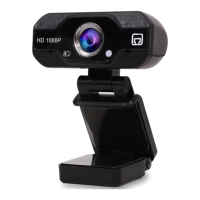
1. HD Resolution 1080P (1920 * 1080)
2. Built-in digital microphone for high quality sound
3. Wide Angle Lens – High resolution video without distortion and with
a Field of view (FOV) - 90°
4. Supported Operating Systems: Win 7/8/10, Mac and Android
5. Light compensation function
6. The resolution is 3MP with a frame rate of 30FPS
Operation - Basics
1. Place your TLK WV webcam in a convenient position –
preferably on a computer monitor, desktop or tripod.
This way you can make a video call at your own comfort.
2. Placing on a monitor: Place the webcam as shown in
the images and open the base with your other hand.
Mount the webcam, making sure the foot of the base
is rested properly on the back of your monitor.
3. Connect the webcam to a computer USB port as shown
in the image below. The drivers will be installed automatically
and a “RED LED” will indicate the web cam power is ON.
4. Using the webcam: This webcam does not come with a video calling software. To
make a video call, use your video calling application.
5. In your video calling application, select the webcam “PC Camera” from the list of
devices to start using the TLK WV webcam. When the web camera starts capturing,
the “GREEN LED” will indicate the web cam is active.
Do not connect the TLK WV web
camera to any USB chargers or AC
main as it can lead to shock and
result in injury.


 To Next Page
 Loading...