5 FIRST STEPS
Switch on: the phone by pressing the power on/off-key for
at least 5 seconds.
Switch off: by pressing power on/off for 5 seconds again.
When using a new SIM card, enter the 4 digit PIN Code
(Personal Identication Number) and conrm with .
PIN-Code: The PIN-Code is a 4-digit number combination
preventing others from switching on your mobile phone.
• Switch off your PIN-Code: In menu: SettingsàSecurity
à Power on PIN1 à PIN off.
Entering Menu:
press -key ( between and ).
scroll through menu points: with and .
■
conrm/ choose with .
For navigating in the menu, use
to conrm and to cancel / take a step back in the .
Note: due to inactivity, the phone lights and screen turn off
after a while. To turn on again, press any key.
Incoming Call: Pick up call: Press -key –
Reject call: Press -key
End call: Press - key.
Dial: Enter the telephone number via the keypad (including
area code with 0) à start call with .
Redial list: press -key, scroll through call list with (all
dialled, missed and received calls) and select a number and
start call with .
Handsfree Speaking:
During a call handsfree function can be switched on or off: by
pressing the M2 button Options à Handsfree.
Alarm:
in standby mode: key à Tools à select Alarm à
Alarm 1, 2 or 3. To switch on an alarm à On and key in the
time for the alarm. With you conrm. You also can select
either One shot alarm or Weekly alarm. Select the days for
the alarm (choose days with and conrm with -key).
If the alarm rings, end with . Use mute function with to
reactivate the alarm after 5 minute.
9 OTHER FUNCTIONS IN SETTINGS
Enter menu with à continue to Settings: , à
• Proles: To choose a phone prole (f.i. Silent) and congure
your personal settings.
• Network settings: dene settings for call forwarding and call
waiting.
• Display Settings to choose other languages, adjust contrast
of the LCD display, the time and the date
• Keypad Lock: To select the time before the keypad is locked
• Security: Activate, deactivate or change PIN and
phonecode (default phone code: 0000).
• Recover Default Value: Reset the phone to factory settings.
6 PHONE BOOK
Saving names and numbers (start with international prex,
e.g. +44 for UK).
Enter menu in standby mode with , à menu points: Dial
to, Edit, Delete, Create, Copy, Move, Status.
Storing phone book entries (Name & Number):
Enter menu with à continue to Phonebook: à
continue to „Create“ à continue to „Save to SIM/Save to ME“
enter name via the keypad (See chapter 8, Write SMS
for text entry), Enter number, and press key to Save.
Searching phone book entries:
Enter phone book with
Scroll through the entries with and . Or:
Search names: enter the initial letters of the searched name
via the keypad (scroll through with When the requested
name is shown, press to start a call.
M1 and M2 quick dial buttons:
In the idle screen key in the phone number to be saved. Press
2 times and select either Save to or Save to . Conrm
selection with .
To dial a number from the speed dial keys.
Press the / key at least 2 seconds. The number is dialled
automatically.
7 EMERGENCY FUNCTION
You can store a total of 5 emergency numbers (family,
neighbours, friends, emergency services). In case of
emergency these preselected numbers will be dialed
automatically in a sequence, if the emergency key on the
back of the phone gets pressed and held.
A continuous warning tone then starts in “loudspeaker mode”
during emergency, so you and people nearby are warned
due to the emergency! If the rst number cannot be reached,
the second number will be called automatically. If the second
number in row cannot be reached, the third will be called.
(max. 3 rotations of the 5 numbers).
If no emergency number is saved or if your calling card has
expired or you have no access to a foreign network (e.g.
roaming not permitted), 112 will be dialed.
Saving emergency numbers: Enter à Settings à SOS
Setting àSOS-contact list àpress key àCreate: enter
the name and conrm with àenter the number and again
conrm with . For the next emergency number please repeat
this process accordingly. Settings editing or deleting emergency
number go to à Settingsà SOS Setting àSOS-contact list
and press à Edit/Delete. For dening your emergency
message go to SettingsàSOS SettingsàSOS message
(writing text: see chapter 8) For deactivating the SOS function:
Enter à SettingsàSOS SettingàSOS buttonà à
Disable à
Note: If you want to save emergency numbers from ofcial
services, police, re department, etc., you have to clarify this
with the certain institution. No liability will be assumed for
possible costs incurred if you dial accidentally.
8 SMS MESSAGES
SMS (Short Message Service) are written messages with a
maximum of 160 characters.
Receive SMS: A short signal and a registration on the display
inform you about a new, incoming SMS message. With you
can read the message immediately or see a list of messages
which have already been received. Enter à Short
Message à Inbox.
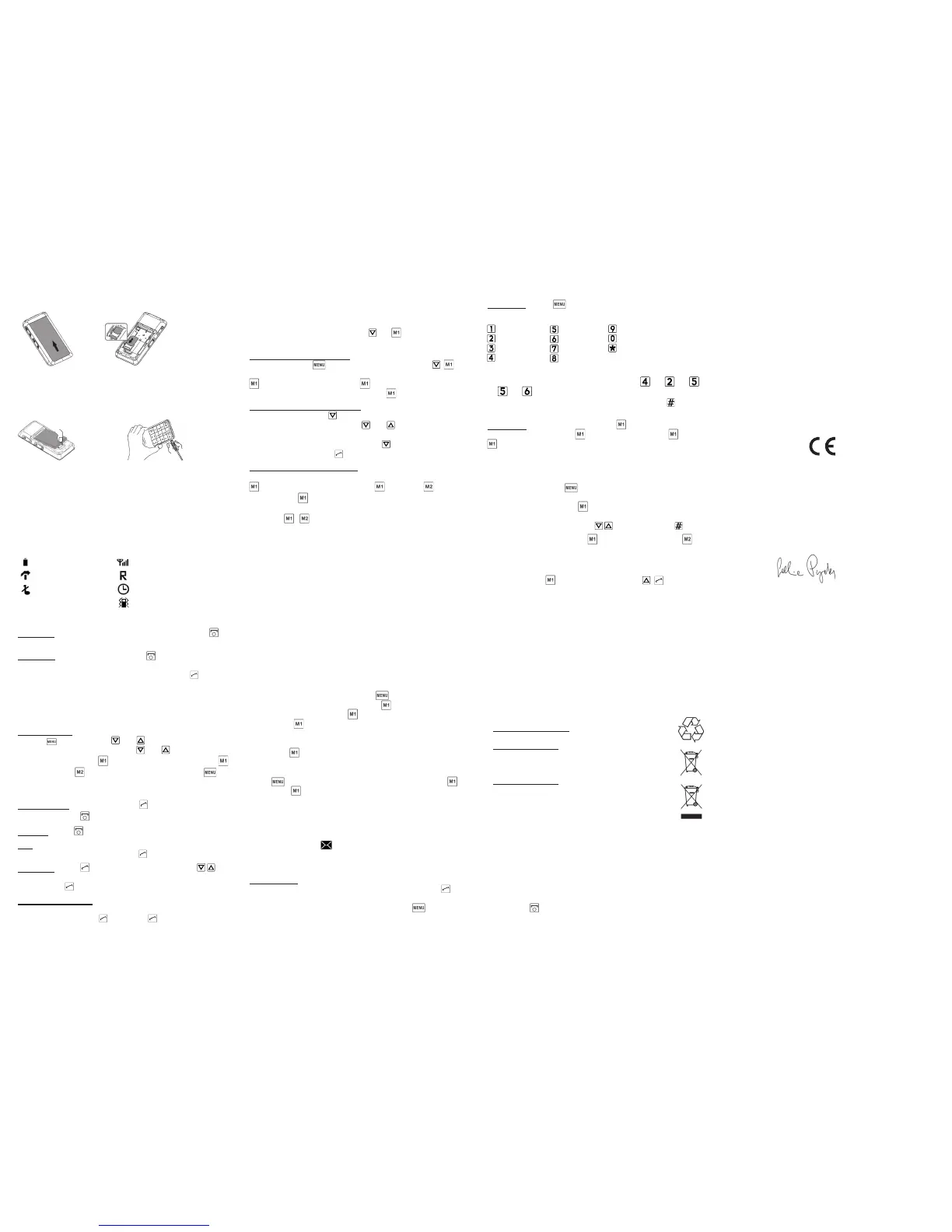
Fig. 1
2 INSERT SIM CARD
Fig. 2
Figure 3: Insert battery
Slide cover close with a click
Figure 4: To charge plug the charger cable into the jack on
the left side of the device
During charging: Bar (battery) on the display lls
Battery charged: Bar (battery) shows full
Note: Charge battery at least 4 hours before the rst call !
3 INSERT BATTERY AND CHARGING
4 DISPLAY SYMBOLS (SCREEN)
Figure 1: Remove battery cover
Figure 2: Insert SIM card with the gold contacts
facing down into the SIM card holder
Fig. 3
Fig. 4
signal strength
roaming mode
Alarm on
Vibration on
battery strength
Missed call
Silent
Every key has several characters, which appear through pres-
sing the key several times. For example: 2x , 1x , 3x ,
3x , 3x for Hallo.
Switch between different entry methods by pressing :
abc-only small ABC-only CAPITAL 123-Numbers
Send SMS: Select Only Send with and enter number or
search from phone book ( -key, select contact with ) Press
to send SMS. If you want to send and save a message,
select “Save and Send”. If you only want to save a message,
select “Save only”
. , ! ? ‘ “ @ : 1
a b c 2 ä æ å à
d e f 3 è è ê
g h i 4 ì í î ï
j k l 5 £
m n o 6 ö ø ó
p q r s 7 ß $
t u v 8 ü ù ú
w x y z 9 ý þ
Space; 0
Special characters: , . ? ; :
! “ ’ @ _ ~ & + - ( ) < > { } [ ] ...
10 DISPOSAL
• Disposal of packaging: Packaging materials are
recyclable and should enter the recycling process.
• Disposal of battery: Do not insert battery into
household rubbish for disposal! You are obligated to
return used batteries. These can be handed into local
collection areas or to specialty shops.
• Disposal of Device: Take care of the environment:
When this product is taken out of service, do not
throw it into the household rubbish, but dispose of it,
where old devices are accepted and brought into an
eco-friendly disposal/recycling procedure.
12 DECLARATION OF CONFORMITY (DOC)
We, Emporia Telecom Productions- and Sales-GmbH
& Co.KG., hereby declare that the design of the device
conforms to the relevant EU directives described below.
Item Description: Dual Band Mobile Phone Item Number: C140
Relevant EU Directives for Radio /Telecommunication Systems 1999 / 5 / EU
R & TTE Directive 1999 / 5 / EC
Harmonised EN Professional and Basic Standards:
The item corresponds to the following norms:
Health: EN 50360:2001
Radio: EN 301 511 V9.0.2
Signed:
Eveline Pupeter
General Manager
Issue date: 01. 03. 2012
Area of Issue: Linz/Austria
Safety: EN 60950-1:2006+A1:2009
EN 62209-2:2010,
EN 62209-1:2006
EN 50360:2001
EMC: EN 301 489-7 V1.3.1
EN 301 489-1 V1.8.1
2200
Write SMS: Enter à Short Message à Create new: à
The text entry is done via the letters on the keypad.
11 FREQUENTLY ASKED QUESTIONS
• Screen shows “Insert SIM card! Only emergency call
112“: Check the direction of the SIM card
• A call failed: Check the selected telephone number and area
code again for accuracy (area code entered?).
• The mobile telephone display is blank/black: Telephone
is in energy saving mode (press any key) or it is switched
off (press for 5 seconds to switch on).
• The mobile phone does not react: Remove battery, re-insert
and switch on the device. If there is still no reaction, refer to
the service centre.
• The charging procedure does not begin: This can take
several minutes. If there is no reaction after 30 minutes, refer
phone to service centre.


 To Previous Page
 Loading...