If your unit has a 12V CLA with a grounding tab on the
end, then:
(1) attach that tab to the grounding
post on the Telstra GO prior to
attaching to power.
(2) Use the nut (included)
(3) to secure the tab to the unit.
If your Telstra GO unit does not include a grounding post, simply attach
the grounding tab to any available ground source.
GROUNDING
TAB
12V CLA
1
3
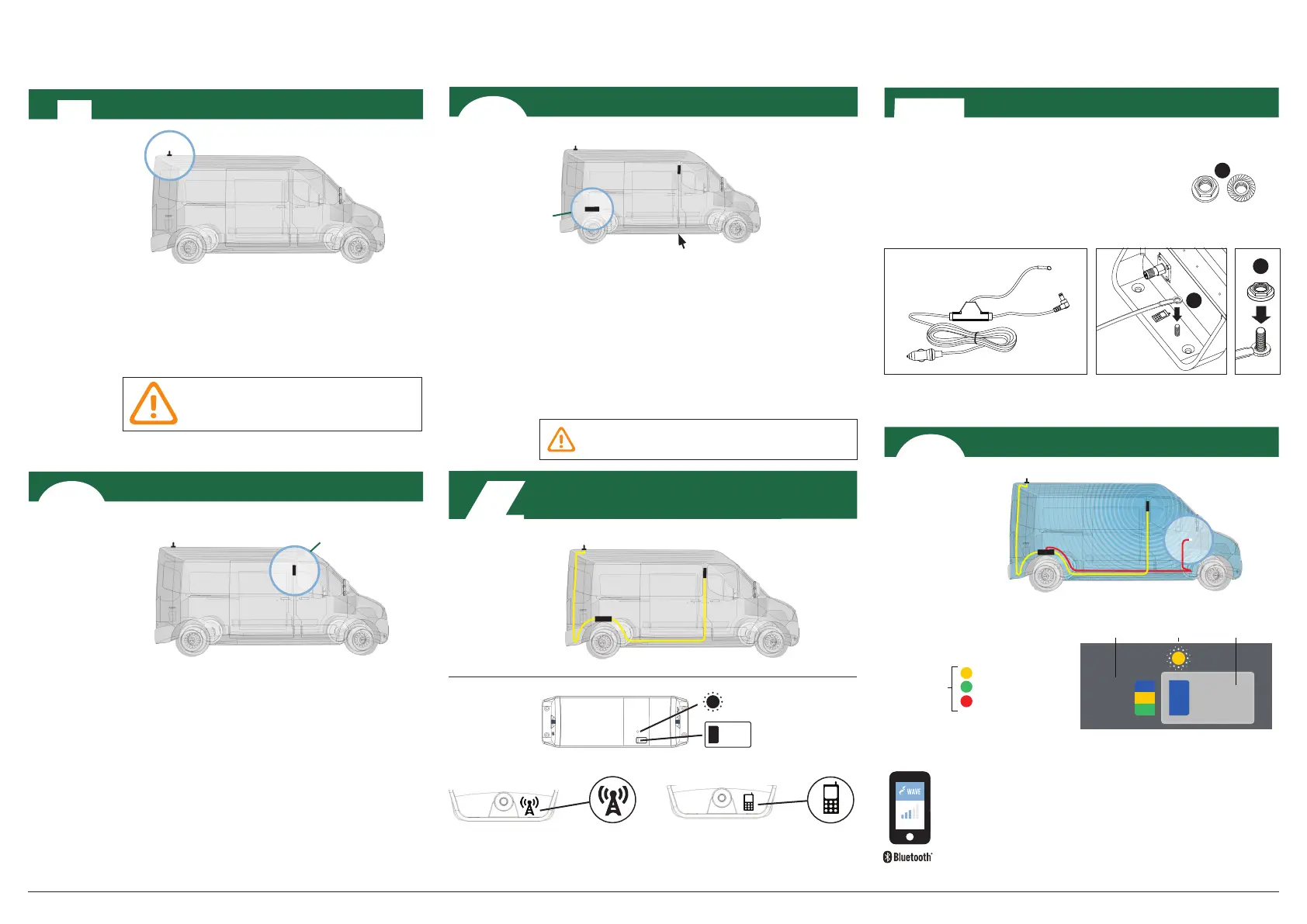
Install Service Antenna
For best performance make sure
there is 50cm of metal around the
base of the antenna.
Mount your Donor Antenna on the exterior of the
vehicle, towards the rear, according to its design,
and the type of vehicle it’s being used with. Make
sure you consider the cable connection to the
Telstra GO unit with your location choice.
Install Service Antenna in the cab, towards the
front, where coverage is needed. Ideally, there should
be substantial material, like the metal of the roof,
between the Donor and Service Antennas, to improve
isolation.
DONOR ANTENNA
Install Donor Antenna
SERVICE ANTENNA
SERVICE ANTENNA
SERVICE ANTENNA
SERVICE ANTENNA
DONOR ANTENNA
Telstra GO Mobile Installation
Mount Telstra GO
Find a good mounting location in your vehicle. Location
should have airflow and be secure from contact with
external objects.
Make sure the unit is within cable range of the 12V
power supply on your vehicle.
Best to make sure all cable lengths support the intended
mounting location BEFORE permanent mounting.
TELSTRA GO
TELSTRA GO
Connect Donor & Service Antennas
to the Telstra GO Unit
LEFT SIDE: Service Antenna
Connector
RIGHT SIDE: Donor Antenna
Connector
DONOR ANTENNA
DONOR ANTENNA
TOP VIEW
STATUS
INDICATOR
MODE
Plug in Telstra GO & Select Mode
Ground the Telstra GO
(*NOTE: if Error, go to troubleshooting at cel-fi.com/support)
AUTO
3G
4G/4GX
MODE
SELECT
BUTTON
MODE
STATUS
INDICATOR
Boosting 3G
Boosting 4G/4GX
Error*
STATUS
INDICATOR
12V POWER
SUPPLY
DONOR ANTENNA
TELSTRA GO
Telstra GO Mobile Smart Signal Repeater www.cel-fi.com
Press the MODE button on the unit to select desired
scanning mode. Status Indicator will blink during the setup
process, and may take a few minutes to complete.
(OPTIONAL: use your smartphone to select mode.
Download the Cel‑Fi WAVE app, and follow the on-
screen instructions.)
NETWORK STRENGTH
TELSTRA GO OPTIONAL
LOCATION
TOP
NUT
BOTTOM
NUT
2
Do not plug in the power supply into the
device until installation is complete.
2
I
3
4
5
6



 To Previous Page
 Loading...