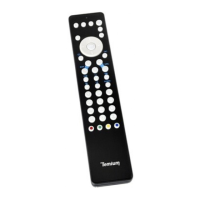
This document is a user manual for a TEMIUM dedicated remote control for Samsung televisions.
Function Description:
This remote control is specifically designed to operate most Samsung televisions. It provides a convenient way to control your Samsung TV, offering essential functions for daily use. The manual details how to set up the remote control, including battery installation and IR code configuration, as well as an advanced learning feature to replicate functions from an original remote control.
Important Technical Specifications:
- SKU: 4654749
- Battery Type: Requires 2 AAA batteries (not included).
- IR Code Configuration: Supports multiple IR codes (0, 1, 2, 3, 4) for compatibility with various Samsung TV models.
- Learning Function: Capable of learning IR signals from an original remote control.
- Learning Distance: For the learning function, the original remote and the TEMIUM remote should be placed 1 to 10 cm apart, with the IR LED of the original remote pointed directly at the sensor of the TEMIUM remote.
- Automatic Exit from Configuration/Learning Mode: The remote automatically exits IR code configuration mode if no button is used for 30 seconds. Similarly, it exits learning mode if no IR learning signal is emitted for 30 seconds.
- Reset Function: Allows for clearing learned data and resetting to default settings (code 0).
Usage Features:
- Battery Installation:
- Open the battery compartment cover on the back.
- Insert 2 new AAA batteries, ensuring correct polarity.
- Close the cover.
- IR Code Configuration:
- Turn on your television.
- Press and hold the "VOL-" and "P+" buttons for 3 seconds until the LED under the power button illuminates.
- Enter one of the IR code numbers (0, 1, 2, 3, or 4).
- If the current code doesn't work, repeat steps 2 and 3 with a different code.
- Note: The LED will flash 6 times if the IR code does not exist.
- Learning from an Original Remote Control:
- Place both the original remote and the TEMIUM remote on a flat surface, with the top of the original remote facing the base of the TEMIUM remote. Ensure the original remote's IR LED points directly at the TEMIUM remote's sensor. Maintain a distance of 1 to 10 cm between them.
- Press and hold the "OK" and "1" buttons on the TEMIUM remote for 3 seconds until the LED under the power button illuminates.
- Release the buttons; the LED will flash.
- On your original remote, select the button you wish to learn and press and hold it until the LED on the TEMIUM remote flashes twice.
- To learn another button, repeat the previous step.
- To exit learning mode, press and hold the "OK" and "1" buttons for approximately 1 second.
- Resetting to Default Settings (Code 0) / Clearing Learned Data:
- Press and hold the "OK" and "0" buttons for approximately 3 seconds until the LED under the power button illuminates.
- Release the buttons, then press the "OK" button. The LED will flash twice, indicating the reset process is complete.
Maintenance Features:
- Battery Precautions:
- Do not mix different types of batteries or new batteries with used ones.
- Use only the recommended type of batteries.
- Remove used batteries from the device.
- Dispose of used batteries responsibly at recycling facilities to protect the environment. Avoid exposing batteries to excessive heat (e.g., sunlight, fire).
- Environmental Responsibility and Disposal:
- The manufacturer emphasizes environmental protection and encourages proper disposal of the device, batteries, and packaging materials.
- Users are advised to dispose of the product and its packaging according to local laws and regulations, as it contains electronic components and potentially batteries.
- Contact local authorities for information on disposal and recycling procedures.
- The device should be taken to a local collection point for recycling, with some centers accepting products free of charge.
- Customer Support:
- Darty France Hotline: 0 978 970 970 (local call rate), available 7 days a week, 24 hours a day.
- Vanden Borre Hotline (Belgium): +32 2 334 00 00, Monday to Friday from 8 AM to 6 PM, and Saturday from 9 AM to 6 PM.
- Fnac France Hotline: 09 69 32 43 34 (free service + call rate), Monday to Saturday from 8:30 AM to 9 PM, and Sunday from 10 AM to 6 PM.
- Compliance: The "CE" symbol indicates that the device complies with European electromagnetic compatibility standards.
- Packaging Recycling Information: The manual includes symbols for sorting packaging materials: plastic tray and film (to be thrown away), and cardboard box (to be recycled). It encourages reducing environmental impact of packaging.
The manual also notes that due to continuous product improvements, minor inconsistencies may appear in the instructions, for which the manufacturer apologizes. The document was published by Etablissements Darty & fils on 04/07/2019.

 Need help?
 General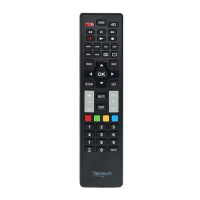

 To Next Page