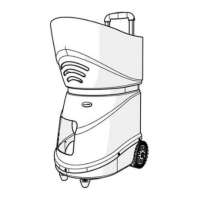
This document describes the TS-08 (TS-06) Tennis Ball Machine, a device designed to assist in tennis training by ejecting tennis balls.
Function Description
The Tennis Ball Machine is designed to be used exclusively on a tennis court for the purpose of ejecting tennis balls. It is controlled remotely via a mobile application, offering various modes and settings for ball delivery. The machine can deliver balls with different speeds, frequencies, and spins, and can be programmed for specific landing points or patterns.
Important Technical Specifications
- Model No.: TS-08, TS-06
- Rated Voltage: DC12V
- Ball Capacity: 160 Pcs
- Speed: 20-140 Km/h
- Feed Rate: 2-10 seconds
- Battery Life: 4-8 hours
- Gross Weight: 19 Kg
- Dimension: 578 × 448 × 528 mm
- Battery: Equipped with a 16AH large capacity lithium battery. A full charge provides approximately 6 hours of normal working time. Charging time is about 8 hours when the battery is exhausted.
Usage Features
The machine's operation is primarily controlled via a mobile application, which needs to be installed on an Android or iOS device.
Software Installation:
- Android OS: Download and install the mobile APP software from
Http://www.tennismash.com.cn/ts0608.apk.
- iOS: Search for "tennismash remote" in the App Store to install.
Bluetooth Connection:
- Turn on the machine's switch.
- Access Bluetooth settings on your mobile phone.
- Scan for devices (TenniSmash08 or TenniSmash06).
- For Android users: Input PIN Code: 1234. (iPhone users skip this step.)
- Once paired, open the app, click the Bluetooth icon, and select the paired machine (TenniSmash08 or TenniSmash06).
- A successful connection is indicated by "Connect to TenniSmash08" (or TS-06) displayed in the upper left corner of the app.
- Click "ON" in the app to start the machine.
- Troubleshooting Connection: If the mobile phone cannot find the machine via Bluetooth or if there are pairing issues, try restarting both the mobile phone and the machine.
Operation Panel:
The physical operation panel includes:
- Fuse: For protection.
- Connect to Charger: Port for charging the battery.
- Switch: Power on/off.
Steps for Use:
- Place the ball machine in the desired location on the tennis court.
- Fasten the ball-loading frame back onto the machine.
- Adjust the direction of the ball delivery.
- Adjust the ball speed and mode via the mobile app.
Differences between TS-06 and TS-08:
- TS-06: Allows adjustment of any landing point on the tennis court via the mobile app. Features left-right swing and vertical swing functions.
- TS-08: Remotely controlled by the mobile app. Offers 6 fixed landing points and 28 types of ball delivery lines. It can compile and set combined ball lines with multiple landing points and define up to 20 landing points for circular ball delivery. The TS-08 can be switched to TS-06 mode (manual mode) to access all functions of the TS-06.
Important Safety Precautions:
- Use only tennis balls; no other types of balls should be ejected.
- Never stand in front of the machine unless you are on the other side of the net (more than 7 meters / 8 yards away).
- Even when paused, balls can eject at any time, so avoid standing in front of the machine.
- Children must be supervised and taught to never stand in front of the machine.
- Do not use the machine in rain or with wet balls.
- Pressure-less balls are recommended for best performance.
- Using a mix of new and old balls may lead to inconsistent results.
Maintenance Features
General Maintenance:
- Vacuum the inside of the machine to remove ball fluff.
- Wipe down the outside with a mild detergent, being careful not to get water inside the machine.
- Wipe down the throwing wheels after every use to prevent residue buildup from the balls.
Troubleshooting:
- Machine does not power on when the power button is pressed:
- Check if the battery is charging.
- Check if the fuse is blown.
- Power light does not illuminate when the power button is pressed (due to excessive current/battery protection lock):
- Turn off the machine.
- Charge the battery for 5 minutes to unlock it.
- Clearing Ball Jams:
- If a ball gets stuck behind the two throwing wheels, the machine may shut down to prevent circuit board damage.
- Turn off the machine and clear the ball jam. If the ball is difficult to remove directly, use hands, pens, sticks, or other tools to move it to the chassis for removal.
- Avoid using wet or airless balls to prevent jamming.
- New machine battery status:
- New machines typically have less than 30% battery charge from the factory.
- Charge the battery fully before first use to avoid inconvenience.
- Machine does not work when the switch is pressed:
- Check if the fuse tube is burnt out. If so, replace it with a spare fuse tube located at the side of the battery pack.
- If the fuse is intact, check if the battery is charged. The charger indicator light should be red when charging and green when full.
- Ensure the charger and socket are securely connected. A loose socket may show a green light, giving a false impression of a full charge.
- Fuse burns out when the machine is started:
- Check for a ball stuck in the machine.
- Adjust the speed to the minimum and restart.
- Ball misses the net:
- Set the ball speed above 6 and place the machine at the midpoint of the baseline.
- Children's balls:
- Orange and green children's balls can be used.
- Red balls cannot be used as they are too large.
- Manual mode adjustment (TS-08 and TS-06) not displayed on phone screen:
- The software interface may not display the adjustment. Observe the change in the position of the serving wheel. Adjustments (up/down, left/right) are circular, meaning the serving wheel moves through its full range of motion.
- Other fault conditions:
- If troubleshooting steps do not resolve the issue, contact customer service for further assistance.

 Need help?
 General

 To Next Page