Setting the high voltage value; Press the Up Button for 1
second to set the high voltage value. The program led will start
flashing and the high voltage value stored in the device will be
displayed on the screen. While the high voltage value is
displayed on the screen, the desired value is adjusted by using
the Up/Down buttons. The set value is saved by pressing the
SET button. The program led will turns off and the input
(mains) voltage value will be displayed on the screen.
Setting the low voltage value; Press the Down Button for 1
second to set the low voltage value. The program led will start
flashing and the low voltage value stored in the device will be
displayed on the screen. While the low voltage value is
displayed on the screen, the desired value is adjusted by using
the Up/Down buttons. The set value is saved by pressing the
SET button. The program led will turns off and the input
(mains) voltage value will be displayed on the screen.
Setting the error wait time value; Press the Time Button for
1 second to set the error wait time value. Program led will start
flashing and error wait value stored in the device will be
displayed on the screen. While the error wait value is displayed
on the screen, the desired value can be adjusted by using the
Up/Down buttons. The set value is saved by pressing the SET
button. The program led will turns off and the input (mains)
voltage value will be displayed on the screen.
Adjusting the screen brightness; Press the Set button for 1
second to adjust the screen brightness. Program led will start
flashing and screen brightness value stored in the device will
be displayed on the screen. While the screen brightness value
is displayed on the screen, the desired value can be adjusted by
using the Up/Down buttons. The adjusted value is saved by
pressing the SET button. The program led will turns off and the
input (mains) voltage value will be displayed on the screen.
ERR
Adjustable Over&Under Voltage Relay (40A)
GKE-40
SET
TIME UP DOWN
Error
Ledi
Program
Led
Set
Button
Time
Button
Up
Button
Down
Button
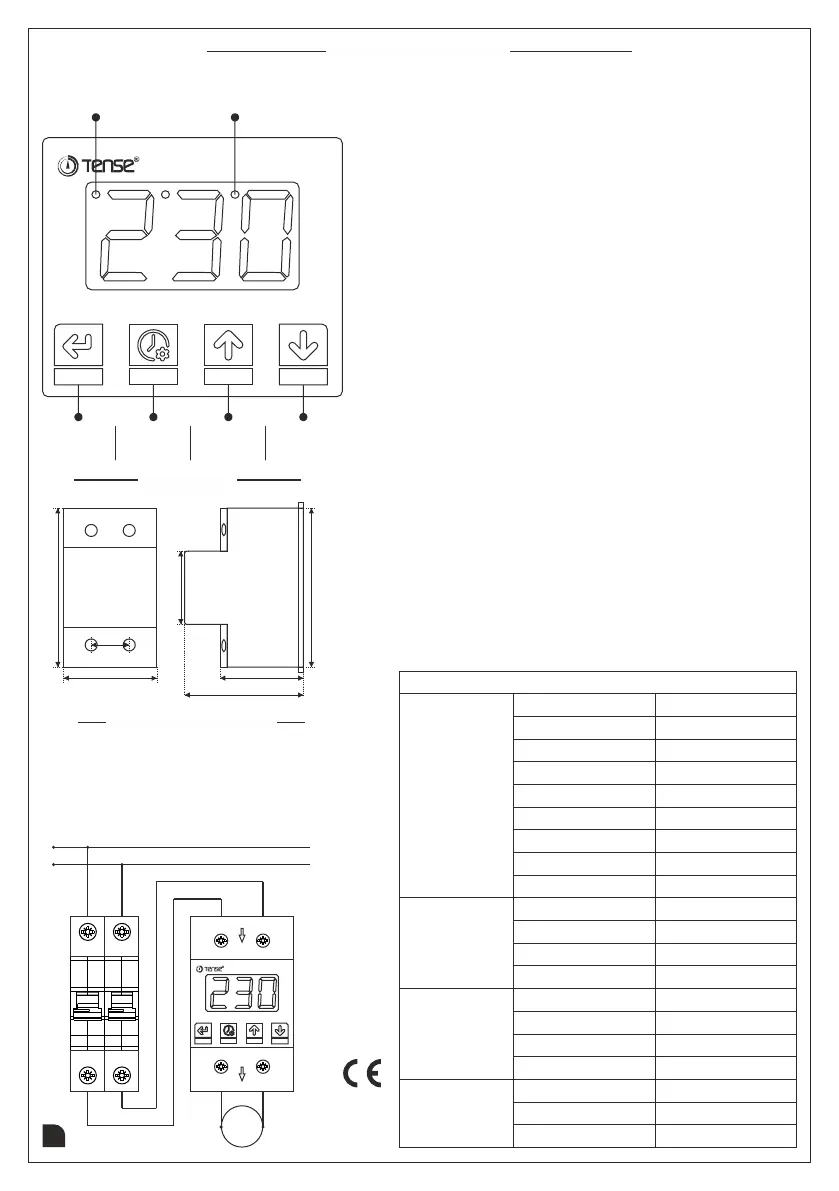
Dimensions
91mm
43,3mm
67,5mm
42mm
21,6mm
52,9mm
90,3mm
Connection Diagram
2
Document No: DK-100-3
Setting Up the Device
ERR
Adjustable Over&Under Voltage Relay (40A)
GKE-40
SET
TIME UP DOWN
N
N
L
L
IN
OUT
N
L
Load
The Neutral and Phase connection comes from the
mains must be connected to the "N" and "L" terminals
at the IN part of the device. Neutral and Phase
connection of the devices that are desired to be protected
from over and under voltage should be taken from the
"N" and "L" terminals in the OUT part of the device.
MADE IN
TURKEY
www.tense.com.tr
Technical Informations
Rated Current
40A
Technical
Specifications
Rated Voltage
230V AC
Frequency
50Hz. - 60Hz.
Protection Range
0V - 450V AC
High Voltage
230V - 300V
Settings
Ranges
Low Voltage 120V - 210V
Error Waiting
Screen Brightness
0.1sec. - 600sec.
Operating Temp.
-20°C - +55°C
High Voltage
240V ± 5V
Factory
Settings
Low Voltage
180V ± 5V
Error Waiting
Screen Brightness
5sec.
5
1 - 5
Cable Diameter
Maks. 6mm²
Mountings
Mounting Type
Mounting on DIN rail
Operating Power
<4VA
Operating Altitude
<2000m
Display
3 Digit LED Display
Connection Type
Terminal Connection
Weight
<250gr.



 To Previous Page
 Loading...