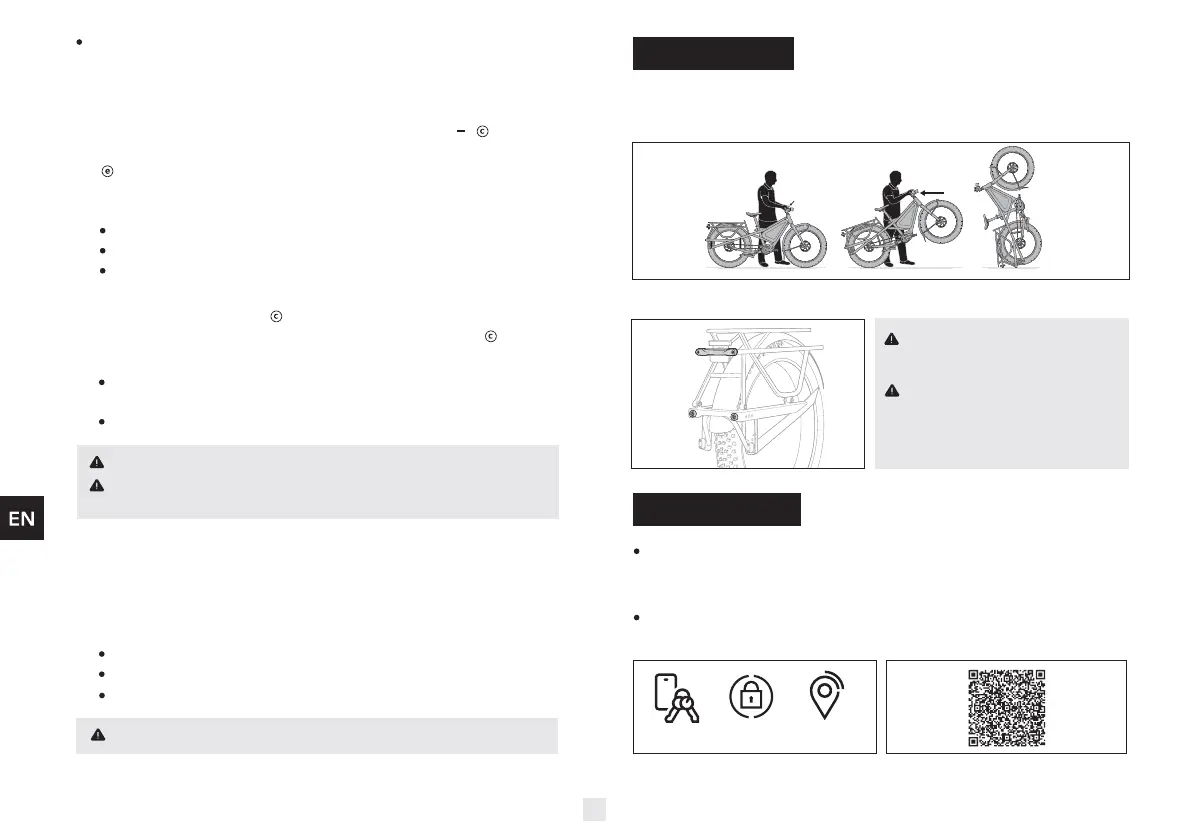
In public areas, hold the bike to
prevent it from accidentally falling
over.
Before leaving a vertically parked bike
unattended, first strap the bike to a
fixed object to prevent it from falling.
eBike Flow App
The eBike Flow app is the control center for the Bosch smart system on
your Orox. Use the app to lock your bike, monitor your riding activity and
battery status, and more.
You will be automatically subscribed to a 12-month free trial of Flow+
upon activation of the eBike Lock and Alarm.
Download the eBike Flow app
Security features managed by eBike Flow app
ELECTRONIC
eBIKE LOCK
eBIKE ALARM GPS TRACKING
3. Make sure all support points touch the ground evenly.
1. Apply rear brake.
2. Pull up on handlebar and walk backwards.
Vertical Parking
Practice handling the bike in a safe area before riding on public roads.
9. Note the drive assistance is limited to:
25 km/h in countries that follow the EU standard
32 km/h (20 mph) for Class 1 in countries that follow the USA standard
45 km/h (28 mph) for Class 3 in countries that follow the USA standard
7. The walk assistance aids you when pushing your Orox. The speed
of this function depends on the selected gear and can reach a
maximum of 4 km/h. To start walk assistance, press the “ ” button for
more than 1 second and keep it pressed. The battery charge indicator
will go out and a white moving light shows that it is ready. To activate
walk assistance, one of the following actions
must occur within the next 10 seconds:
Push the Orox forwards.
Push the Orox backwards.
Perform a sideways tilting movement with the Orox.
After activation, the motor begins to push and the white bars change to
ice-blue. If you release the button, walk assistance is stopped. You can
reactivate walk assistance within 10 seconds by pressing the button.
The push assistance is switched off as soon as one of the following occurs:
The wheels of the Orox are locked (e.g. by applying the brakes or
hitting an obstacle);
The speed exceeds 4 km/h (2.5 mph).
The walk assistance function must only be used when pushing the Orox.
There is a risk of injury if the wheels of the Orox are not in contact with the
ground while using the walk assistance.
8. Use gears as you would on a conventional bicycle to maintain an efficient
cadence for your riding style. This will maximize the efficiency of the
assistance to your power input and prevent premature wear on the drive
system.
TURBO: Maximum assistance, supporting the highest speed for
sporty riding.
4



 To Next Page
 Loading...