Operation
14 Testboy
®
26
Operation
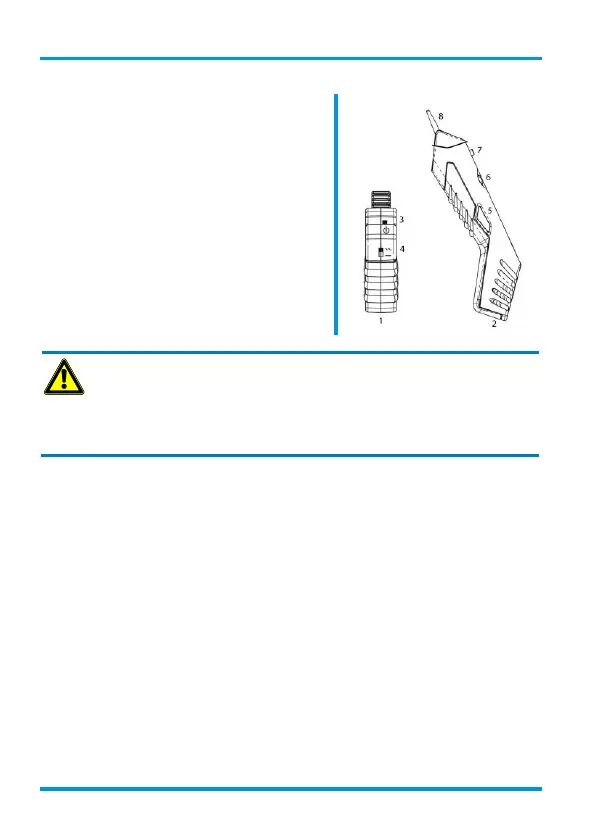
Connect the cables of the transmitter (1) to a wire of
the cable searched for.
Select the test sound (4) (continuous or alternating
sound) and switch on (3) the transmitter (1).
Use the rotary switch (6) to switch on (3) the receiver
(2). The volume can be set according to the ambient
conditions.
Press the activating button (5) and touch all possible
cables with the tip (8).
The sound received is loudest at the cable searched
for.
WARNING
Only deenergized cables or lines must be connected.
Before touching conducting cables, check (measurement, short-circuiting) that they
are deenergized.
Identification of live conductors is not possible. Pay attention to this in order to pre-
vent electric shock.
When searching for a cable using the cable detector, the sound signal could be incorrect due to
different strengths of field or multiple cables could be found. Perhaps the cable detector receives
the electromagnetic fields of a sound signal from another cable connected to the TRANSMITTER
in the vicinity, but not from that assumed. If the field strength is low, the cable detector does not
perhaps detect the correct cable. The sound detection can be influenced by different factors, in-
cluding:
● screened lines/wires
● thickness and type of insulation
● distance from the source of sound
● fully-isolated consumer devices that prevent effective earthing
● routing of the cable network
● condition of the test instrument and batteries
Checking coaxial cables
In order to check coaxial cables, connect the red cable to the screening of the cable and the black
cable to the internal conductor.


 To Next Page