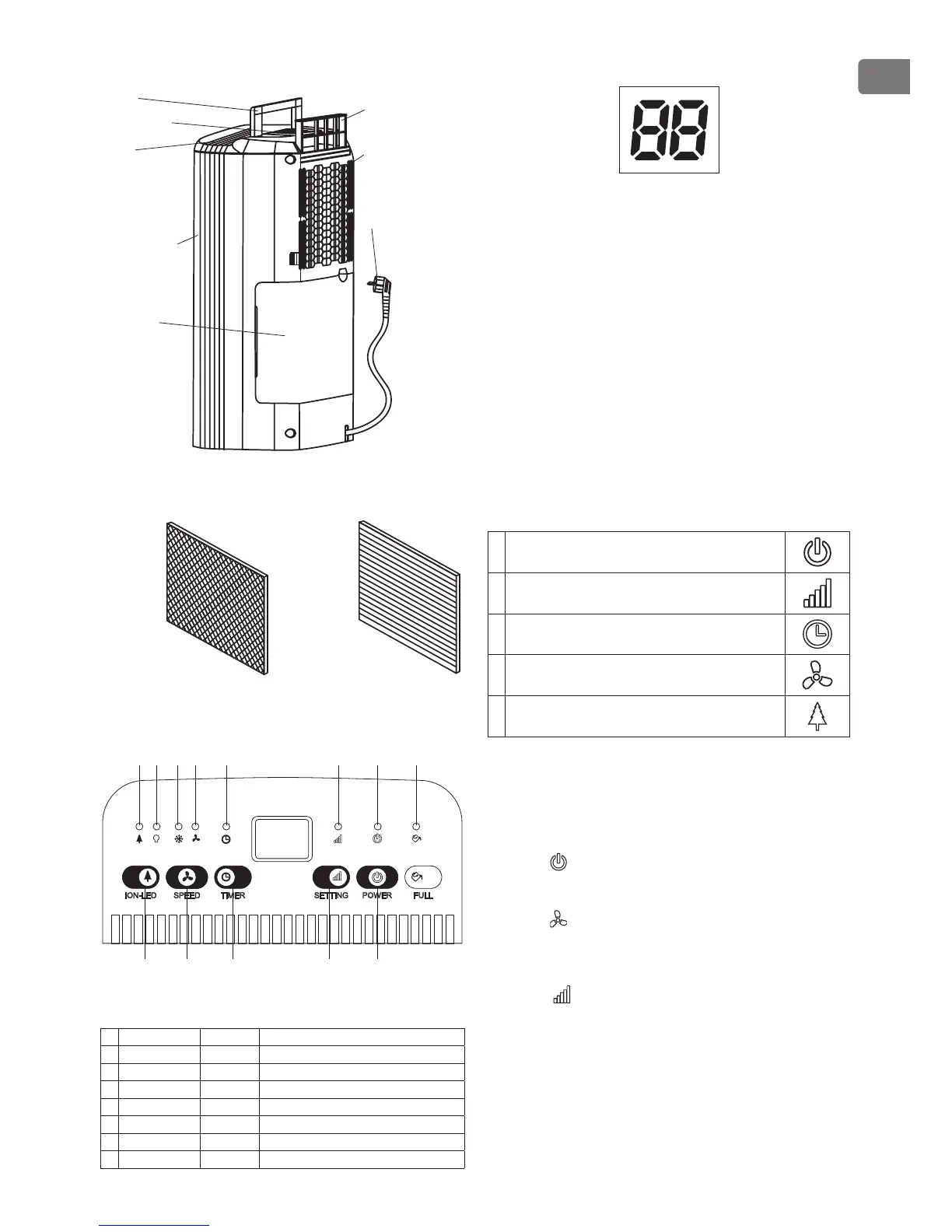
PARTS
Outlet
Front shell
Water tank
Handle
Control Panel
Filter box
Backshell
Supply cord
OPTIONAL
Activated
carbon filter cloth
(Optional)
PU filter layer
(Optional)
OPERATING INSTRUCTIONS
8
Е D C B A
7 6 5 4 3 2 1
Led Indicators
1. W.F-LED Red Water full-Led
2. POWER-LED Green Power Led
3. SET-LED Green Set-Led
4. TIM-LED Green Timer-Led
5. LF-LED Green Low-fan Led
6. HF-LED Green High-fan Led
7. UV-LED Blue UV- Led (Optional)
8. ION-LED Green Ion-Led (Optional)
Humidity Level & Timer 2 digit display
The indicator features 3 functions:
•
when the unit is plugged in, it will indicate the room
humidity level.
•
when you set the humidity, it will indicate the
humidity that you have selected
•
when you program the time for the unit to turn on
and off, it will show the hours.
•
When the environment humidity is lower than 35%,
it will show “LO”
•
When the environment humidity is higher than
95%, it will show “HI”
Push Button Functions
A Power Push Button
B Adjustable Humidity Push Button
C Timer Push Button
D Fan Speed Push Button
E ION Button and UV Button (Option)
Operating Instructions
1. The Power indication light will turn on in green
when the unit is plugged in, regardless of whether
the unit is operating or not.
2. Press , button once to start operation. Press it
again to stop operation
3. Press button as follows: Press to set the desired
fan speed. It can be adjusted between high speed
and low speed.
4. Press , button to set the desired humidity level in
the room, which can be set from 40% to 80% at 5%
intervals.


 To Next Page