EN
4 Operation and Storage Manual of Panel Heater
When the set time has elapse, the appliance going to Comfort mode !
Deactivation of „Eco„ mode
- You can exit “Eco” mode by pushing “On/Off” button for 1.5
sec. Then the heater turns off. The display will continue showing the set
temperature. Or press “Mode” button to choose different mode.
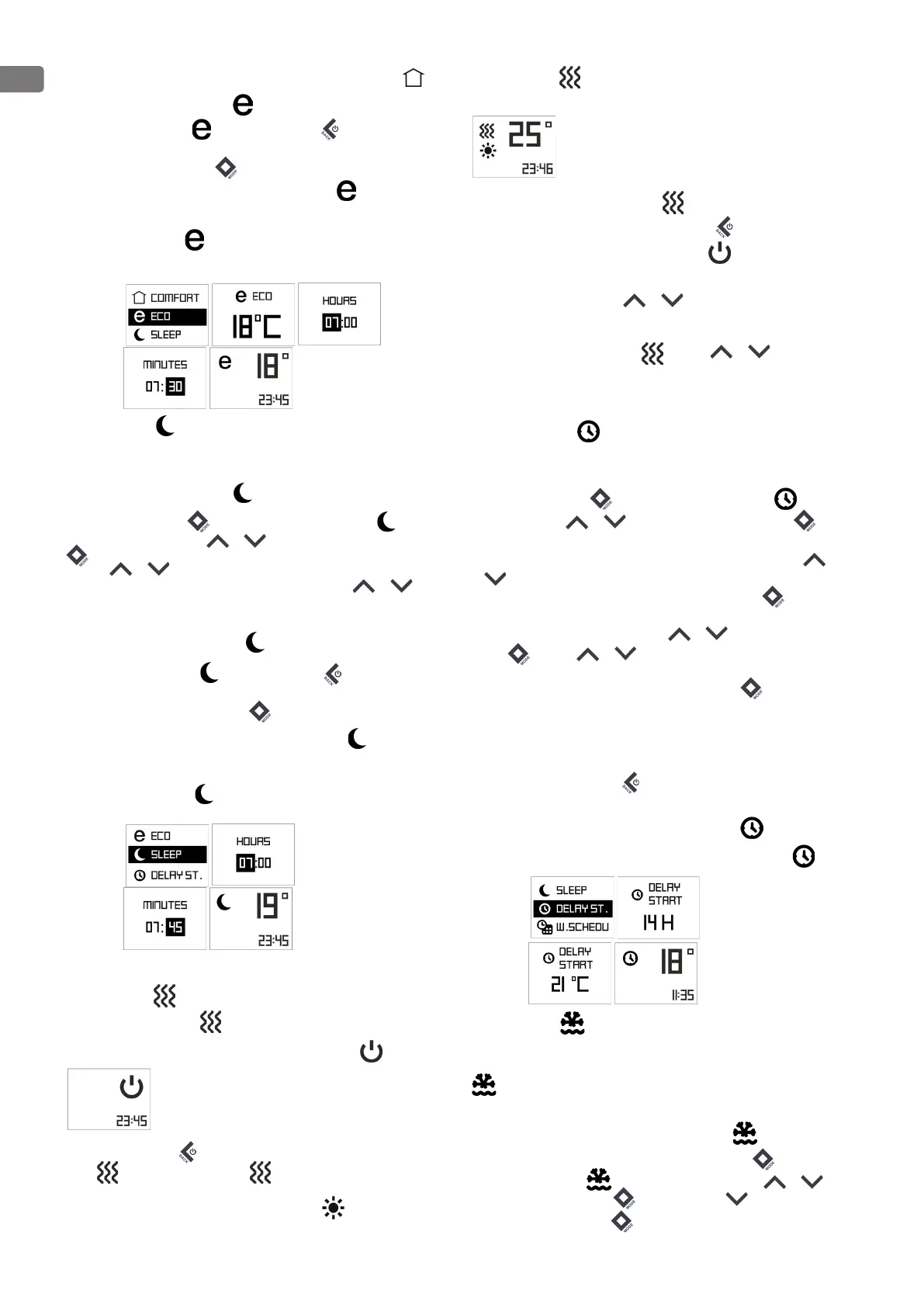
Visualization on Display in “Eco” mode settings :
- Set temperature
The display shows “Eco” in the top and the set temperature
1.3. Sleep mode with On/Off option – two hours after activation, the
convector decreases the set temperature with -3°C under the set temperature
in Comfort mode. User could set the time range for operating in Sleep mode
then the appliance switches to Comfort mode. By default: 6 hours.
Activation of „Sleep mode„
Push the button “Mode” for 3 sec and select “Sleep mode” by
pushing any of the buttons: or , and confirm with “Mode” button
. If you want you can set the clock time: select by pushing any of the
buttons: or , reach actual hour time. Confirm with “Mode” button. The
minute icon is flashing and by pushing any of the buttons: or , reach
actual minute time. Confirm with “Mode” button (range 00.00-24.00). When the
set time has elapse, the appliance going to Comfort mode!
Deactivation of “Sleep mode”
User can exit “Sleep mode” by pushing “On/Off” button for 1.5
sec. Then the heater turns off. The display will continue showing the set
temperature. Or press “Mode” button to choose different mode.
Visualization on Display in “Sleep” mode settings :
- Set temperature
The display shows “Sleep” in the top and the set temperature
2. Basic modes
“Heating” mode
Start “Heating” mode
When the panel heater is switched-off its digital display shows .
By pushing the ON/OFF button for 1.5 sec the appliance goes into “Heating”
mode . Then the display indicates mode. The set temperature is
indicating in the right. If the room temperature is lower than the set one, the
heater will switch automatically on, and a heating sign will appear on the
display.
The display shows in the top and the set temperature
Deactivation of “Heating” mode
User can exit “Heating” mode by pushing “On/Off” button for 1.5 sec. Then
the heater turns off. The display will be showing OFF.
Temperature adjustment
By pushing any of the buttons: or the user enters “Temperature
adjustment” mode and the user can change the temperature settings in
the desired direction. The new settings are saved and the heater goes
automatically into “Heating” mode . If any of or buttons get
pressed longer than 0.5 sec., the temperature settings will start automatically
increase or decrease at a rate of 6 units per second. The range of available
temperature settings is from 10 up to 30 degrees.
Delay start function
The delay start function allows the user to set the time at which the convector will
switch on and start heating.
Push the “Mode” button for 3 sec and select “Delay Start” by pushing
any of the buttons:
or and confirm with “Mode” button , user
can enter the time and temperature, when it will automatically go to “Heating”
mode. Initially a setting of 12 hours is set by default and by pushing
or buttons user can change the time settings in the desired direction.
After the hour of “delay start” mode is chosen, press “Mode” button for
confirmation. After that set the temperature at which the convector will start
operating by pushing of any of buttons:
or . Confirm with “Mode”
button . If any of or buttons is held for more than 0.5 seconds,
the time and temperature settings start automatically increase or decrease at a
rate of 4 units per second. Confirm with “Mode” button or don’t press any
button for 3 seconds.
If user enters time – 00, this mode will not be implemented. If the “Delay start”
mode is already enabled and user selects the “Delay Start” mode again, it can
be changed the remaining time in both possible directions. You can exit this
mode by pushing the “On/Off” button. Then panel heater will go into
“Heating” mode. The “Delay start” needs to be set from 0 to 96 hours.
Visualization on Display in “Delay start” settings :
The display shows “Delay start” in the top and the set temperature
Anti-frost mode
If the room temperature falls below 5°C and the panel heater is off, the heater
will turn on automatically in order to prevent freezing of the area. Indication –
in left top corner - only when work the anti-frost mode
Factory settings of the function is ON (switched On).
Activation and deactivation of Anti-frost mode
- If the customer wants to change it – push “Mode” button for 3 sec and
select “Anti-frost” mode by pushing any of the buttons:
or
.
Confirm with “Mode” button and user can push button to reach ‘’OFF”.
Confirm with “Mode” button .


 To Next Page
 Loading...