This document describes the NINGBO TEVERUN TECHNOLOGY CO.,LTD Colorful TFT Display, model UKC2, a display unit designed for various applications, likely electric vehicles or similar systems.
Function Description
The UKC2 is a 3.5-inch colorful TFT screen that serves as a central information display and control interface. It provides real-time data, allows for system adjustments, and offers diagnostic information.
Key functions include:
- Information Display: Shows current speed (AVG, MAX, RT), mileage (Odometer, Trip distance), clock, riding time, battery status, output power, motor ON/OFF state, and real-time current and temperature.
- Control Interface: Allows users to adjust assist levels (ECO, 1, 2, 3, 4, 5), backlight brightness (5 levels), and switch between different display modes.
- System Settings: Provides access to a menu for configuring various parameters such as unit system (Metric/Imperial), power system voltage (48V/52V/72V), temperature protection thresholds (80-130°C), zero start (N/Y), auto-off time, wheel diameter (8-14 inch), cruise control (OFF/AUTO/MANUAL), ABS (ON/OFF), speed magnets (1-88), assist parameters (Assist1-Assist5), EABS level (1-5), F/R start level (1-5), F/R current limits, and export mode (NO/YES).
- Diagnostic Features: Displays error codes for maintenance purposes (Motor phase, Hall failure, Handlebar turning fault, Undervoltage protection, Controller error, Communication error, Over-temperature protection).
- Battery Information: If the system supports battery communication, it can display detailed battery information including voltage, capacity, cycle times, temperature, last uncharge time, remain capacity, and full capacity.
- Password Protection: Supports power-on password protection and allows for password reset.
- Software Upgrade: The software can be upgraded via UART.
Important Technical Specifications
- Screen: 3.5-inch TFT colorful screen.
- Power Supply: 48V/60V/72V.
- Rated Operating Power: 1W.
- USB Charging Port: DC 5V 500mA.
- Off Leakage Current: < 1uA.
- Max Operating Current: 1000mA.
- Operating Temperature: -20°C to 70°C.
- Storage Temperature: -30°C to 80°C.
- Dimensions: 92.8mm (height), 61.2mm (width), 80mm (depth, including mounting bracket). The control panel dimensions are approximately 55.30mm (width), 39.35mm (height), and 44.00mm (depth).
- Materials: ABS product shell, imported high-strength Acrylic LCD transparent window. The product holder material is glass fiber mixed with nylon.
Usage Features
- Power On/Off: Press and hold the Power button for 1 second. The display automatically shuts down after 10 minutes of no operation or ride (configurable).
- Assist Level Adjustment: Short press UP/DOWN buttons to change assist levels.
- Headlight/Display Mode Change: Press and hold the UP button for 1 second to turn on/off the headlight and switch between daytime/night mode. This also adjusts backlight brightness.
- Data Cleanup: Press and hold UP & DOWN buttons concurrently for 1 second to reset temporary data (AVG Speed, MAX Speed, Trip, Time).
- Menu Navigation: Double-press the M button (within 0.3 seconds) to enter/exit the parameter setting menu. Use UP/DOWN to select items, M to confirm, and POWER to cancel or go back.
- Speed Measurement: The number of speed measuring magnetic steel (magnetic pole) can be adjusted.
- Unit System: Configurable between Kilometer and Mile modes.
- Intelligent Power Indicator: Provides stable power indication, unaffected by motor start-stop fluctuations. If battery communication is supported, it displays an accurate percentage.
- Clock Function: Internal battery ensures the clock works even when the display is off.
- Cruise Control: Can be set to OFF, AUTO, or MANUAL.
- ABS: Can be turned ON or OFF.
- Export Mode: When enabled, speed is limited to 25% and requires an initial speed for motor power.
- Mounting: Clamps are suitable for 3 sizes of handlebars: 31.8mm, 25.4mm, and 22.2mm. Adapter rings are provided for 25.4mm and 22.2mm handlebars.
Maintenance Features
- Error Code Display: The display shows specific error codes (1, 2, 4, 5, 6, 7, 8) to help diagnose issues related to motor phase, Hall sensor, handlebar, undervoltage, controller, communication, and over-temperature.
- Factory Reset: A factory setting menu allows restoring all parameters (except odometer) to their default values.
- Software Upgradability: The ability to upgrade software via UART allows for future improvements and bug fixes.
- Screw Installation: Users are advised to pay attention to the screw's torque value during installation to prevent damage, as damages caused by excessive torque are not covered by the warranty.

 Need help?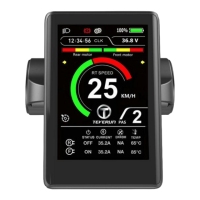

 To Next Page
 General