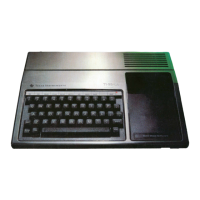
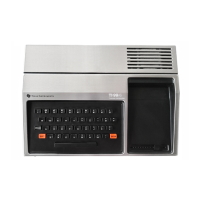
The provided document is a service manual for the Texas Instruments TI-99/4A Home Computer, Model PHC004A, published by Sams Computerfacts. This manual offers comprehensive technical service data, troubleshooting guides, and replacement parts information for the computer.
Function Description:
The Texas Instruments TI-99/4A is a home computer designed for general use, including running basic programs, playing games, and performing various computing tasks. It features a keyboard for input, a cartridge port for expanding functionality with Solid State Cartridges, and interfaces for peripherals such as cassette recorders, joysticks, and a monitor. The computer's core operations are managed by a microprocessor (U600, TMS9900NL), supported by a video display processor (U100, TMS9918ANL) for graphics output, and a sound generator (U511, SN94624N) for audio. It also includes RAM (D416C ICs U102-U109) for temporary data storage and ROM for system software and cartridge programs. The system outputs video and audio signals through an RF modulator (J201) to a standard television or monitor.
Important Technical Specifications:
- Model: PHC004A
- Microprocessor (CPU): U600, TMS9900NL. The manual details pin voltages and waveforms for troubleshooting CPU operation, including address and data lines.
- Video Display Processor (VDP): U100, TMS9918ANL. This IC is responsible for generating video graphics. Troubleshooting involves checking waveforms at pin 36 of U100 and pin 4 of J201 (RF Modulator output).
- Sound Generator: U511, SN94624N (or TMS9919). Produces audio output. Troubleshooting involves checking for a .7V p-p waveform at pin 7 of U511.
- RAM: D416C type ICs (U102-U109). These are 4Kx1 dynamic RAM chips, crucial for program execution and display memory.
- Oscillators:
- 48 MHz Oscillator: Connected to pin 1 of IC U601 (Timing Generator). Frequency should read 12.00 MHz.
- 10.7 MHz Oscillator: Connected to pin 39 of IC U100. Frequency should read 10.738635 MHz and can be adjusted by Coil L100.
- Power Supply: The power supply board (Model AC9500) provides various DC voltages, including 5V, 12V, -5V, and a regulated B+ voltage of 21.5V (at L6). It also handles AC voltages from the power transformer (T1), with secondary outputs of 17.85VAC and 8.55VAC.
- Cassette Interface: Supports two cassette recorders (CS1 and CS2) for loading and saving programs. CS1 uses a three-plug cable (Mic, Earphone, Remote), while CS2 uses a two-plug section for saving programs or data only.
- RF Modulator: J201. Outputs video signals to a monitor or TV on channel 3 or 4. Requires 11.78V (red wire), 1.95V (yellow wire), and .54V (clear wire), with the clear wire also carrying a 1V p-p video signal.
- Keyboard: A matrix keyboard for user input.
- Joystick: Supports two joysticks (Joystick 1 and Joystick 2) for gaming and control.
Usage Features:
- Power Up: Displays a main title screen upon turning on. Pressing any key brings up a menu, which varies based on the Solid State Cartridge inserted.
- Solid State Cartridges: These cartridges expand the computer's capabilities. The computer should be turned Off when inserting or removing them.
- Cassette Operation: Programs can be loaded ("OLD CS1") and saved ("SAVE CS1") using a cassette recorder connected to the cassette plug (J400). Instructions are provided for connecting the recorder (Mic, Earphone, Remote inputs). Volume and tone controls on the recorder can affect loading success.
- Program Control: Basic programs are run by typing "RUN" and pressing ENTER. Programs can be stopped by holding FCTN and pressing '4'. The computer can be reset by holding FCTN and pressing '='.
- ALPHA LOCK Key: Used in BASIC mode for specific operations.
Maintenance Features:
The manual is primarily a service guide, offering detailed instructions for troubleshooting and repair:
- Preliminary Service Checks: A step-by-step guide for initial diagnosis, including checking cables, peripherals, and power supply.
- Quick Component Location: Uses "GRIDTRACE," "CIRCUITRACE," and component photographs to help locate parts on the boards.
- Standardized Notation Schematics: Provides detailed circuit diagrams with waveforms, voltages, and stage identification.
- Step-by-Step Troubleshooting Guides: Specific procedures for diagnosing issues related to the CPU, crystal oscillators, video signals, sound, keyboard, joysticks, and cassette recorder.
- Logic Chart: Contains logic probe readings for various ICs (U100, U102-U109, U300, U302, U500-U506, U507-U511, U600-U616, Q200, Q201, Q300, Q301) to isolate defective circuitry. Readings are provided for Power Up mode, and specific key presses or actions (e.g., sound production, program loading/saving) are noted for certain pins.
- Complete Components Parts List: An easy-to-use format listing semiconductors, capacitors, resistors, coils, and miscellaneous parts, with field replacements shown where possible. Includes manufacturer part numbers, ECG, General Electric, Motorola, NTE, RCA, Workman, and Zenith cross-references.
- Disassembly Instructions: Detailed steps for removing the cabinet bottom, power supply board, main board, and keyboard, including screw locations and metal clamp removal.
- Safety Precautions: Emphasizes the importance of using an isolation transformer, maintaining AC line voltage, removing AC power before servicing, handling PCBs with care to prevent static discharge, using a grounded-tip soldering iron, and avoiding freon-propelled sprays. It also covers general safety regarding power cords, ventilation, and liquid exposure.
- Adjustment: Instructions for adjusting the 10.7 MHz oscillator (L100) to a frequency of 10.738635 MHz.
- Wiring Data: Provides specifications for general-use unshielded hook-up wire (Belden No. 8529 solid, 8522 stranded), 300-Ohm input lead (Belden No. 8225), and 75-Ohm input lead (Belden No. 8241).

 Need help?
 General

 To Next Page