16
The Outdoor Temperature Transmitter
• Remote transmission of outdoor
temperature to Weather Station by 433
MHz
• Shower proof casing
• Wall mounting case
• Mounting at a sheltered place. Avoid
direct rain and sunshine
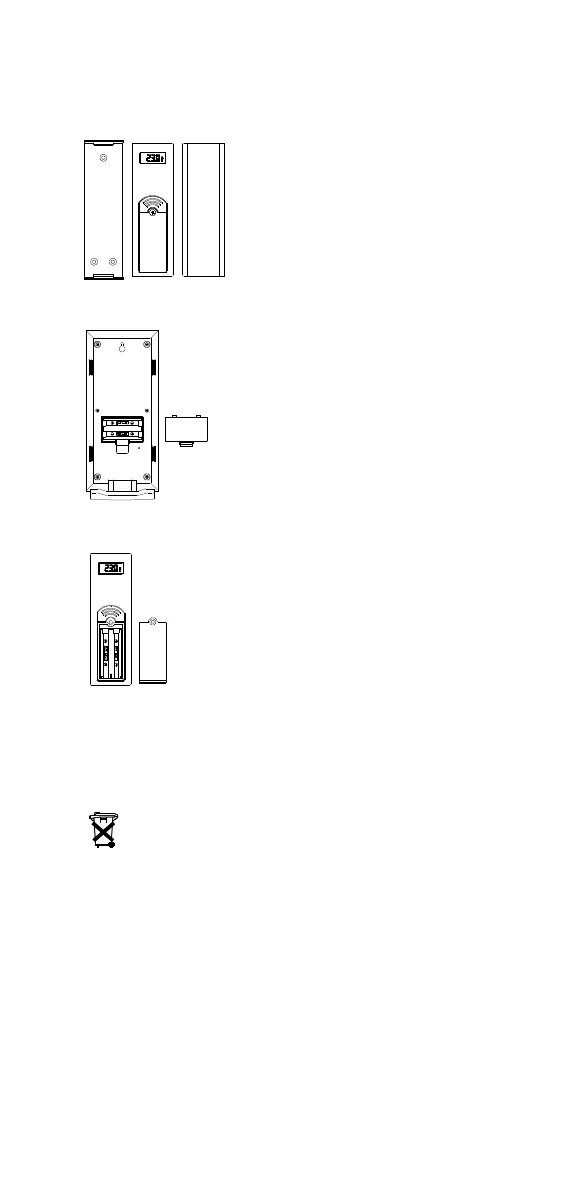
TO INSTALL AND REPLACE BATTERIES IN THE WEATHER
STATION
The Weather Station uses 2 x AA, IEC LR6,
1.5V batteries. To install and replace the
batteries, please follow the steps below:
1. Insert finger or other solid object in the
space at the bottom center of the battery
compartment and lift up to remove the
cover.
2. Insert batteries observing the correct
polarity (see marking).
3. Replace compartment cover.
TO INSTALL AND REPLACE BATTERIES IN THE
TEMPERATURE TRANSMITTER
• Remote transmission of outdoor temperature to
Weather Station by 433 MHz
• Shower proof casing
• Wall mounting case
• Mounting at a sheltered place. Avoid direct rain
and sunshine
Note:
In the event of changing batteries in any of the units, all
units need to be reset by following the setting up
procedures. This is because a random security code is assigned by the
transmitter at start-up and this code must be received and stored by the
Weather Station in the first 3 minutes of power being supplied to it.
BATTERY CHANGE:
It is recommended to replace the batteries in all units on an annual basis
to ensure optimum accuracy of these units.
Please participate in the preservation of the environment.
Return used batteries to an authorized depot.
SETTING UP
1. First, insert the batteries into the Weather station (see “How to
install and replace batteries in the Weather station” above).
Once the batteries are in place, all segments of the LCD will light up
briefly. Then the indoor temperature and humidity, the time as 0:00
the date as TH.1., the weather icons (sun and clouds) will be
displayed. If the indoor temperature and humidity are not displayed
after 15 seconds, remove the batteries and wait for at least 1 minute
before reinserting them. Once the indoor data is displayed proceed
to step 2.
2. Within 3 minutes of activating the Weather station, place the
batteries into the transmitter (see “How to install and replace
batteries in the Temperature transmitter“ above).


 To Next Page