EasyManua.ls Logo

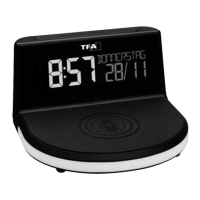
TFA CHARGE-IT WIRELESS - User Manual

TFA CHARGE-IT WIRELESS
30 pages
Go to English
Print Icon
To Next Page IconTo Next Page
Loading...
Bedienungsanleitung
Instruction manual
Mode d’emploi
Instrucciones de uso
Gebruiksaanwijzing
Istruzioni per l'uso
Kat. Nr. 60.2028.01
TFA_No. 60.2028_Anleitung_06_20 05.06.2020 11:13 Uhr Seite 1
Question and Answer IconNeed help?

Do you have a question about the TFA CHARGE-IT WIRELESS and is the answer not in the manual?

Summary

Before you use this product

Delivery contents

Lists the items included in the product package: digital alarm clock, power adapter, and instruction manual.

Range of application and benefits

Overview of the instrument's features like inductive charging, colour display, and alarm functions.

For your safety

Risk of electrocution

Warning about electrical hazards: use correct socket, avoid water contact, and keep away from children.

Product safety information

Advice on avoiding extreme temperatures, moisture, overheating, and obstructions.

Device elements overview

Display components

Identifies display elements like time, date, temperature, and symbols (PM, alarm, auto-dim).

Housing components

Details housing parts including charging pad, USB port, ventilation slots, and mood light.

Button functions

Explains the function of each button: SNOOZE/LIGHT, GLOW, SET, ALARM, and RESET.

Getting started and operation

Initial setup

Steps for initial setup: removing film, connecting power adapter, and initial device startup sequence.

Basic operation

Instructions for fast mode, returning to normal mode, and auto-quit setting mode.

Setting adjustments

Guide to setting language, time format (12/24hr), date, year, month, and temperature unit.

Alarm function setup

How to activate, set, and adjust alarm times and snooze intervals.

Display and light features

Alarm handling

Describes how the alarm sound stops, reactivates, and how to use the snooze function.

Display modes

Explains how to cycle through different display modes showing date, weekday, and room temperature.

Brightness control

Instructions for adjusting display brightness in 4 levels or turning it off.

Automatic dimming

Guide to activating and setting the automatic dimming function for the backlight.

Advanced features and charging

Mood light control

How to activate and select mood light colours, continuous colour change, and brightness.

Wireless charging

Instructions for inductive charging of mobile phones via the Qi standard and indicator light.

USB charging

Details on using the USB port for charging devices that do not support wireless charging.

Maintenance, troubleshooting, and specifications

Care and maintenance

Guidelines for cleaning the instrument and storing it properly when not in use.

Troubleshooting

Common problems like 'No display' or 'Incorrect indication' and their solutions.

Waste disposal

Information on proper disposal of the product and batteries according to WEEE directive.

Technical specifications

Key specifications including temperature range, power consumption, output, dimensions, and weight.

Summary

Before you use this product

Delivery contents

Lists the items included in the product package: digital alarm clock, power adapter, and instruction manual.

Range of application and benefits

Overview of the instrument's features like inductive charging, colour display, and alarm functions.

For your safety

Risk of electrocution

Warning about electrical hazards: use correct socket, avoid water contact, and keep away from children.

Product safety information

Advice on avoiding extreme temperatures, moisture, overheating, and obstructions.

Device elements overview

Display components

Identifies display elements like time, date, temperature, and symbols (PM, alarm, auto-dim).

Housing components

Details housing parts including charging pad, USB port, ventilation slots, and mood light.

Button functions

Explains the function of each button: SNOOZE/LIGHT, GLOW, SET, ALARM, and RESET.

Getting started and operation

Initial setup

Steps for initial setup: removing film, connecting power adapter, and initial device startup sequence.

Basic operation

Instructions for fast mode, returning to normal mode, and auto-quit setting mode.

Setting adjustments

Guide to setting language, time format (12/24hr), date, year, month, and temperature unit.

Alarm function setup

How to activate, set, and adjust alarm times and snooze intervals.

Display and light features

Alarm handling

Describes how the alarm sound stops, reactivates, and how to use the snooze function.

Display modes

Explains how to cycle through different display modes showing date, weekday, and room temperature.

Brightness control

Instructions for adjusting display brightness in 4 levels or turning it off.

Automatic dimming

Guide to activating and setting the automatic dimming function for the backlight.

Advanced features and charging

Mood light control

How to activate and select mood light colours, continuous colour change, and brightness.

Wireless charging

Instructions for inductive charging of mobile phones via the Qi standard and indicator light.

USB charging

Details on using the USB port for charging devices that do not support wireless charging.

Maintenance, troubleshooting, and specifications

Care and maintenance

Guidelines for cleaning the instrument and storing it properly when not in use.

Troubleshooting

Common problems like 'No display' or 'Incorrect indication' and their solutions.

Waste disposal

Information on proper disposal of the product and batteries according to WEEE directive.

Technical specifications

Key specifications including temperature range, power consumption, output, dimensions, and weight.

TFA CHARGE-IT WIRELESS Specifications

General IconGeneral
CompatibilityQi-enabled devices
Wireless ChargingYes
Wireless Charging StandardQi
Output Voltage5V
Wireless Charging Output5W