TIP
Install Stabilization Bar
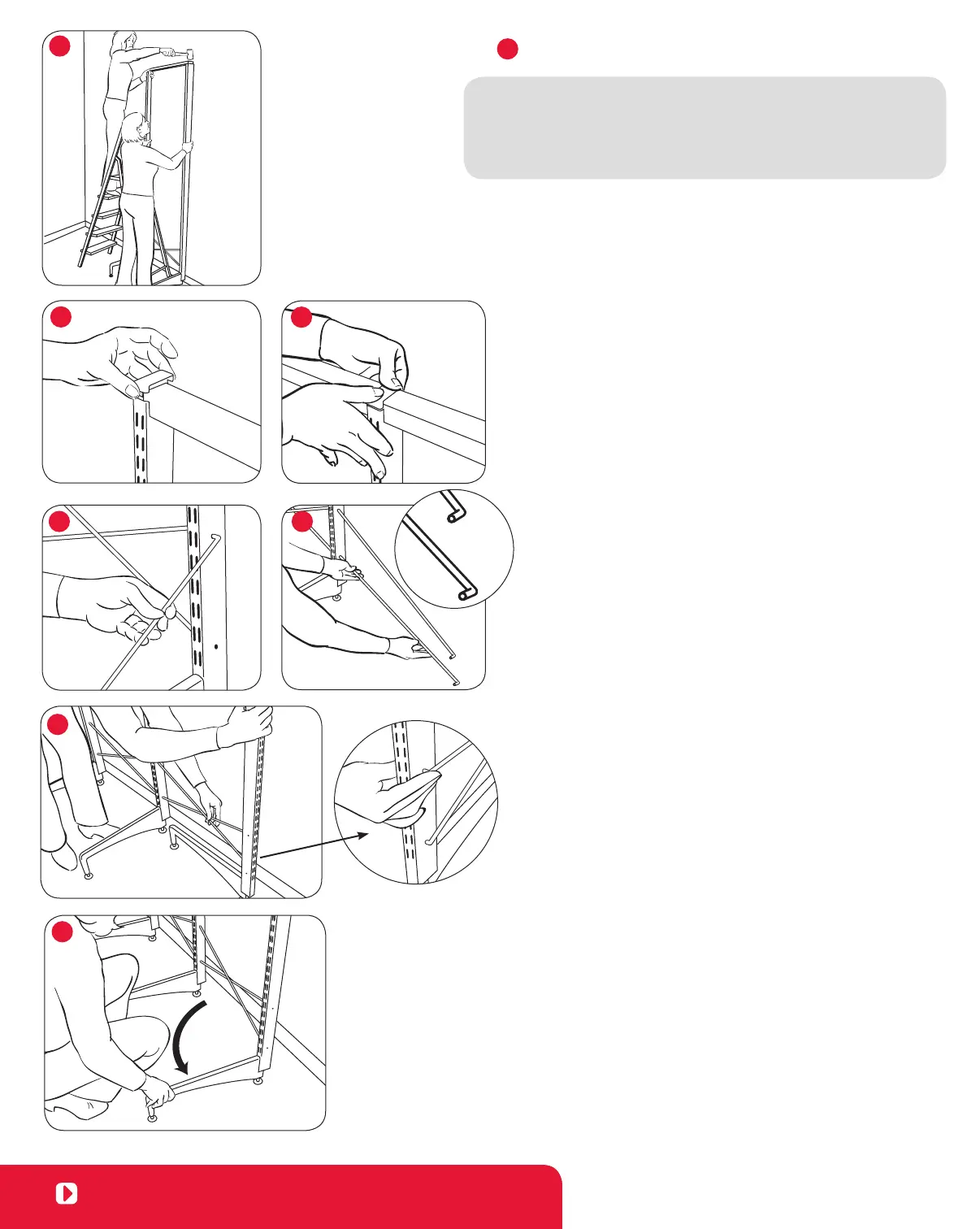
• When assembling a 62" or 83" unit, use a ladder or step stool
to reach the top of the solution. Another person should hold the
Uprights in place as you tap the Stabilization Bar into the top of
the Uprights.
– Stand the unit upright and position it at the desired location against
the wall.
– Secure the Stabilization Bar by tapping both ends into the top of the
two Uprights with the plastic mallet. (Figure A)
– Alternate tapping left and right ends until both are locked
into place.
If assembling a 4' or wider solution, proceed to the next section.
– If assembling an 18", 2' or 3' wide solution, you can now add
End Caps (included) to the top of the Uprights for a finished
appearance. (Figure B)
Add a section to a
Single - Sided Solution
– Insert Upright into Foot as directed on the previous page.
– Insert one Crossbrace into the top hole on the side of the Upright to
the completed section (Figure D); insert the other Crossbrace into the
bottom hole. The bent tips on the unattached end of each Crossbrace
should point forward. (Figure E) For an 18" section, the bent tips on
the unattached end of each crossbrace should point backward.
– Position the third Upright so that the Foot points toward the already
completed section. (Figure F) For an 18" section, position the third
Upright so the Foot points away from the completed section.
– Insert the unattached ends of the Crossbraces diagonally into the
third Upright. (Figure E) Pull the third Upright back to the forward
position (so that the Foot is facing forward.) This locks the Crossbraces
into place. (Figure G)
– Add the Stabilization Bar as shown in Step 3 above. Tap the
Stabilization Bar into the shared Upright first, then the third Upright.
– Alternate tapping the left and right ends of the Stabilization Bar until
both are locked into place.
– Repeat this process for additional sections.
– Add End Caps and Center Cap(s) (included) at the top of the Upright for
a finished appearance. (Figure B, Figure C)
Refer to your design for placement of the elfa Brackets on
the freestanding Uprights.
Once you’ve added all elfa components, adjust levelers as needed
with the wrench included with the Feet.
view from back
STEP 3
A
B
C
D
E
F
G
6
Visit containerstore.com/installation to view video instructions.


 To Next Page
 Loading...