

EasyManua.ls Logo

The G-LAB KEYZ TITANIUM - User Manual

The G-LAB KEYZ TITANIUM
3 pages
Print Icon
To Next Page IconTo Next Page
Loading...
USER'S GUIDE
MANUEL D'INSTALATION
GUIA DEL USARIO
GUIA DO USARIO
GEBRUIKERSHANDLEIDING
MANUALE DI ISTRUZIONI
BEDIENUNGSANLEITUNG
���������� ��� ������������
KEYZ titanium
Testing Club
Wireless Gaming Keyboard
JOIN THE LAB
Check out our website to become
brand ambassador and test our latest
releases
REJOIGNEZ LE LAB
Rendez-vous sur notre site pour
participer à notre programme de
testeur
UNITE AL LAB !
Visite la web para paraticipar en
nuestro programa de prueba.
www.the-g-lab.tech
plug & play
FR
Ne nécessite aucun driver, est reconnu automatiquement par votre système
It’s not necessary to install a driver. It is automatically recognized by your system
No necesita ningun driver, su sistema lo reconocera automaticamente
Nao necessita de nenhum driver e é automaticamente reconhecido pelo
Non necessita di alcun driver e viene riconoscuito automaticamente dal vostro
Diese tastatur erfordert keinerlei Treiber und wird von Ihrem System auomatissch
EN
ES
PT
NL
IT
DE
seu e é seusistema
U heeft geen driver nodig en de muis wordt auomatisch herkend door het systeem
erkannt
Playstation/Xbox/PC
Compatible :
Question and Answer IconNeed help?

Do you have a question about the The G-LAB KEYZ TITANIUM and is the answer not in the manual?

Overview

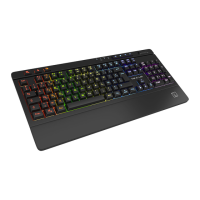
The KEYZ TITANIUM is a wireless gaming keyboard designed for a versatile gaming experience across multiple platforms. It is compatible with PlayStation, Xbox, and PC, offering a plug-and-play setup that requires no driver installation, as it is automatically recognized by the system. This simplifies the user experience, allowing for immediate use upon connection.

Function Description:

The KEYZ TITANIUM keyboard is primarily a gaming peripheral, but it also integrates multimedia control for enhanced user convenience. Its wireless nature provides freedom of movement and a clutter-free setup, which is particularly beneficial for gaming environments. The keyboard features a membrane type, which typically offers a quieter typing experience and a softer feel compared to mechanical keyboards.

Important Technical Specifications:

  • Keyboard Type: Membrane
  • Multimedia Shortcuts: 4 + volume scroll wheel
  • Anti-Ghosting Keys: 9
  • Backlight: Customizable by software
  • Connector: 2.4 GHz No latency USB Dongle
  • Battery: 3000 mAh Rechargeable
  • Cable Length: USB-C 1.5m (for charging)
  • Charging Time: 5 Hours
  • Compatibility: PlayStation, Xbox, PC
  • Dimensions: 450x220x33mm
  • Weight: 950g
  • Transmitting Power (PIRE [dBm]/EIRP[dBm]): Maxi: -36 dBm, Mini: -45 dBm
  • Frequency Band: Maxi: 3118.68 MHz, Mini: 196.57 MHz

Usage Features:

The KEYZ TITANIUM offers several features to enhance the gaming and user experience:

  • Plug & Play: No drivers are needed; the keyboard is automatically recognized by your system (Windows compatible).
  • Game Mode:
    • Windows Lock Mode: A dedicated function to lock the Windows key, preventing accidental presses during intense gaming sessions. This is activated by pressing FN + Z.
    • WASD to Arrow Switch: Allows users to swap the functionality of the WASD keys with the arrow keys, providing flexibility for different game control schemes. This is also activated by pressing FN + Z.
  • Backlight Control: The keyboard features customizable backlighting, which can be adjusted to suit user preferences or gaming ambiance.
    • Change Backlight Effects: Users can cycle through different backlight effects by pressing FN + 1 through FN + 5.
    • Increase/Decrease Backlight Brightness: The brightness of the backlighting can be adjusted using FN + ↑ (increase) and FN + ↓ (decrease).
    • Increase/Decrease Backlight Speed: The speed of dynamic backlight effects can be controlled with FN + + (increase) and FN + - (decrease).
  • Multimedia Shortcuts: A comprehensive set of multimedia shortcuts provides quick access to various functions:
    • FN + F1: Mute/Unmute
    • FN + F2: Decrease Volume
    • FN + F3: Increase Volume
    • FN + F4: Mute Microphone
    • FN + F5: Stop Playback
    • FN + F6: Previous Track
    • FN + F7: Play/Pause
    • FN + F8: Next Track
    • FN + F9: Open Email Client
    • FN + F10: Open Web Browser
    • FN + F11: Lock Computer
    • FN + F12: Open Calculator
    • REP + ↑: Increase Repeat Rate
    • AVP + ↓: Decrease Repeat Rate (This seems to be a typo in the manual, likely intended for page up/down or similar function, but given the context of repeat rate, it might refer to a specific keyboard setting.)
    • There are also dedicated keys for adjusting repeat rate and other functions, indicated by icons.

Maintenance Features:

While the manual does not explicitly detail maintenance features, the following can be inferred:

  • Rechargeable Battery: The 3000 mAh rechargeable battery means users do not need to constantly replace disposable batteries, reducing waste and offering convenience. The USB-C charging cable ensures modern and efficient charging.
  • Software Customization: The customizable backlight via software suggests that firmware updates or configuration tools might be available, allowing users to maintain and personalize their keyboard's performance and aesthetics over time.
  • Environmental Responsibility: The presence of the WEEE (Waste Electrical and Electronic Equipment) symbol indicates that the product should not be disposed of with general household waste but should be taken to a designated collection point for recycling. This highlights the manufacturer's commitment to environmental sustainability and guides users on proper end-of-life disposal.

The KEYZ TITANIUM is positioned as a user-friendly and versatile wireless gaming keyboard, offering essential gaming features, multimedia controls, and customizable backlighting, all within a plug-and-play framework. Its robust battery life and multi-platform compatibility make it a suitable choice for gamers seeking convenience and performance.
The G-LAB KEYZ TITANIUM Specifications

General IconGeneral
BrandThe G-LAB
ModelKEYZ TITANIUM
CategoryKeyboard
LanguageEnglish