Sync 2 Pro
EN
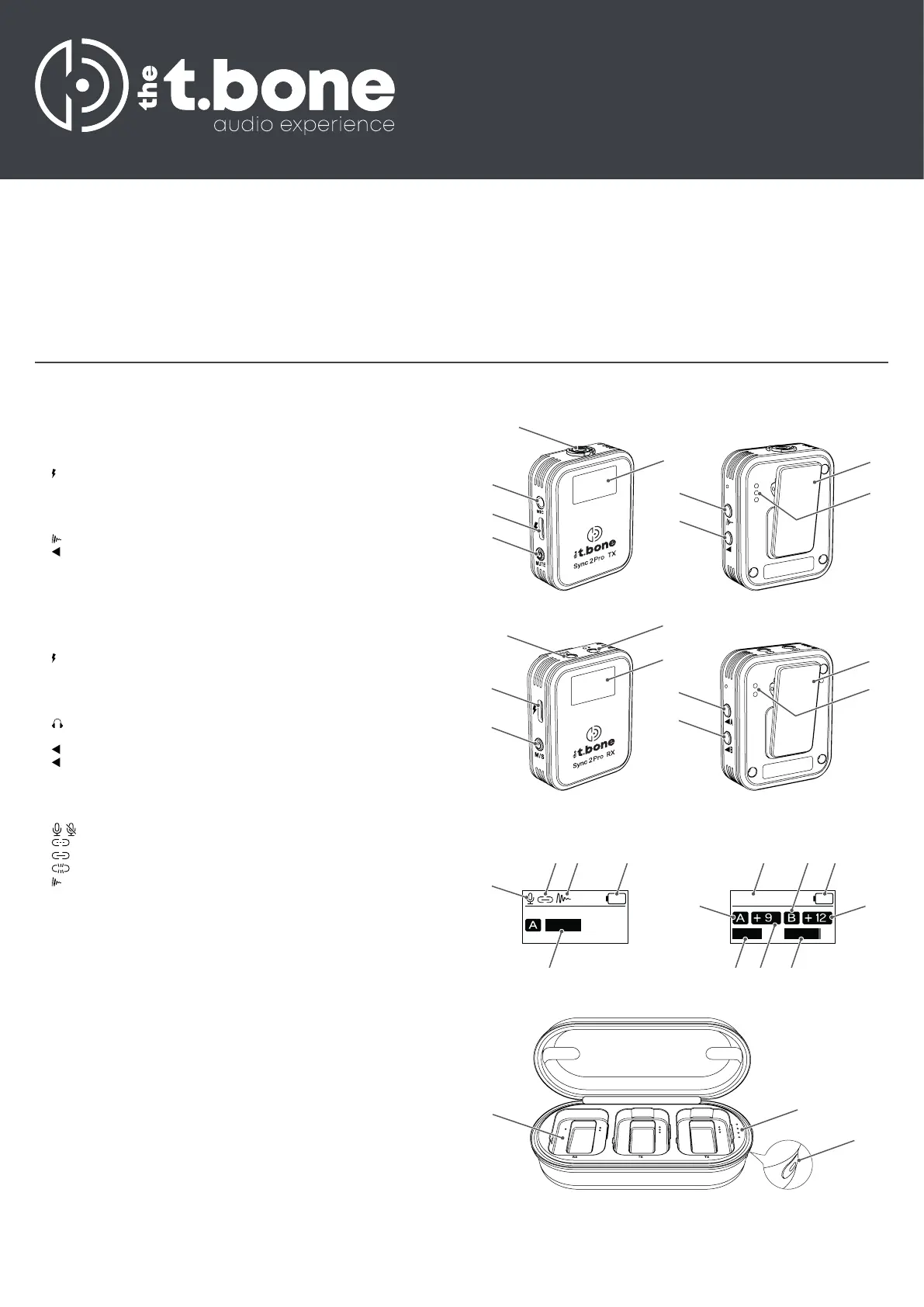
Connections and controls
Transmitter
1. [MUTE] | Main switch. Hold down the button for three seconds to turn
the device on or off.
Press the button to mute or unmute the built-in microphone.
2. | USB-C charging connection
3. [MIC] | Connection for the external lavalier microphone, designed as
3.5-mm jack socket
4. Built-in microphone
5. TFT display
6. | Button for adjusting noise reduction
7. | Volume control button
8. Clip for attaching the device to a belt or clothing
9. Charging contacts for the charging case
Receiver
1. [M/S] | Main switch. Hold down the button for three seconds to turn the
device on or off.
Press the button to switch between channel modes (mono, stereo, safety).
2. | USB-C charging connection / recording output for connecting the
USB-C cable to smartphones or computers, designed as 3.5-mm jack
socket
3. [OUT] | Recording output for connecting the smartphone cable or camera
spiral cable to smartphones or cameras, designed as 3.5-mm jack socket
4. | Headphone output, designed as 3.5-mm jack socket
5. TFT display
6. A | Button for adjusting the volume or transmitter A
7. B | Button for adjusting the volume or transmitter B
8. Clip for attaching the device to a belt or clothing
9. Charging contacts for the charging case
Display – transmitter
1. / | Muting on or off
2. | Connecting to the receiver
| Connected to the receiver
| Disconnected from receiver
3. | Noise reduction activated
4. Charge level display
5. Quality of the audio transmission
Display – receiver
1. Channel mode (mono, stereo, safety)
2. Charge level display
3. Display for transmitter A
4. Quality of the audio transmission of transmitter A
5. Volume of transmitter A
6. Display for transmitter B
7. Quality of the audio transmission of transmitter B
8. Volume of transmitter B
Charging case
1. [RX/TX] | Charging slots for the receiver and the transmitters
2. Charge level display
3. USB-C charging connection
Features
Professional digital 2.4 GHz radio system with two transmitters,
one receiver and a charging case
ideal for mobile applications such as interviews, micro video recordings
and vlogging
Transmitter can be used with built-in microphone or external lavalier
microphone
Distortion-free signal transmission
Mono or stereo mode possible
Switchable noise-cancelling lter
Auto-pairing
Built-in TFT display
TRS headphone output for real-time monitoring
TRS recording output
USB recording output
TRS microphone input
Built-in lithium-ion battery
Clip for attachment to belt or clothes, also for installation on hot shoe
Colour: black
&
'
(
%
&
%
'
(
$
#
Stereo
$
#$ % #'ö
Transmitter Receiver


 To Next Page
 Loading...