Need help?
Do you have a question about the THERAGUN Wave Roller and is the answer not in the manual?
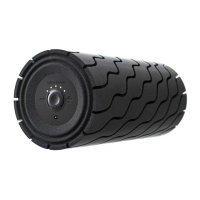
Controls for adjusting the device's speed settings.
Visual indicator for the device's battery status.
Visual indicator for the current speed setting.
Port for connecting the power adapter to charge the device.
Step-by-step instructions for turning on, adjusting speed, and turning off the device.
Details on connecting the device to the Theragun app via Bluetooth for setup and use.
Steps for charging the device using the provided power adapter.
Information on wireless charging and interpreting battery status colors.
 General
| Dimensions | 12 inches x 5.1 inches |
|---|---|
| Weight | 3 lbs |
| Battery Life | Up to 3 hours |
| Material | Hypo-allergenic EVA foam |
| Connectivity | Bluetooth |
| Color Options | Black |
| Type | Vibrating Foam Roller |
| Speed Settings | 5 |
| Vibration Levels | 5 |
| Intended Use | Muscle recovery |

 To Next Page