P1 P2
P3 P4
F F
F F
06
07
3
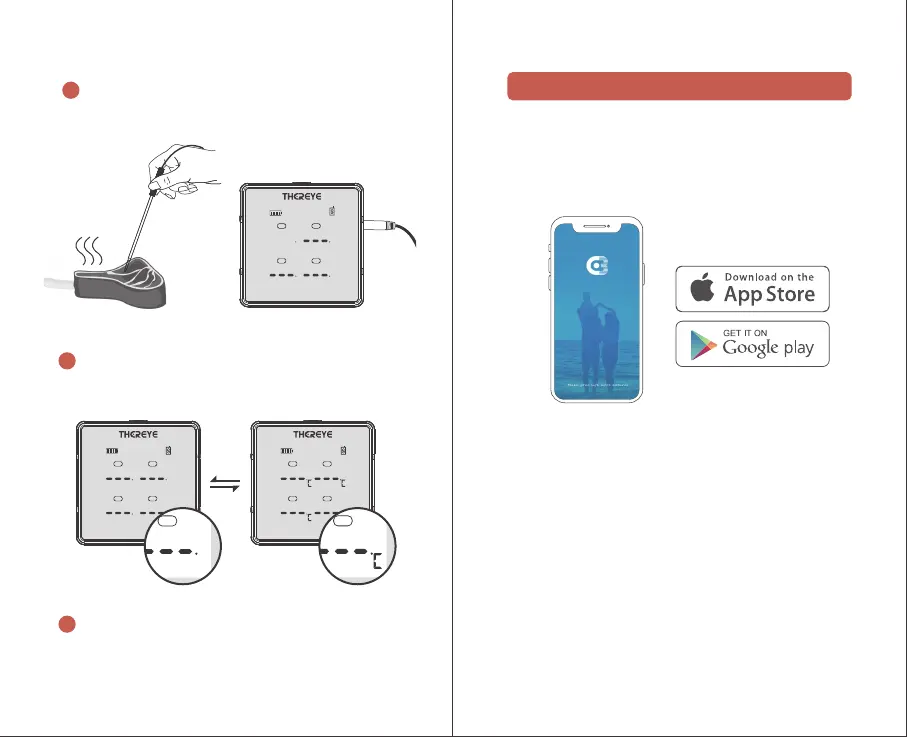
Insert the probe into the food, and the screen shows
the instant food temperature;
4
When the LCD display brightness is 100%, press the
power button to switch Celsius/Fahrenheit;
5
Use the phone APP to check the probe temperature,
set the time and temperature alarm.
Download and install the APP and Pairing
What You Need
A smart device running iOS8.0 (or above) or Android
4.3(or above)
Search the EB LinkLite app from the Apple Store for
IOS devices or on the Google Play Store for Android
devices.
Enable Bluetooth function on your smart device
Open the App, tap the “+”icon in the top right corner
or the “Add Device”icon in the middle of display or
search Food Probe ( BLE) or Meatthermometer.
Tap the device icon and follow the onscreen
instruction to complete pairing.
Done! Your Thereye Smart Bluetooth Wireless Meat
Thermometer is ready for use!
①
②
③
④
Using your transmitter
P1 P2
P3 P4
P1 P2
P3 P4
F F
F F
89


 To Next Page