36
Drain pump
Large food remnants in the rinsing water not retained by
the filters may block the waste water pump. In this case:
9 WARNING
Use caution when removing parts for cleaning as
some debris may be sharp.
1.
Disconnect the appliance from the power supply.
2.
Take out upper rack 12 and lower rack 9".
3.
Remove the filters 1b.
4.
Scoop out standing water - use a sponge if necessary.
5.
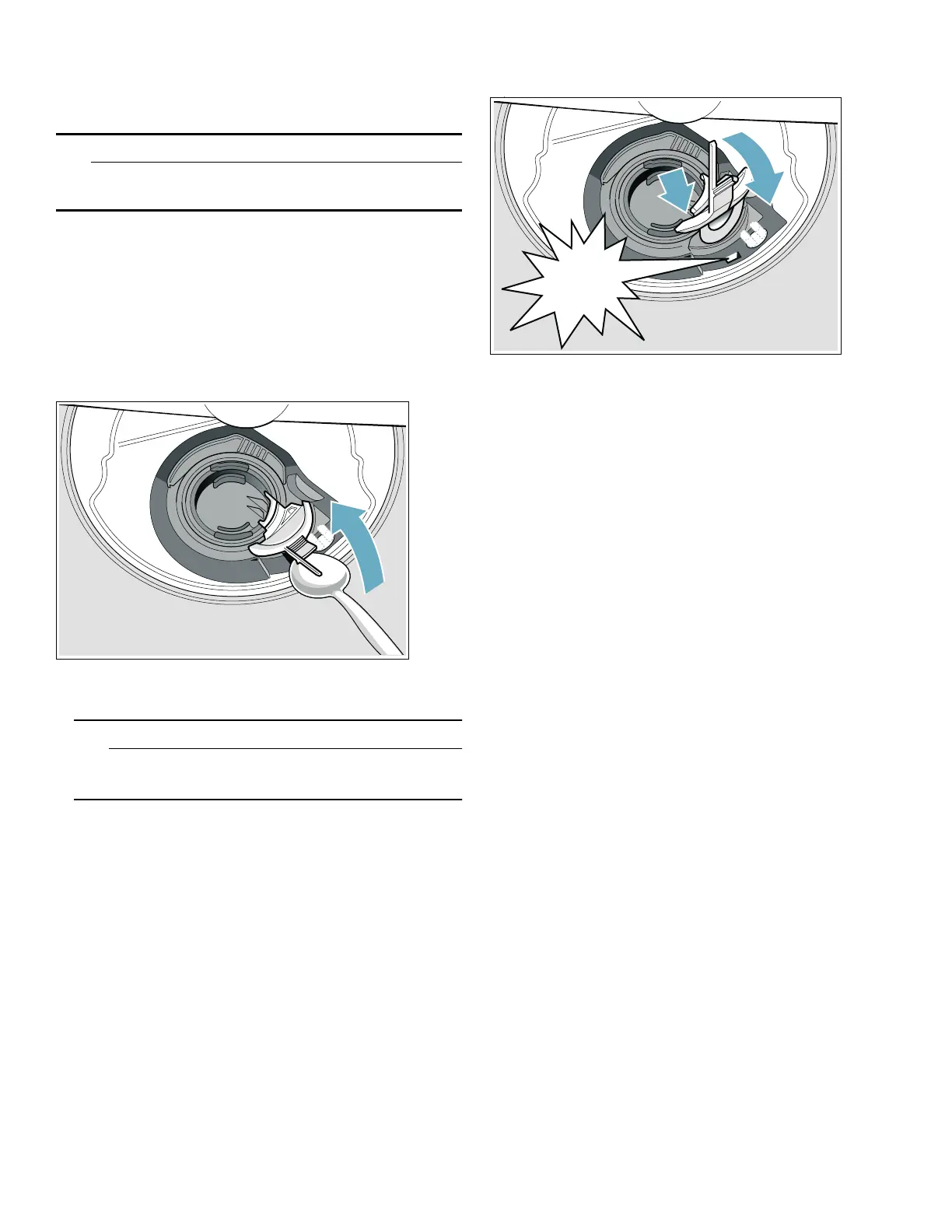
Using a spoon, pry off the pump cover (as shown) until
it clicks, then grip the cover and pull upward until it
resists and then pull forward (1). Remove cover
completely.
6.
Check inner compartment and remove any foreign
objects.
9 WARNING
Use caution when removing parts for cleaning as
some debris may be sharp.
7.
Place pump cover in the original position (2) and
press down until it engages (3).
8.
Place cover in the original position, press down and
engage.
9.
Reinstall filters.
10.
Re-insert racks.
Note: The drain pump will not work properly if the drain
pump cover is not snapped in completely until it clicks.
&OLFN




 To Next Page