
 Need help?
Do you have a question about the Thermomate IHTB302 and is the answer not in the manual?
Specific electrical safety precautions for installation and maintenance.
Warning about sharp edges and potential injuries from cuts.
General safety guidelines for installation and initial use.
Important warnings and advice regarding installation and operation.
Detailed steps and requirements for electrical connection.
Safety measures to prevent electrical hazards during operation.
Health considerations for users, especially with implants, due to electromagnetic fields.
Warnings about hot surfaces and preventing burns during use.
Specific hazards related to sharp edges and blades.
Further critical safety advice for using the appliance.
Preparation steps before physically installing the cooktop.
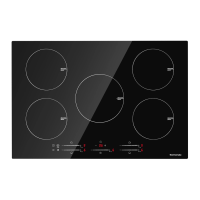
Visual identification of components on the IHTB302 model's top surface.
Explanation of controls and functions on the IHTB302 model.
Guidelines for choosing and preparing installation materials and dimensions.
Troubleshooting guide for error codes and common issues.
Key technical details, dimensions, and power ratings for the models.
Visual identification of components on the IHTB775 model's top surface.
Explanation of controls and functions on the IHTB775 model.
Introduction to induction cooking technology and its benefits.
Initial steps and checks before operating the cooktop.
How to interact with and use the cooktop's touch-sensitive controls.
Explanation of display codes indicating incorrect pan usage or placement.
Procedures for safely turning off cooking zones and the entire cooktop.
How to set a timer to automatically switch off multiple cooking zones.
How to set a timer to automatically switch off a single cooking zone.
Explanation of power distribution and boost function limitations for IHTB302.
Explanation of power distribution and boost function limitations for IHTB775.
Safety feature that automatically stops operation when excessive temperature is detected.
How the cooktop detects and responds to small, unsuitable items on the surface.
Safety feature that automatically turns off the cooktop after a set time.
Overview of the two primary ways the timer can be used.
 General
| Brand | Thermomate |
|---|---|
| Model | IHTB302 |
| Category | Cooktop |
| Language | English |

 To Next Page