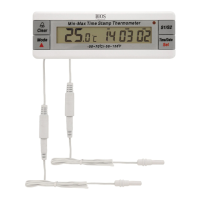
FEATURES:
• Dual channel measurement
• Low/high alarm limit setting
• Minimum and maximum reading memories with real time and date stamp
• Flashing light alarm indicator
• °C/°F switchable
• Time and date display
• Low battery indicator
• Flip-out desk stand
• Magnetic attachment
SPECIFICATION
Measuring Range
-50°C to 70°C (-58°F to 158°F)
Display Accuracy
± 1°C
Display Resolution
0.1°
Display Reading Update
10 seconds
Alarm Limit Setting Resolution
1°
Time Accuracy
± 3 seconds per day
Time Display Format
24 hours
Date Display Format
Day/month/year
Effective Calendar Period
2011-2099
Battery
1.5 volt, type AAA x 2 pieces
Probe cord length
1,000 mm
Display Size
90(W) x 16(H) mm
Product Size
135(W) x 45(H) x 23(D) mm
Accessories
1. 1.5 volt, type AAA battery x 2 pieces
2. Magnet on back of unit
3. Sensor holder with double sided tape x 2 pieces
INSTALLATION
1. Open battery cover.
2. Install batteries with correct polarity positioning.
3. Close battery cover.
4. Fully extend the probe wires.
5. a) If using glycol tubes (available separately) then place glycol tubes in a vaccine box inside fridge.
b) If not using glycol tubes, please place sensors in a secure area inside the fridge away from the wall on the fridge.
6. Peel off LCD display protective sheet.
OPERATION
Select Temperature Unit
Slide the °C/°F switch on the back to select temperature unit.
Time And Date Display
Press TIME/DATE to switch the display to show the current time or date.
In date display mode, the display will automatically switch back to time display if there is no operation for 10 seconds.
Time Setting
1. In time display mode, press and hold SET for about 3 seconds to enter time setting and the hour (HR) digits will be flashing.
2. Press to adjust the digits to the current hour.
3. Press SET once to confirm the hour setting and then the minute (MIN) digits will begin to flash.
4. Press to adjust the digits to the current minute(s).
5. Press SET once to confirm the minute setting and then the second (SEC) digits will begin to flash.
6. Press to adjust the digits to the current second.
7. Press SET again to finish time setting and return to normal display.
Date Setting
1. In date display mode, press and hold SET for about 3 seconds to enter date setting and the Year digits will be flashing.
2. Press to adjust the digits to the last two digits of the current year.
3. Press SET once to confirm the year setting and then the month digits will begin to flash.
4. Press to adjust the digits to the current month.
120SC
ADVANCED VACCINE FRIDGE THERMOMETER


 To Next Page
 Need help?
 General