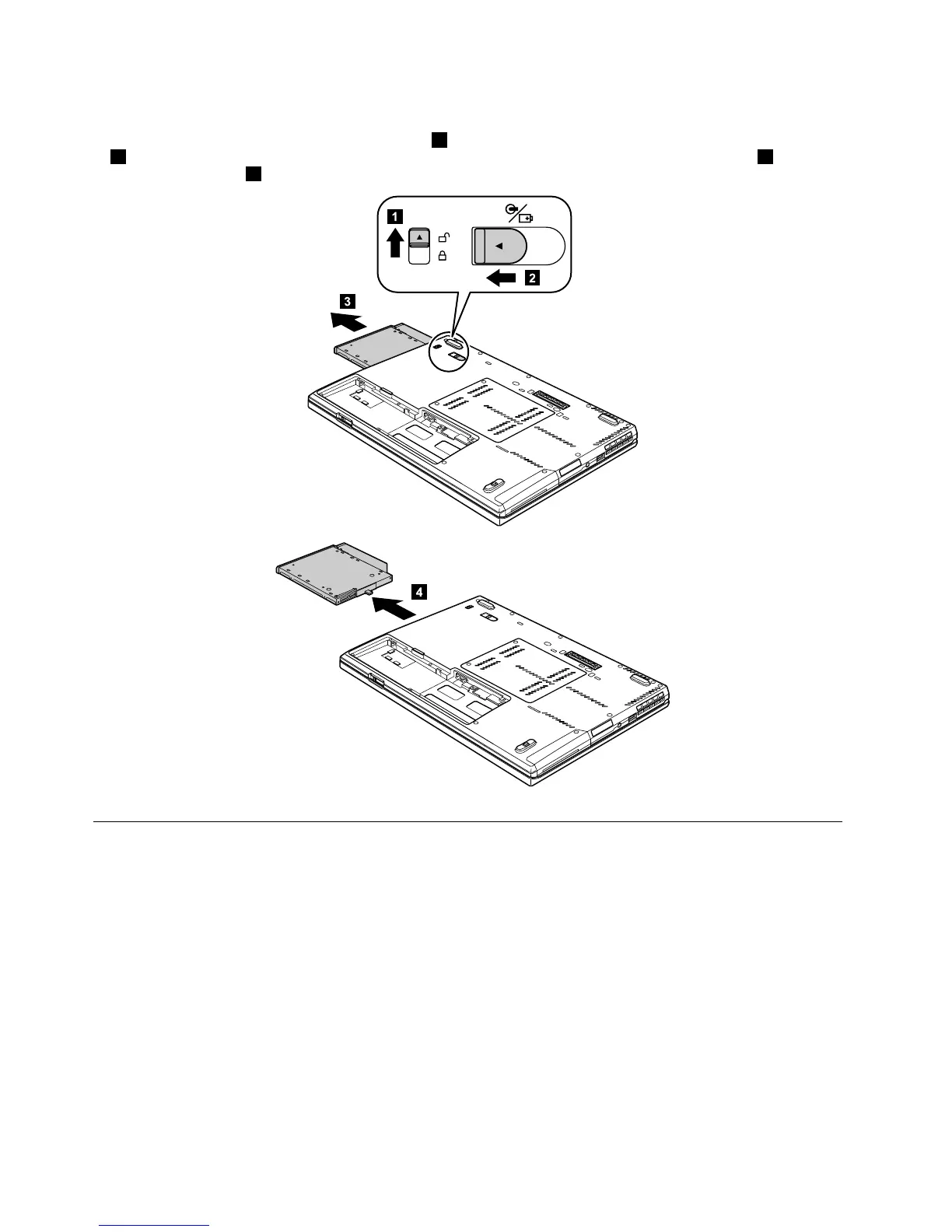
Table10.RemovalstepsofSerialUltrabaySlimdeviceortravelbezel
Holdingthebaylocklatchintheunlockedposition1,slidethebayejectlatchinthedirectionshownbyarrow
2,andthenpullouttheSerialUltrabaySlimdeviceorthetravelbezelinthedirectionshownbyarrow3to
completelyremoveit
4.
1030Solid-statedrive(SSD)orharddiskdrive(HDD)
Foraccess,removetheFRU:
•“1010Batterypack”onpage68
Attention:
•Donotdropthedriveorapplyanyphysicalshocktoit.Thedriveissensitivetophysicalshock.Improper
handlingcancausedamageandpermanentlossofdata.
•Beforeremovingthedrive,havetheusermakeabackupcopyofalltheinformationonitifpossible.
•Neverremovethedrivewhilethesystemisoperatingorisinsuspendmode.
70HardwareMaintenanceManual



 To Next Page