EasyManua.ls Logo

Thomas DryBOX - Page 31

Thomas DryBOX
40 pages
Print Icon
To Next Page IconTo Next Page
To Previous Page IconTo Previous Page
Loading...
GB
     
  ( )
 THOMAS
   
     ,
     .
    ,  
.       
    .  
  .     .
    .
    
     . 
       
(CR1632   / 3 ).  
     
.
     .
  
Maintenance
+
Knopfzelle
Changing the battery of the remote control on the handle of the
suction hose (dependent on model)
If your THOMAS
can no longer be controlled by the remote control
unit on the handle, the remote control unit battery must be
replaced.
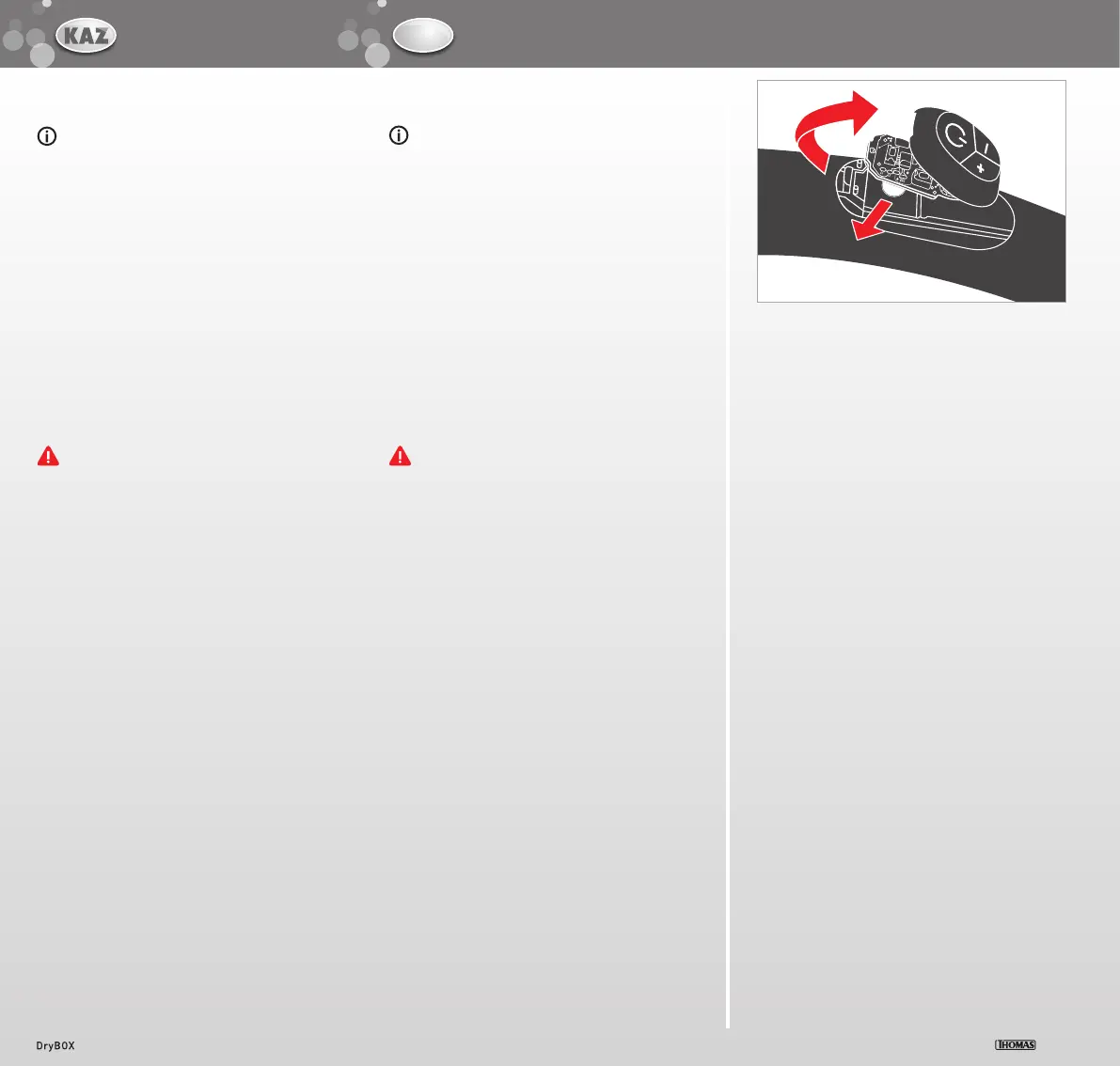
Open the housing of the remote control and take out the board.
Use a coin to press the lock of the remote control housing downward.
Lift off the housing of the remote control unit. Carefully take out
the board.
Remove the battery laterally from the battery holder. Dispose of
the used battery through your local collection system. Replace the
battery with one of the same type (round cell CR 1632 / 3 V).
Insert the new battery from the side all the way into the bat-
tery holder.
The minus pole of the battery must face up.
31

Related product manuals