3
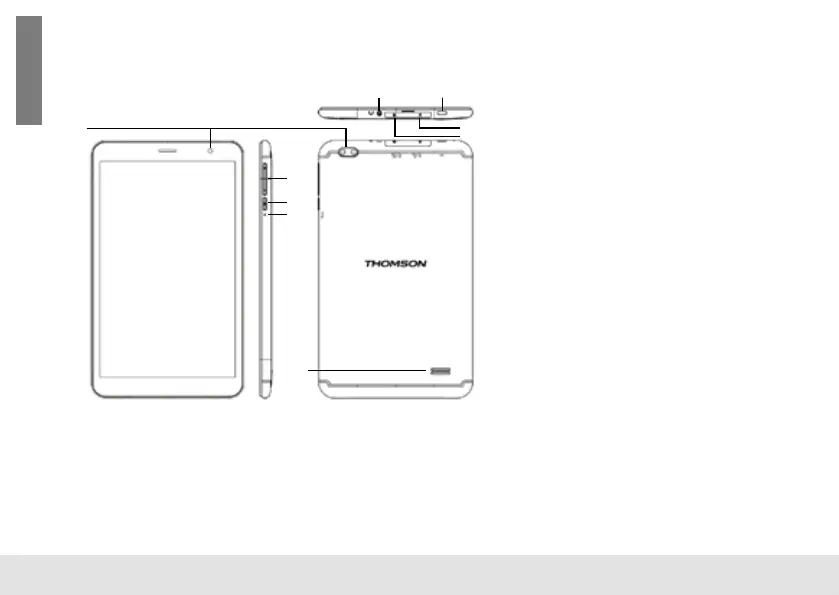
Press to turn the unit on, or to turn the screen on or off. Press
and hold to access the Power Off menu.
4. Reset
Press this button to force off the system when the device is
halted.
5. Speaker
6. Headphone
Audio output connection for headphones.
7. USB Type-C port
This new-generation USB port has the particularity of being ver-
satile, since it allows data, video and audio streams, and energy
to be transmitted. The use of an adapter (not supplied) will be
necessary to use some of the connector’s features.
8. Micro SD-CARD
Load external Micro SD-cards here.
9. Micro SIM slot
Inserting a SIM card activates the 4G LTE module of your device.
The 4G LTE module requires the subscription of a service
contract purchased separately from a supplier.
UNIT AT A GLANCE
1. Camera
Use it to take pictures or capture videos.
2. VOL+/VOL-
Press VOL+ to increase the volume level. Press VOL- to decrease the volume level.
3. Power
6 7
1
2
3
4
5
9
8
English
BOX CONTENTS
1. THOMSON tablet
2. User manual
3. Power USB charger
4. USB type C cable
SPECIFICATIONS
Processor UNISOC T310
RAM 2 GB LPDDR4
Storage
8GB / 16GB / 32GB / 64GB / 128GB / 256GB
ash built-in ( depend of model ), microSD
card slot (max.64GB supported)
Display 8'', IPS 1280x800, 10 point multi-touch
Wi-Fi Networking 802.11a/b/g/n/ac
Audio Output 3.5mm headphone
PC Interface 1 x USB type C cable
Additional Features
Built-in microphone, Front facing camera
2MP, rear 5MP, speaker 1W x 1
Operating System Android 13 Go Edition
Power USB charger
Rechargeable Li-poly battery power 3.7V /
4000mAh, adapter DC 5V 2A
English



 To Next Page