Basic Operation
22
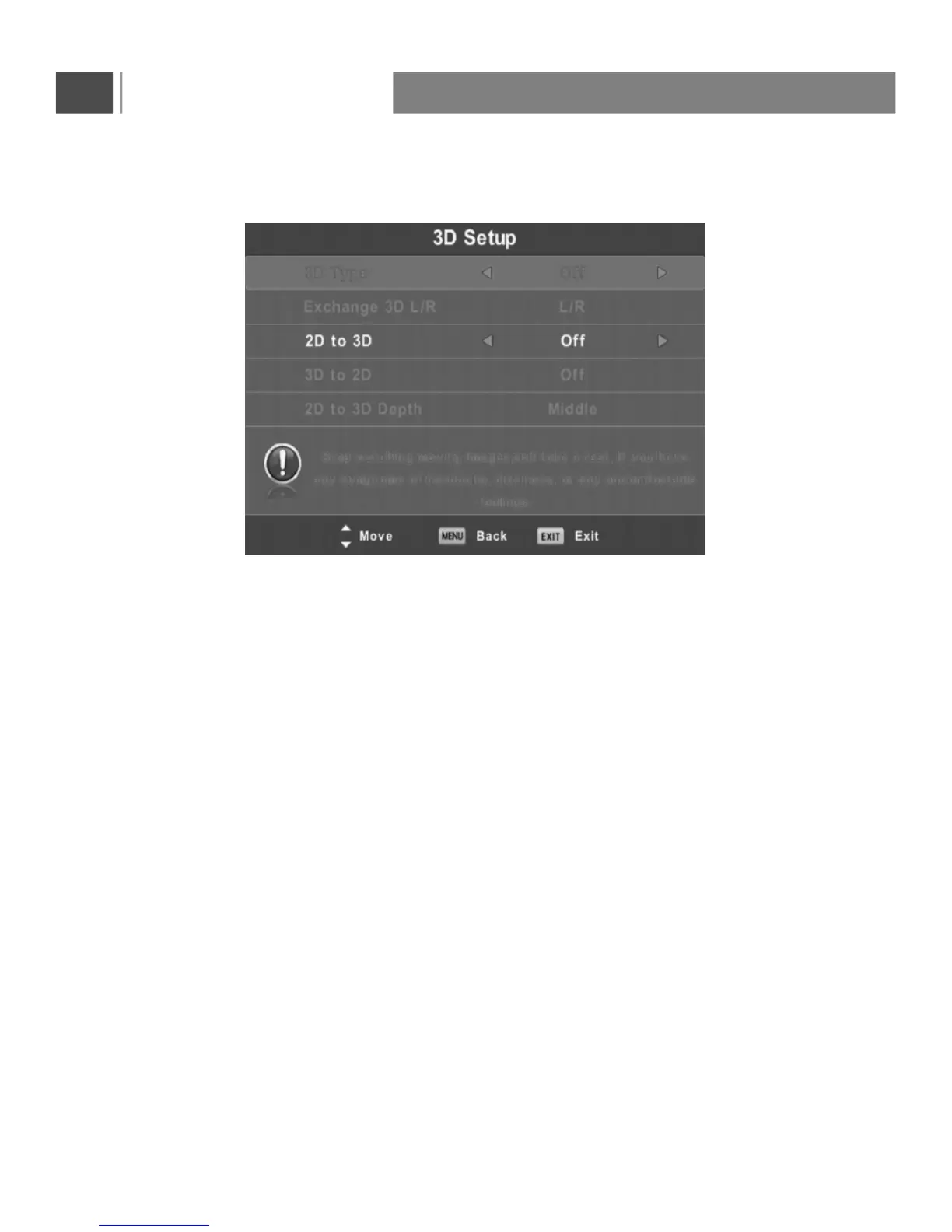
3D Type
Set 3D videos to 3D mode according to the videos' format.
Press Enter to choose from (3D Off/Side by Side/Top and Bottom /Line by Line/Frame Packing).
This item is only available in HDMI/ VGA/ USB and Frame Packing only available in HDMI.
Exchange 3D L/R
Switch left eye images and right eye images . In the situation that images from left eye
go through right glasses or right eye images go through left glasses, choose 'L/R' or 'R/L' to get a good 3D
effect. This item is only available when '3D mode' is not 'Off' or '2D TO 3D' is 'On'.
L/R: The first image is left eye image;
R/L: The first image is right eye image.
2D TO 3D
Convert 2D videos to 3D videos in all sources.
This item is unavailable when '3D mode' is not 'Off' or 3D TO 2D is not 'Off'
3D TO 2D
Convert 3D videos to 2D according to the 3D videos' format.
Side by Side: Convert side by side 3D videos to 2D
Top and Bottom: Convert top and bottom 3D videos to 2D
Frame Packing: Convert frame packing 3D videos to 2D
3D Setup



 To Next Page