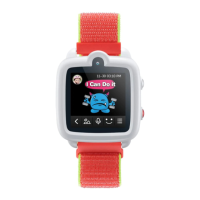
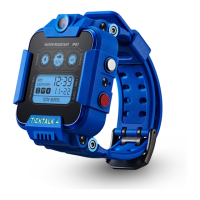
The TickTalk 5 is a smartwatch designed for children aged 5 and up, offering a range of communication, safety, and entertainment features. It serves as a personal smartphone for kids, allowing them to stay connected with family while providing parents with peace of mind through various control and tracking functionalities.
Function Description:
The TickTalk 5 is primarily a communication device, enabling two-way calling, video calling, and messaging. It functions as a standalone cellular device when a SIM card is activated, allowing children to make and receive calls from parent-approved contacts. The watch also includes safety features such as an SOS button for emergencies and location tracking. Parents manage the watch's settings and contacts through a dedicated parental app. Beyond communication and safety, the watch offers entertainment options, including a camera for photos and videos.
Important Technical Specifications:
- Water Resistance: IP67, protecting against minor splashes and spills. This means it can withstand immersion in water up to 1 meter for 30 minutes, but it is not suitable for swimming or showering.
- Charging: Requires a 5V USB charging cord. The manual specifically states that the cord for TickTalk4 is not compatible, emphasizing the need to use the provided TickTalk 5 charging cable. Charging should be done under adult supervision.
- Cellular Connectivity: Supports 4G frequency bands B1, B2, B3, B4, B5, B7, B12, B17, B66 for worldwide users. It operates on a regular cell phone plan.
- SIM Card: Requires a SIM card for cellular service. For pre-loaded SIMs, activation is done via a QR code or website. For international users, a SIM card from a local GSM carrier is needed. The ICCID (Integrated Circuit Card Identifier) for SIM activation can be found in the watch settings under "About Me" or on the back of the SIM card.
- Battery: The manual warns against attempting to replace the battery yourself, as this can cause damage, overheating, or injury.
Usage Features:
- Power On/Off: Hold down the Power Button for 5 seconds.
- SOS Function: Hold down the SOS Button for 5 seconds to automatically call the designated Emergency SOS contact.
- Call 911 (Emergency Call): Quick tap the Power Button once, then the SOS Button twice to instantly call 911. This feature can be enabled or disabled in the parental app.
- Network Connection Check: Swipe up on the screen to check the connection status. A white "CONNECTED" icon indicates a successful network connection. The watch requires a connection to function.
- Parental App: A dedicated app (available for iPhone and Android) is used by parents to manage the watch.
- Admin User: The first person to pair with the watch becomes the Admin User, who can manage and approve Secondary Users.
- Pairing: The watch is paired with the parental app by selecting "PAIR ME" in the watch settings to display a QR code, which is then scanned by the app. Alternatively, the TTID Number can be manually input. The watch must be ON and CONNECTED to a mobile network for pairing.
- Child's Info: Parents can edit the child's profile information through the "PROFILE ICON" in the app. Remote answering features may require the watch's phone number to be set up in the app.
- Preset Contacts: Up to 53 parent-approved contacts can be added through the "CONTACTS ICON" in the Parent Portal. These contacts can call the child, and the child can call them.
- Block Unknown Numbers: The parental app allows enabling "BLOCK UNKNOWN NUMBERS" to prevent strangers from calling the child.
- Other App Users (Secondary Users): The Admin User can set individual access levels for other app users. "LIMITED ACCESS" allows users to only use voice calling, video calling, greeting cards, and in-app messaging with the child. "Full Access Users" have broader control.
- Setup Videos: Instructional videos are available online at www.myticktalk.com/pages/setup-videos, accessible via a QR code in the manual.
Maintenance Features:
- Charging: Use the provided 5V USB charging cord. Ensure the 4 pins of the charging wire are completely touching the base of the charging pins on the watch. Charging should be supervised by an adult.
- Troubleshooting:
- Unable to charge: Check pin contact.
- Watch always offline: Check cellular reception in the area. Connect to Wi-Fi to verify watch functionality. If issues persist, try a different carrier's service.
- Inaccurate location: Location tracking primarily relies on Wi-Fi. Inaccuracies may stem from incorrect location data collected by map companies from Wi-Fi devices. TickTalk provides data from these sources.
- Support: For further information and support, visit www.myticktalk.com/support.
- Cleaning: Keeping the TickTalk band clean and dry is recommended to reduce the possibility of skin irritation.
- Warnings:
- Overheating: The watch may increase in temperature with extended use. Remove the watch if it becomes too warm or uncomfortable.
- Skin Sensitivities: If the child has sensitive skin, ensure the watch is not worn too tightly to prevent irritation. Remove the watch and consult a physician if redness, swelling, itchiness, or discomfort occurs.
- Damage: The watch contains sensitive electronic components. Avoid dropping, burning, puncturing, or crushing it. Do not use a damaged TickTalk (e.g., with a cracked screen, visible water intrusion). Avoid heavy exposure to dust or sand.
- Repair/Disassembly: Do not open, attempt to repair, or disassemble the TickTalk, as this can cause damage, loss of water resistance, injury, and will void the warranty.
- Choking Hazard: Small parts are not suitable for children under 3 years or individuals who tend to place inedible objects in their mouths.
Warranty and Returns:
- 1-Year Limited Warranty: Covers quality issues for one year. Contact support for repair or exchange. Pre-authorization is required for warranty service. Products must be returned in original packaging or packaging with equal protection. Visit www.myticktalk.com/pages/warranty for details.
- Return for Replacement: Defective products are sent to TickTalk for repair or exchange. TickTalk is not responsible for shipping costs for replacement.
- Return for Refund: Unsatisfied customers can return the product within 30 days for a full refund. TickTalk does not cover return shipping costs. Pre-authorization is required. Products must be in brand-new condition with original packaging, manuals, cables, and accessories. The free SIM card should only be returned if not activated. This policy does not apply to damaged or used products. Visit www.myticktalk.com for the return policy and form. Refunds are issued within 2 business days of receiving the return.

 Need help?

 To Next Page
 General