EasyManua.ls Logo

Tiger Electronics Chibibotto - User Manual

Tiger Electronics Chibibotto
2 pages
Print Icon
To Next Page IconTo Next Page
Loading...
Before you play:
Pull out the battery insulation tab;
Insert AAA battery (please see below,
"Inserting the Batteries");
Push re-set button at back of the toy
(Beep sound);
Chibibotto will now wake up and do a little show
for you!
Slot Machine
Tap Chibibotto 3 times to bring up the Slot Machine. Tap
him once to choose one eye and again to choose the other
eye. Try to match up both eyes or you will get a funny
looking face!
Expression for certain times
Chibibotto has special eye expressions that appear at
certain secret times. Watch Chibibotto carefully and check
his face whenever you have time-you may catch him making
some secret expressions!
Sleeping
If you do not play with Chibibotto for a while, he will
eventually close the curtains and go to sleep. Tap Chibibotto
once to raise the curtain and wake him up.
Selecting New Characters
You can change characters types everyday. Chibibotto will
give you two choices every morning. Select one by tapping
him.
Please set the clock before play.
Change to Clock mode by pressing A or B until you see
the clock.
Push and hold the B button until LCD shows clock
and alarm icons.

Push B button to choose clock icon and push A button
to set.
Push B button to choose 'hour' and push A button
to set.
Push B button to choose 'minutes' and push A button
to set.
Push B button to choose alarm icon and push A
button to set.
Push B button to choose ON/OFF and push A
button to set. (The alarm must be ON or it will not
be set.)
Push B button to choose 'hour' and push A button
to set.
Push B button to choose 'minute' and choose B button
to set.
When the alarm goes off, you can make it stop by
tapping Chibibotto or pressing the A or B button.
Alarm sound will automatically shut off after 30 seconds.
Please tap Chibibotto lightly with a pen.
When Chibibotto is tapped, his eye
expression will show .
Do not tap Chibibotto too roughly,
or you may damage the product.
Tapping!
Tapping Chibibotto can suddenly change his mood or make
him get angry. If you tap him too much, he may become
unconscious! Gently tap him once, then wait a bit. He will
soon recover and go back to normal.
INSTRUCTION
ITEM NO. 59670
200101050IWTI-03
AGES 5 & UP
TM
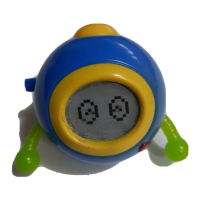
Chibibotto is a chubby, funny little robot who likes to play
with you. He cannot speak, but can express himself by
eye expressions, wiggling his arms, and making sounds.
He plays robotic tunes by himself, and sometimes sings
according to his mood. And he likes to be tapped!
Chibibotto changes into 20 characters. Besides those 20
characters, Chibibotto also has dozens more expressions
that temporarily appear on the screen.
He has happy, angry, and funny expressions. Sometimes
he sings, sometimes he is angry, and if you leave him for
a long time, he closes the shutter and falls asleep.
How do you play with Chibibotto?
What is Chibibotto?
1
A Look at Chibibotto
2
LCD
ENERGY TANK
FOR ELECTRICAL
BRAIN (Button-cell
Lithium battery
CR2032),
SPEAKER
ENERGY TANK
FOR ROBOT ARM
(AAA battery)
SENSOR
(The sensor reacts
when it receives
any vibration/
bouncing action.)
B BUTTON
(choose, clock set)
LED
(heart-shaped light)
ROBOT ARMS
A BUTTON
(select, sound-off
button)
RESET BUTTON
How to Play
3
How to Set the Clock
4
How to Set the Alarm
5
INSTRUCTION
Things to Do with Chibibotto
6
OXX
OXO
XXO
XOO
XXX
XOX
TAPSHAPE TAPSHAPE
Secret Codes
7
Chibibotto can also be played by using secret codes. All
characters and events that appear in Chibibotto can be
called by those secret codes-if you know them!
The secret codes are shown by different shapes. Each
shape corresponds to a different way of tapping Chibibotto.
Change to Clock mode by pressing A or B until
you see the clock.
Push and hold B button until LCD shows clock and
alarm icons.

Question and Answer IconNeed help?

Do you have a question about the Tiger Electronics Chibibotto and is the answer not in the manual?

Overview

The Chibibotto is a chubby, funny little robot designed for interactive play, primarily through eye expressions, arm wiggling, and sounds. It cannot speak but communicates its mood and reactions through these non-verbal cues. The device also plays robotic tunes and sometimes sings. A key interactive feature is its responsiveness to tapping.

Function Description:

  • Interactive Play: The Chibibotto responds to tapping, which can change its eye expression, mood, or even make it angry. Excessive tapping can lead to it becoming "unconscious," requiring gentle tapping and a brief wait for recovery.
  • Character and Expression Variety: The device can transform into 20 different characters and displays dozens of temporary expressions on its screen. These expressions include happy, angry, and funny moods.
  • Sleep Mode: If left unattended for an extended period, Chibibotto will close its "curtains" and go to sleep. A single tap will wake it up.
  • Daily Character Selection: Every morning, Chibibotto offers two new character choices, which the user can select by tapping.
  • Slot Machine Game: Tapping Chibibotto three times activates a "Slot Machine" game. Users tap once to choose one eye and again for the other, aiming to match both eyes for a funny face.
  • Secret Expressions: Chibibotto displays special eye expressions at certain secret times, encouraging users to observe it frequently.
  • Secret Codes: The device supports secret codes, which allow users to call up specific characters and events. These codes are entered by tapping Chibibotto in different patterns, represented by various shapes (e.g., XOO, XXX, XOX, XXO, OXX).
  • Sound and Sensor Control: The device allows users to turn off the speaker and the tapping sensor. This is done by switching to Robot Mode (displaying Chibibotto's eyes) and then pushing and holding the A button until it beeps to toggle sound, and repeating the process to toggle the sensor.

Technical Specifications:

  • Item Number: 59670
  • Model Number: 200101050IWTI-03
  • Power Source:
    • Robot Arm Energy Tank: Requires 1xAAA battery (not included).
    • Electrical Brain Energy Tank: Requires 1xCR2032 button-cell Lithium battery (included).
  • Components:
    • Speaker: For sound output.
    • LCD: Liquid Crystal Display for eye expressions and other visual cues.
    • LED: Heart-shaped light.
    • Robot Arms: Wiggle for expression.
    • Sensor: Reacts to vibration/bouncing action.
  • Buttons:
    • A Button: Functions as a select and sound-off button.
    • B Button: Functions as a choose and clock set button.
    • Reset Button: Located at the back of the toy, used for resetting the device.

Usage Features:

  • Initial Setup:
    • Pull the battery insulation tab.
    • Insert the AAA battery (if not already installed).
    • Push the reset button at the back of the toy (using a ball-point pen) to initiate a wake-up show.
  • Clock Setting:
    • Navigate to Clock mode using A or B buttons.
    • Push and hold B until clock and alarm icons appear.
    • Use B to choose clock icon, then A to set.
    • Use B to choose 'hour', then A to set.
    • Use B to choose 'minutes', then A to set.
  • Alarm Setting:
    • Navigate to Clock mode using A or B buttons.
    • Push and hold B until clock and alarm icons appear.
    • Use B to choose alarm icon, then A to set.
    • Use B to choose ON/OFF, then A to set (alarm must be ON to be set).
    • Use B to choose 'hour', then A to set.
    • Use B to choose 'minute', then B to set.
    • Alarm can be stopped by tapping Chibibotto or pressing A or B. It automatically shuts off after 30 seconds.
  • Tapping Interaction: Gentle tapping with a pen is recommended. Avoid rough tapping to prevent damage.
  • Battery Installation: Requires an adult to open the battery compartment. Do not mix old and new batteries, or alkaline, standard, and rechargeable batteries. Batteries must be inserted with correct polarity. Exhausted batteries should be removed. Rechargeable batteries must be removed for charging under adult supervision.

Maintenance Features:

  • Cleaning: Clean only with a piece of soft, dry cloth.
  • Battery Replacement: Replace batteries at the first sign of erratic operation.
  • Damage/Defect Policy: If the product is damaged or has missing parts, do not return it to the store. Contact Tiger Electronics, Ltd. Repair Center with a note explaining the problem, sales slip, date, place of purchase, and price paid.
  • Warranty: 90-day limited warranty covering defects in materials or workmanship. Product returned within this period will be repaired or replaced free of charge. After 90 days but within one year, a service fee applies.
  • Storage: Avoid high temperatures and direct sunlight to prevent damage.
  • Handling: Do not press the liquid crystal display or subject it to heavy shock. Use a ball-point pen for the reset switch.

Safety Warning:

CHOKING HAZARD - SMALL PARTS. NOT FOR CHILDREN UNDER 3 YEARS.

Tiger Electronics Chibibotto Specifications

General IconGeneral
BrandTiger Electronics
ModelChibibotto
CategoryToys
LanguageEnglish