The Timeguard Wi-Fi Smart Camera (Model: WFIC) is an indoor-use smart camera designed for home surveillance and monitoring, offering remote access and control through the Tuya Smart App. It provides high-definition video streaming, two-way audio communication, and local storage capabilities, making it a comprehensive solution for keeping an eye on your property.
Function Description:
The Wi-Fi Smart Camera allows users to monitor their premises remotely via a smartphone or tablet. It captures video at 1080P (1920x1080) resolution at 20 frames per second (FPS) or VGA 640x480 at 20FPS, providing clear visual feeds. The camera features a 140-degree diagonal field of view, ensuring a wide coverage area. Equipped with an internal speaker and microphone, it supports two-way audio, enabling users to listen in on their environment and communicate with individuals near the camera. For video storage, the camera supports up to a 128GB Micro SD Card (not included), allowing for local recording of footage. The device is designed for indoor use only and connects to a 2.4GHz Wi-Fi network. It integrates with the Tuya Smart App, which facilitates setup, pairing, and management of the camera, as well as integration with other smart home assistant services like Google Home and Amazon Alexa.
Important Technical Specifications:
- Operating Voltage: 5V, 1A
- Display Resolution: 1080P (1920x1080) at 20 FPS / VGA 640x480 at 20FPS
- Field of View: 140 Degrees Diagonal
- Audio: Internal Speaker and Microphone
- Storage: Supports up to 128GB Micro SD Card (not included)
- Image Sensor: 1/2.9" 2 Megapixel CMOS
- Operating Temperature: -10°C to +45°C
- Audio/Image Compression: H.264
- Works with VPN: No (live feed disabled if active)
- WLAN-Standard: 802.11 b/g/n
- Encryption: WEP/WPA/WPA2
- Dimensions (H x W x D): 117mm x 61mm x 61mm
- System Requirements: Smartphone/Tablet with at least iOS 8.0 or Android 5.0, WLAN-enabled router: 2.4GHz (Separate Band), Tuya Smart App.
Usage Features:
The camera's setup and operation are primarily managed through the Tuya Smart App.
- App Download and Registration: Users must download the "Tuya Smart" App from Google Play Store or the App Store. Registration involves providing an email or mobile number, receiving a verification code, and setting a password.
- Home Management: Before adding devices, users can structure their household within the app by setting up a nickname for their profile and defining rooms (e.g., Living Room, Master Bedroom, Study Room) to allocate devices.
- Device Pairing: To pair the camera, users connect it to a power source using the supplied USB cable. After booting up (indicated by a solid green light), they select "Add Device" in the Tuya Smart App, choose "Security and Sensor" category, and then "Smart Camera." The app will guide them to connect to the 2.4GHz Wi-Fi network (5GHz networks are not supported). Users then scan a QR code displayed on their phone/tablet with the camera lens to initiate pairing. A sound prompt from the camera confirms successful scanning.
- Live Feed and Controls: Once paired, the camera's live feed is accessible through the app. Users can rename the device and access various settings.
- Device Removal: To remove a device from the account, users navigate to the device controls menu in the app, select the settings option, and then choose "Remove Device."
- Smart Home Assistant Integration: The camera can be integrated with Smart Home Assistant services like Google Home and Amazon Alexa. This is done through the "More Services" option in the "Me" section of the Tuya Smart App, which provides on-board instructions for connecting to third-party platforms. Note that support for these services is provided by TuyaSmart, not Timeguard.
Maintenance Features:
- Cleaning: If cleaning is required, the Smart Camera should be unplugged and wiped with a dry cloth.
- Environmental Considerations: The device is for indoor use only and should not be immersed in water or any other liquid.
- Firmware Updates: The app's settings menu includes a "Firmware Information" section, which likely allows for checking and updating the camera's firmware to ensure optimal performance and security.
- Troubleshooting: In case of problems, users are advised to contact the Timeguard Customer Helpline at 020 8450 0515 or email helpline@timeguard.com, rather than returning the unit to the store.
- Warranty: The product comes with a 3-year guarantee, covering manufacturing defects. For warranty claims, proof of purchase is required. Shipping costs for replacements are borne by the customer.

 Need help?
 General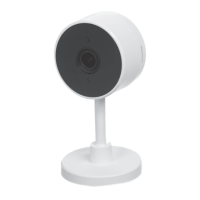

 To Next Page