Additional Product Information, Troubleshooting, and
Specifications Can Be Found at:
TireMinder.com/trailer
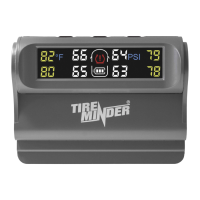
TireMinder@ Trailer TPMS
Thank you for purchasingthe new TireMinder@Trailer TPMS.Pleaseuse the following guide
below to setup your new system. If you have any questions or need assistance,call our customer
support line at (772)463-6522.We are available Monday through Friday,9AM to 5PM Eastern.
Initial Setup
I. Install the hard-wired signal booster using the instructions located inside the booster pouch.
2. Insert the CR1632batteries, flat-side up, into each transmitter. Do this one at atime. As the
capsare numbered, return the same cap to the transmitter it came from.
3. Removethe monitor's screen protector. If you don't, the numbers will never change!
NOTE: THIS SYSTEM IS DESIGNED FOR
TRAILERS 25FT OR LESS WITH 70 PSI OR LESS.
For Larger Rigsor High Pressures,go to:
TireMinder.com
Additional Product Information, Troubleshooting, and
Specifications Can Be Found at:
TireMinder.com/traiIer
4. Power ON the Monitor
Turn on the monitor by pressing the
center button at the top. If the
monitor does not turn on
automatically, usethe provided USB
cable to charge the monitor for at
least 30 minutes before continuing the
setup.
Once the monitor hasturned on, it
will automatically be in Monitoring
Mode. Monitoring Mode isthe mode
you need to be in to receive alerts. In
this mode, you may usethe left or
right buttons to change units of
temperature and units of pressure,
respectively.
5. Adjust the Baseline Pressure
I. From Monitoring Mode, press and
hold the center button for 5
seconds until you hear a beep and
see the first learned tire position
blinking. This is PressureSetting
Mode. Here, you will let the
monitor know how much pressure
you run in your tires. For example,
if your trailer tires run at 60 PSI
cold, enter 60 PSIat each tire
position.
2. Use the left and right buttons to
lower and raise the tire pressure,
respectively. Use the center
button to move from tire to tire.
Once all baselines pressuresare
set, press and hold the center
button for 5 seconds until you
hear a beep. This will return you to
Monitoring Mode.
3. Once you are back in Monitoring
Mode, you should not see the
screen flashing or seethe red
TPMS icon.
87.F
Pressu re
Down
SS(O SS 83
SH 81 SS
86
SS SS 83
SH @ SS
Change
Tire
86
Pressure
SS SS 89
SH @ SS 86
SS SS 89
86
6. Adding Transmitters to the Monitor
The TireMinder transmitters are
numbered according to tire position.
Attach the appropriate transmitter to
the corresponding tire position. Example.
Transmitter labeled 3, screw onto
passenger rear tire positon. Transmitter
labeled I, screw on to driver front tire
position. If you only have 2transmitters,
place the transmitter labeled 1on the
driver's side and the transmitter labeled 2
on the passengerside.Once the
transmitters have been screwed onto
their corresponding tire position, you will
seethe current pressure and
temperature reading for that tire
position.
7. How the Alerts Work
This system is designedto check for tire issuesevery 6 seconds. If a tire
issueoccurs, it's very important not to panic. After receiving an alert, find a
safe place to pull over to assessthe issue.Pleasenote, asthis system
monitors for rapid drops in pressure,keep in mind that environmental
factors such as potholes, braking, elevation, and weather can causerapid
shifts of pressure and temperature. Theseshifts will subside within 10
minutes or less.
Turning Off the Monitor
To turn the monitor off, pressand hold the center button for a full 10
seconds.After 10seconds,the screen will go blank. You may turn off the
monitor from within any mode.
Warranty
This warranty is limited to the replacement of the product only and does
not extend to any incremental cost incurred. In no caseshall Minder's
liability exceed the purchase price. This warranty gives you specific legal
rights which may vary from state to state or province to province.
Warranty void if used on tires 71PSIor higher.
TireMinder@
3000 SE Waaler Street
Stuart FL 34997
(772)463-6522
www.MinderReserarch.com
info@Minderresearch.com


 Need help?
 General