tojock@126.com
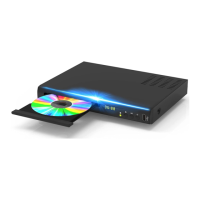
1. How to open the discs door?
Dear Customer,
I am sorry to hear you can't open the disc door successfully, please try below
steps first:
A. Plug the power adapter of the blu ray DVD, and press the on/off button in the
front of the DVD player or the power button on the remote control. The display
light color will be changed from red to green
B. Then LED display shows "H", please wait for 3-5 seconds until it shows "NO
DS" logo on the display panel
C. Then press the open/close the disc compartment, waiting for 2 seconds then
the disc door will open. When the disc door opened, the display will show
"OPEN"
Please don't try to open the discs door when the display shows "H" only, this is
not the correct operation steps.
If it turns out to be the product quality issue, please feel free to message us,
replacement or refund will offer for you timely.
Best Regards
Tojock Support
2. Why it didn't play my discs?
Before I solve your issues for you, please read below information first, this is very
helpful for playing blu ray discs.
About DVD Region Specifications


 To Next Page
 Loading...