Check the water level and
regularly top up when necessary
with cold water. When filling the
tank with water, ensure the hopper
is in place.
Turn the dial to select the feed size
you require (120–330 ml / 4–11 fl
oz).
Position your sterilised bottle under
the spout. Adjust bottle stand if
necessary (bottle neck should sit
close to the spout).
Press the start/stop button.
A red light will flash and a volume
of hot water is dispensed into your
bottle.
1 2 3
Before each use you must ensure that your water tank is above the minimum fill mark.
Always use cold water when filling the water tank, other than when cleaning.
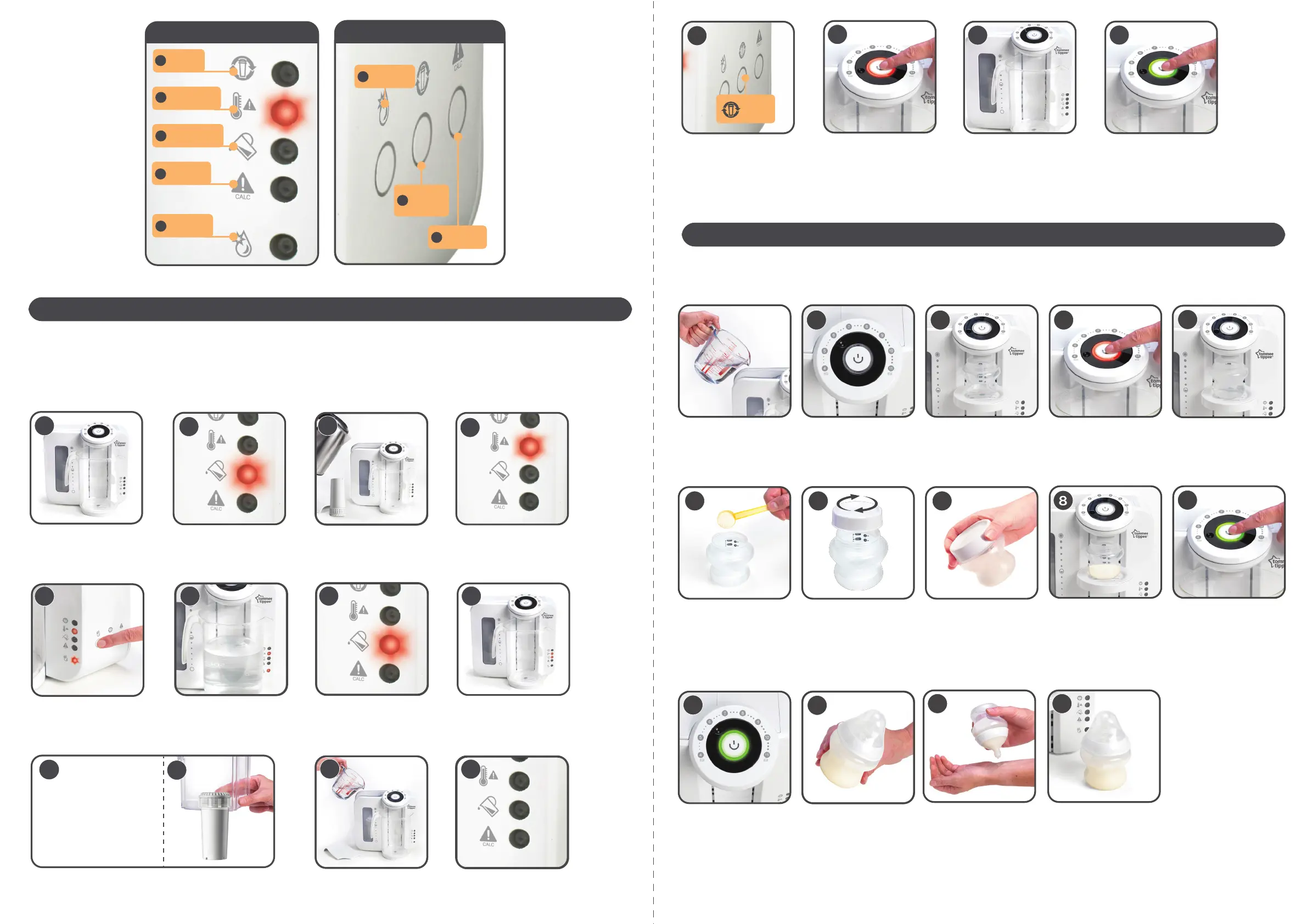
ACTION BUTTONS
CLEANING
MODE
O
FILTER
VOLUME
RESET
P
DE-CALC /
DE-SCALE
Q
SET UP
USAGE
As with any other method of making up a feed, it’s essential that good hygiene practices are observed in the use and maintenance of your Perfect
Prep machine. Ensure your hands and all surfaces that come in to contact with the machine and its components are clean, and that the unit is
away from direct sunlight and heat sources.
REGULAR CLEANING: For hygiene and safety reasons you should clean your unit on a regular basis. We recommend you carry this out at least every 4
weeks, whenever you replace your filter or if the machine has been unused for a period of 7 days.
Place a container under the
dispenser spout to capture the water
used to clean the system (ideally at
least 1.8 litre capacity).
Plug in the unit, the tank empty
warning light will illuminate.
Fill the water tank with freshly
boiled water.
Wait for the tank empty warning
light to go out. The water tank hot
light will illuminate.
Press the cleaning mode button and
hold for 2 seconds. The cleaning
mode light will illuminate.
Allow the cycle to fully complete with
boiled water dispensing into the
container that you placed underneath
during step 1.
The tank empty warning light will
illuminate once the water has
flushed through the system.
Discard the contents from the
container used and place it back
under the dispenser spout.
1
3
2
4
5
7
6 8
Without removing the hopper from the machine and still holding the filter
by the top, place the filter in the hopper, ensuring it locks in to place.
Fill the hopper with cold water. Wait for the tank empty warning
light to go out.
• Remove the filter from the
packaging
• Remove sticker from the top of filter
• Fill a bowl with cold tap water
• Fully submerge the filter in the water
• Gently agitate until the bubbles stop
9a
9b
10
11
Handling the filter
by the top only:
Remove the milk storage lid and
replace your bottle onto the bottle
stand.
Always check that the amount
dispensed is consistent with the
size of feed you have selected on
the dial (by adding formula, your
feed will appear larger than the feed
size chosen). Add the sterilised teat,
screw ring and hood and shake.
For your child’s safety always check
food temperature before feeding by
testing on a sensitive part of your
skin.
Your bottle is now ready to serve.
Make sure you discard any
unwanted feed as per the formula
manufacturer’s recommendation.
Press the start/stop button again.
The red light will go out and the
green light will flash. If this button is
not pressed within 2 minutes of the
hot water being dispensed a long
beep will sound. If the alarm sounds
you should discard the feed and
repeat the process from step 1.
Wait whilst the remainder of water is
dispensed. Once completed, there
will be a double beep and the green
light will change to solid.
The light will change to solid red
and there will be a double beep to
indicate the end of the first stage.
You will need to make up your feed
within 2 minutes.
Carefully remove the bottle from the
stand and measure the correct
number of formula scoops into the
bottle.
Screw the sterilised milk storage lid
onto the bottle and ensure that the
lid is tight. Be careful when handling
hot liquid.
Shake well until the formula powder
has dissolved.
4
5 6 7
9
10
11
12 13
WARNING LIGHTS
WATER TANK
HOT
WATER LEVEL
LOW
DE-CALC /
DE-SCALE
CLEANING
MODE
K
L
M
N
CHANGE
FILTER
J
Set the dial to 120ml/ 4 fl oz with container
under the dispenser spout.
Press the start/stop button. A red
light will flash.
The appliance will dispense an
amount of hot water.
Press the start/stop button again.
A green light will flash and an amount
of water will be dispensed to finish
the cycle. Discard the contents of the
container. Fit the bottle stand.
Your machine is now ready to use.
13
14
15
Press the filter volume reset button
for 2 seconds to clear the memory.
FILTER
VOLUME
RESET
12


 To Next Page
 Loading...