COL
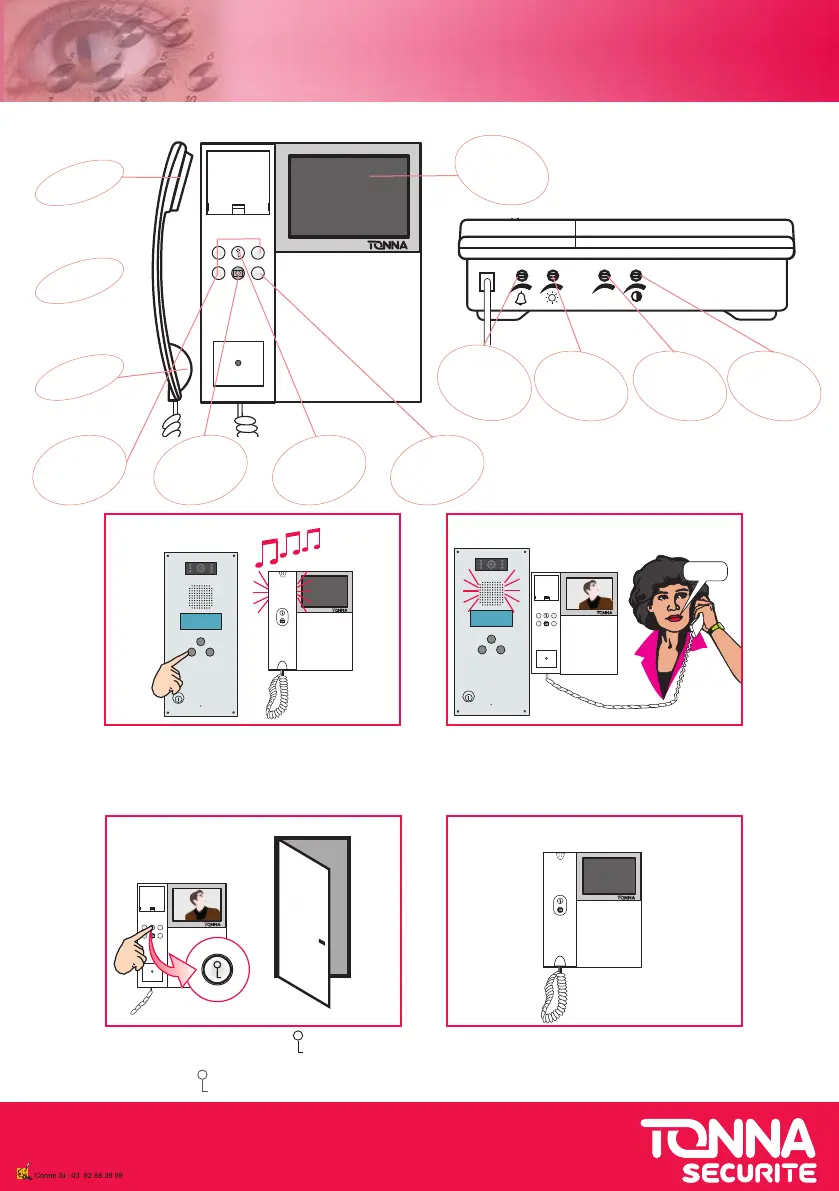
UTILISATION DU MONITEUR
USE THE MONITOR
1 - un visiteur appel, le moniteur sonne et
l’image s’ache
1 - visitor calls, monitor rings and a picture
appears on the screen
allo
oui
2 - décrochez le combiné pour
acver l’inter-
phone, vous conversez avec
votre visiteur
2 - li the handset to answer
4 - raccrochez le combiné
4 - hang up the handset
69644010 - V10/13
3 - appuyez sur le bouton « » pour ouvrir
la porte
3 - push « » buon to open the door
LED rouge
coupure sonnerie
Red LED
bell cut o
Réglage du
volume de
la sonnerie
Adjust bell
volume
Réglage des
couleurs
Adjust colors
Réglage de la
luminosité
Adjust
brightness
Ecran LCD
couleur 4”
4” colors LCD
screen
Haut Parleur
Loudspeaker
Microphone
Microphone
Combiné
Handset
Touche
«ouverture porte»
Door opening
buon
Réglage du
contraste
Adjust
contrast
Touche
«
coupure sonnerie»
Red LED
bell cut o
Touches non
ulisées
Unused buons



 To Previous Page