Topcom Butler xxxx 19
PowerLan 6420
19
ENGLISH
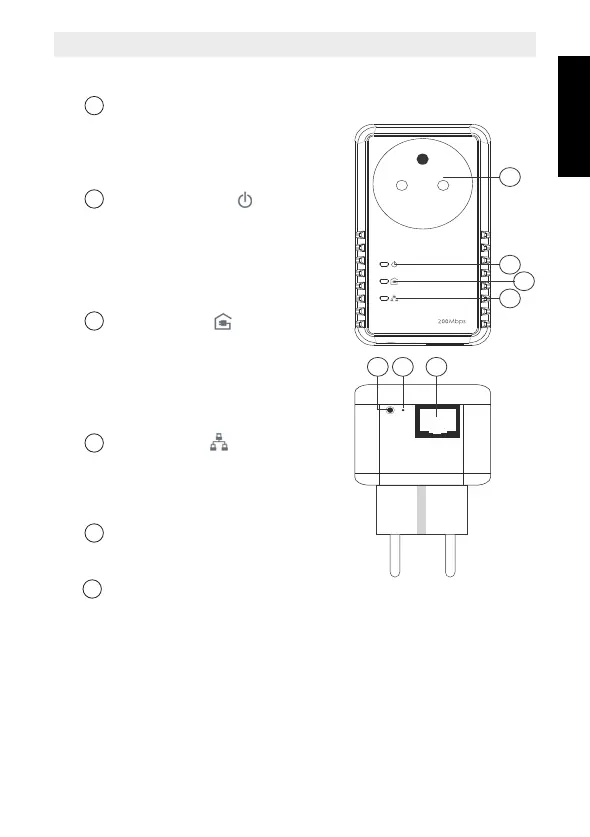
5 Description
Power supply socket
– You can plug in your hardware, such
as a modem, PC, set-top box, games
console, TV, etc., to supply them
with power.
Power supply LED
– On: normal operation
– Flashing (0.5 seconds on/0.5 seconds
off): in connection mode.
– Slow flashing (1 second on/4 seconds
off): in stand-by mode (energy saving
mode)
Powerline LED
Shows the quality of the connection
with other Powerline plugs.
– Green: excellent quality.
– Orange: good quality.
– Red: poor quality.
The LED flashes during data transfer.
Ethernet LED:
– On: successful connection with another
device through an Ethernet cable.
The LED flashes when data is being
transferred.
Ethernet connection (RJ45):
For connection to an external device
through an Ethernet cable.
Full reset button:
– Push in the reset button, with a paper
clip for example, for 3 seconds to reset
the Powerline.
Following reset, the standard
password "HomePlugAV" is loaded.
1
2
3
5
HL_Topcom PL 6420.book Page 19 Thursday, October 7, 2010 4:04 PM


 To Next Page