5
Protalker 1116
8.6 Charging the battery
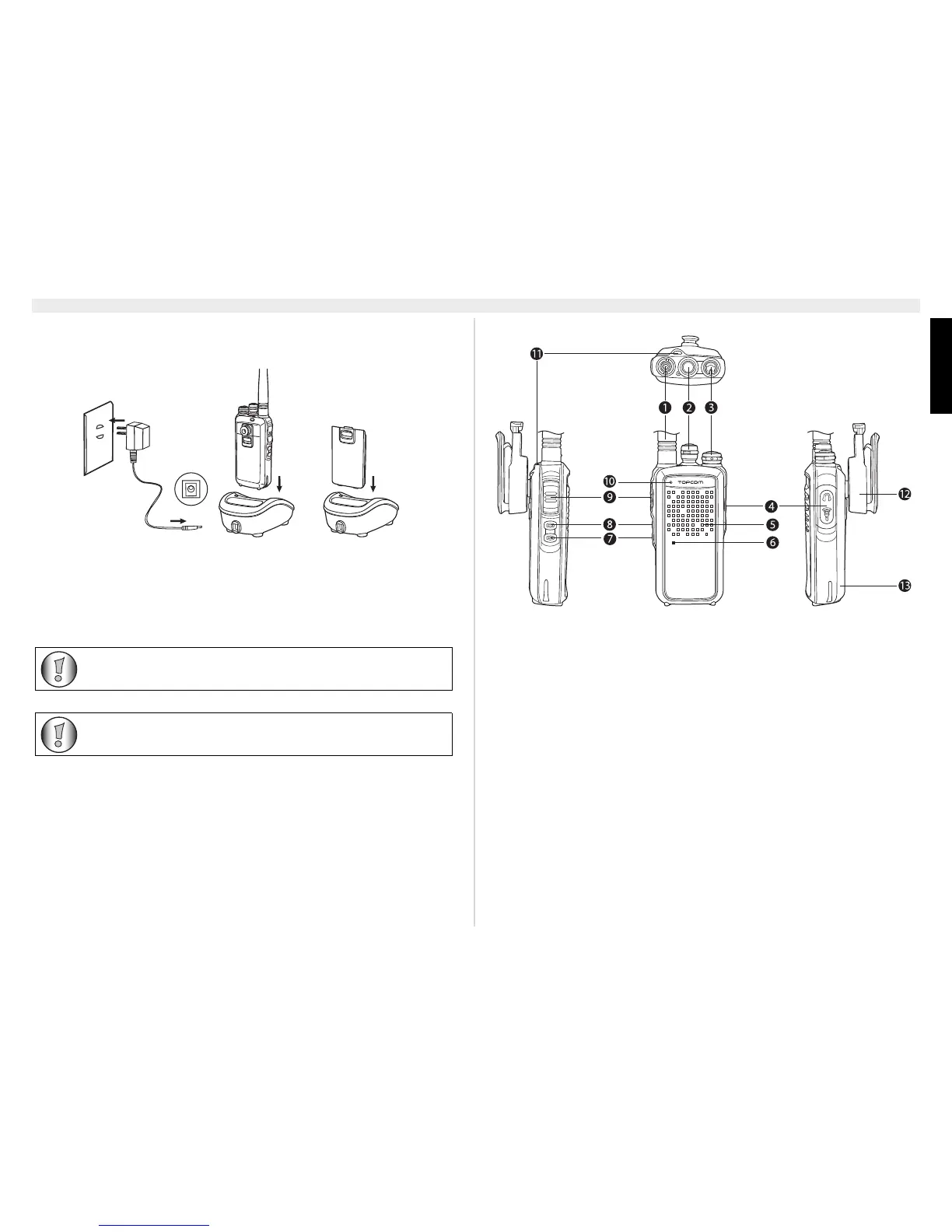
1. Connect the power jack of the power adapter to
the back of the desktop charger.
2. Plug in the power adapter in an easy accessible power socket.
Put in the PMR (with installed battery) or the separate battery into the charger.
The LED colour will indicate the charging status of the battery:
• Red : Charging
• Green : Fully charged
When the battery is fully discharged it will take
about 3.5 hours to charge the battery.
Do not use the PMR while charging the battery. Switch off the power of the
PMR while charging.
Do not short-circuit the batteries or dispose in fire. Remove the batteries
if this device is not going to be used for a long period.
9 The PMR radio
1. Fixed antenna
2. Channel selector (16 positions)
3. On/Off, Volume rotatable knob
4. External Speaker/Microphone, PC cable connector
5. Speaker
6. Microphone
7. Function key 1
8. Function key 2
9. PTT-button
10. Status LED
– Green : Receiving
– Red blinking : Scanning
– Red : Transmitting
– Green blinking : Battery status indication
11. Strap hole
12. Belt clip
13. Battery



 To Next Page