ENGLISH
5
Twintalker 5400
12.7.1 Changing sub-channels
12.8 Making a call
12.9 Monitor
You can use the monitor function to check for weaker signals in the current channel.
• Press the MON - key to start monitoring.
• If you hold this key for more than 3 seconds, the radio will go into continuous monitoring mode.
• Press the key again to disable the monitor function.
12.10 Channel Scan
Channel scan performs a search for active signals in an endless loop from channel 1 to 8.
Once an active channel is found, the scanning will stop so you can listen to the conversation.
If there is no more activity on the found channel, the scanning will resume after two seconds.
If you press the PTT- key on the found channel, the scan function will end and the radio will remain on this channel.
12.11 VOX
When the optional headset (without PTT-key) is connected, the voice activated transmission function (VOX) can be used.
This way, the user does not need to press the PTT button to start transmitting. The Twintalker 5400 will start transmitting when you
start talking into the microphone of the headset.
12.12 Roger Beep On/Off
After the PTT - key is released, the unit will send out a roger beep to confirm that you have stopped talking.
12.13 Key Beep On/Off
When a key is pressed, a tone can be heard.
12.14 Key lock
13 Warranty
13.1 Warranty period
The devices have a 24-month warranty period. The warranty period starts on the day the new unit is purchased. There is no warranty
on standard or rechargeable batteries.
Consumables or defects causing a negligible effect on operation or value of the equipment are not covered. The warranty has to be
proven by presentation of the original or copy of the purchase receipt, on which the date of purchase and the unit-model are indicated.
13.2 Warranty exclusions
Damage or defects caused by incorrect treatment or operation and damage resulting from use of non-original parts or accessories are
not covered by the warranty.
The warranty does not cover damage caused by outside factors, such as lightning, water and fire, nor any damage caused during
transportation. No warranty can be claimed if the serial number on the units has been changed, removed or rendered illegible. Any
warranty claims will be invalid if the unit has been repaired, altered or modified by the buyer
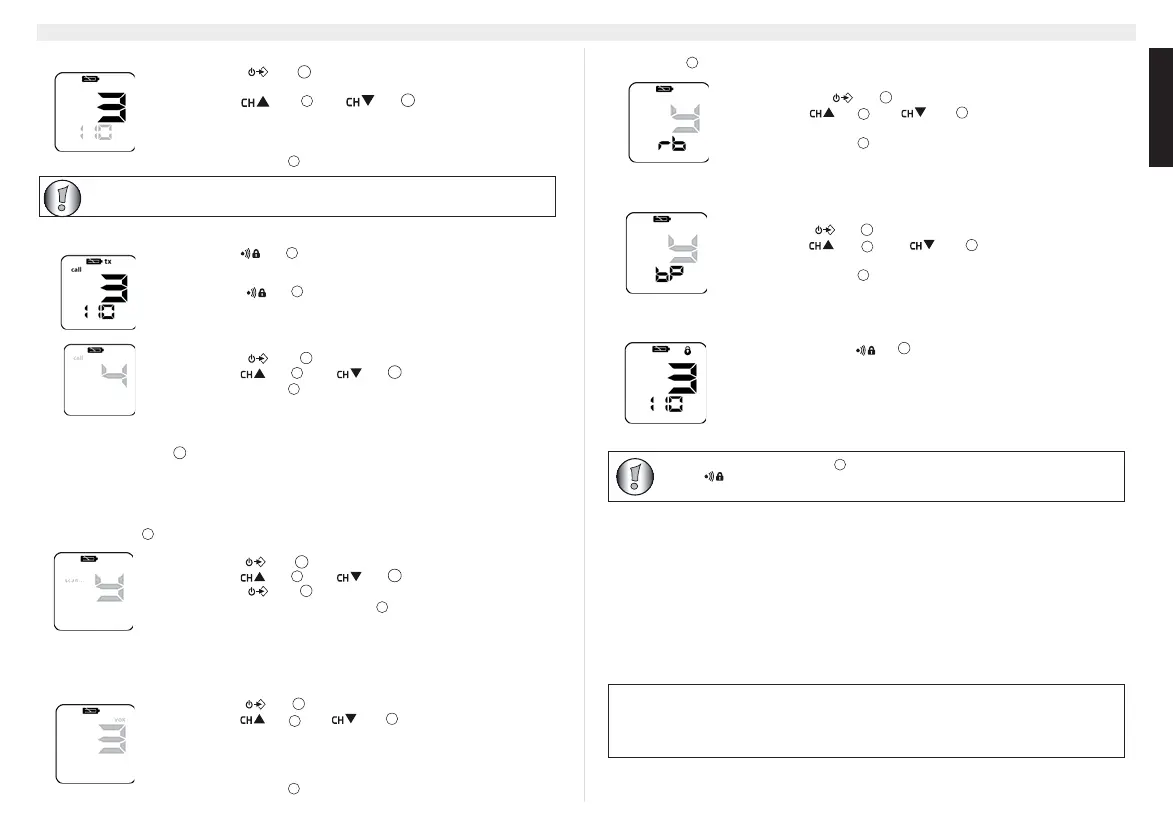
• Press the - key : The current selected sub-channel (or “oF” in case of
no sub-channel) will blink.
• Use the - key or the - key to select the desired sub-
channel:
1..38: CTCSS code (1...38)
39..121: DCS code (1...83)
• Press the PTT - key to confirm
When you press the - key you will transmit a call tone to the other users on the same
channel/sub-channel.
This will indicate that you want to start a conversation.
• Press the - key
There are 5 different call tones. You can select a call tone in the menu:
• Press the - key four times
• Use the - key or the - key to select the call tone
• Press the PTT - key to confirm.
• Press the - key two times
• Use the - key or the - key to select Y for scanning
• Press the - key to confirm : Scanning will begin
• The scanning will stop once the PTT - key is pressed.
• Press the - key three times
• Use the - key or the - key to select the VOX level or oF to
disable VOX. (there are 5 VOX levels)
– Level 1 : Highest sensitive for quite environments
– ...
– Level 5 : Lowest sensitivity for noisy environments
• Press the PTT - key to confirm
11
Annex B will show all detailed information about the CTCSS and DCS sub-channel codes.
The Roger Beep can be switched On or Off:
• Press the the - key five times
• Use the - key or the - key to enable (Y) or disable (n) the
Roger Beep
• Press the PTT - key to confirm
The key beep can be switched On or Off:
• Press the - key six times
• Use the - key for the - key to enable (Y) or disable (n) the
key tone
• Press the PTT - key to confirm
• Press and hold the -key for three seconds to activate/deactivate the key
lock function.
11
When key lock is enabled, the PTT- key , the volume control-keys, the monitor-key (MON) and the call-
key the will still be operational. All other keys are locked.
This product is in compliance with the essential requirements and other relevant provisions of the R & TTE directive
1999/5/EC.
The Declaration of conformity can be found on :
http://www.topcom.net/support/cedeclarations.php



 To Next Page
 Loading...