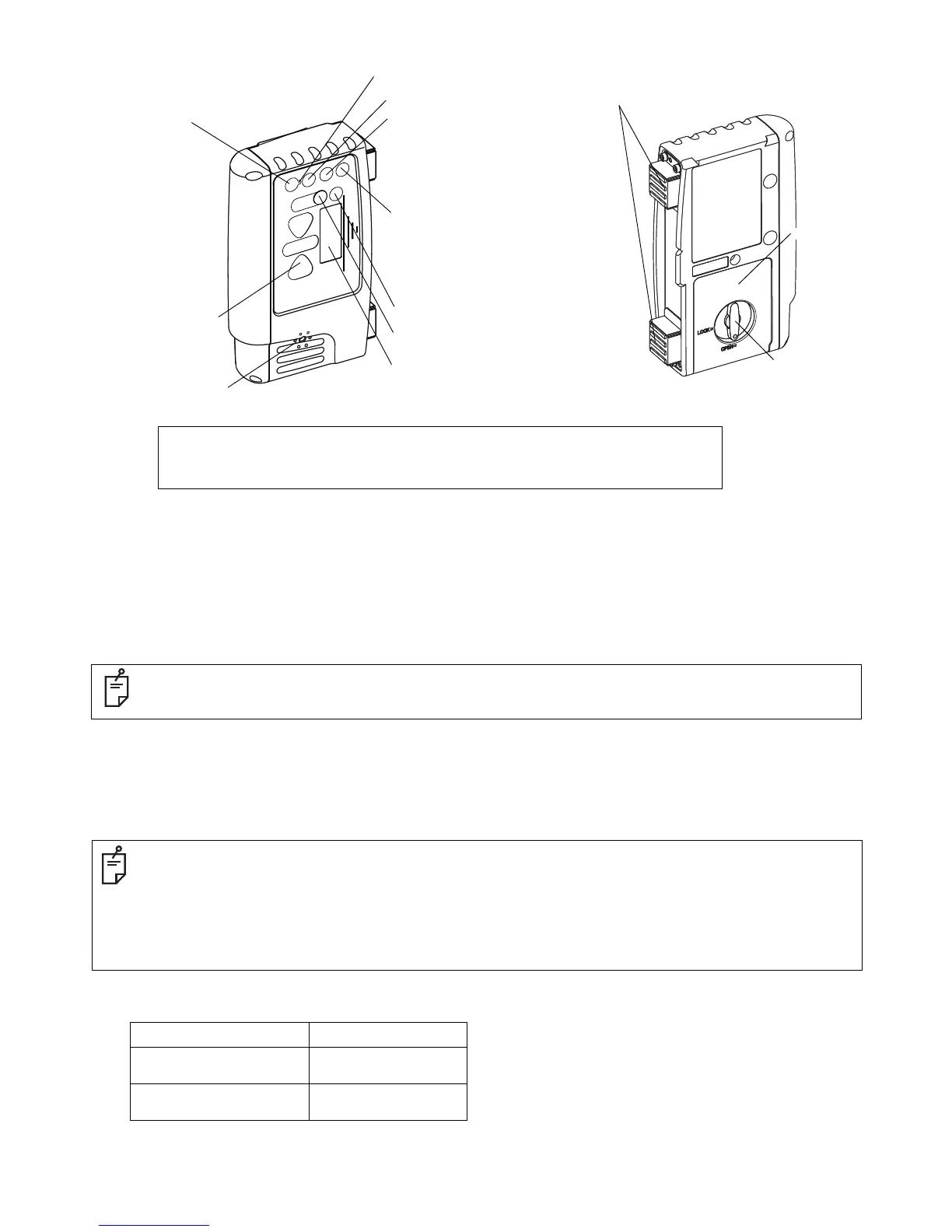
Magnet
Indicator(LCD)
Power switch
Power ON: Short push
Power OFF: Long push
LCD back light ON/OFF:
Short push when power is ON
(Auto turn-off after two minutes)
Detective precision (Mode) switch
Buzzer sound switch
Buzzer sound: Quiet/Loud/OFF:Short push
LED ON/OFF: Long push
Indicator(LED)
Buzzer speaker
Risk of damage to installation surface of machine, because it uses a strong magnet.
See [Laser beam positions and display patterns] in the Instruction manual for the display area and display pattern.
This instrument is able to perform wireless communication with the LS-B110W/LS-B10W, sold separately.
See the LS-B110W/LS-B10W Instruction manual for details on the LS-B110W/LS-B10W.
Wireless communication switch
Communication ON/OFF: Short push
Communication default setting: Long push
Wireless communication LED
Tilt switch
Zero-set switch
Battery cover
Battery cover knob
How to set up the wireless communication default setting
Place the LS-B110W/LS-B10W and RD-100W in close position, so that they will not be affected by other wireless communications.
1 Turn on the power for both the LS-B110W/LS-B10W and RD-100W.
2 Long-push the wireless communication switch for the LS-B110W/LS-B10W and RD-100W. While setting up, the wireless communi-
cation LED (yellow light) will turn on.
3 When the instrument is ready to be used, a buzzer will sound (buzzer sound: peep) and the communication will begin.
How to use wireless communication
1 When power for both the LS-B110W/LS-B10W and RD-100W are turned ON, communication will automatically begin.
During communication, the wireless communication LED will flash quickly.
During communication preparation, the wireless communication LED will flash slowly
Lighting/Flashing pattern of wireless communication LED
Lights While setting up the default
Flashes quickly
While LS-B110W/LS-B10W is
communicating
Flashes slowly
Communication is in
preparation
• If the communication fails, a buzzer will sound (buzzer sound: pi, pi, pi). Eliminate any influence from other wireless instrument and redo
the communication default setting.
• While setting up the default, only the default OFF (short-push of the wireless communication switch) is operable.
• When beginning the communication with LS-B110W, detective precision, tilt direction, tilt precision and ON-GRADE position setting will
be changed to the same setting as the
LS-B110W.
• When the detective precision, tilt direction, tilt precision or ON-GRADE position settings are changed while communicating with LS-
B110W, the setting for the
LS-B110W will also change in conjunction with the RD-100W.
• When begining the communication with LS-B10W, detective precision, buzzer sound, LED ON/OFF setting will be changed to the same
setting as the
LS-B10W.
• When the detective precision, buzzer sound or LED ON/OFF settings are changed while communicating with LS-B10W, the setting for
the
LS-B10W will also change in conjunction with the RD-100W.
• If you wish to change the
LS-B110W/LS-B10W to communicate, redo the communication default setting.


 To Next Page
 Loading...


