10
3.3 Bind the VCI
①
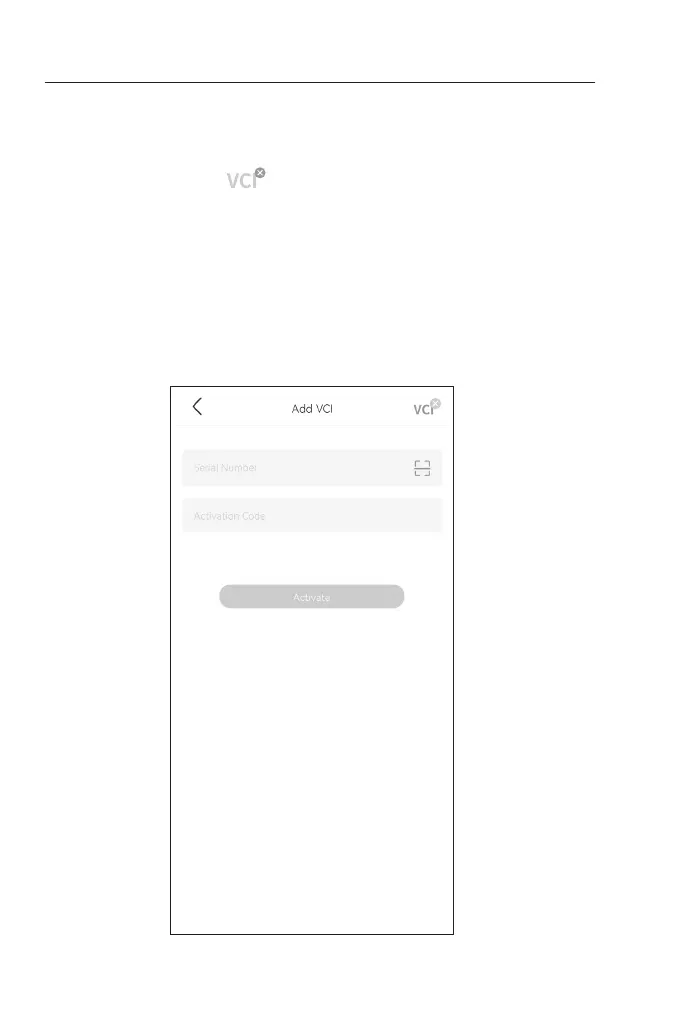
Tap Me > VCI Management > Add VCI.
②
To get the serial number and activation code, please scan the QR
code on the product.
Alternatively, tap the icon at the top right of the activation
screen to establish a Bluetooth connection (see Figure 3-3). Once
the Bluetooth connection between the TopScan and your phone
is established, the serial number and activation code will be
automatically obtained.)
Note:
The TopScan should be properly plugged into the vehicle's DLC
before Bluetooth can be connected.
③
Then, tap Activate.
Figure 3-3


 To Next Page