13
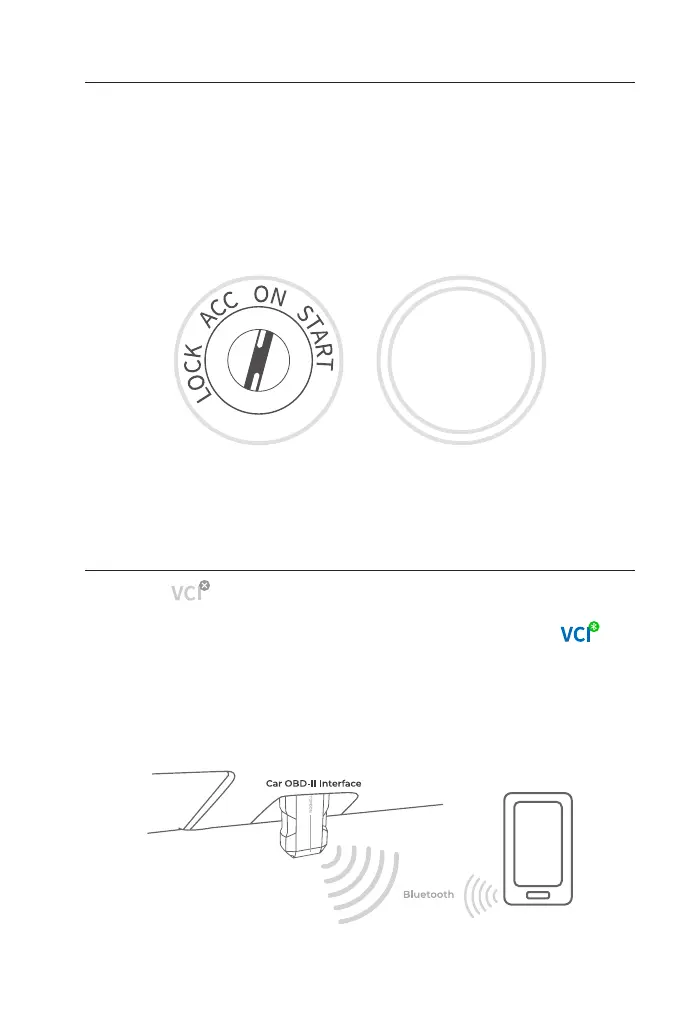
3.6 Turn the Ignition to the "ON" Position (see Figure 3-7)
3.7 Bluetooth Connection
If your vehicle is equipped with a keyless start system and the
ignition switch is an "Engine Start Stop" button (see Figure 3-8), press
the "Engine Start Stop" button until the car is in "ON" mode. Do not
apply the brake while pressing the "Engine Start Stop" button or you
will start the car instead of putting it in the "ON" position.
The method of ignition varies by vehicle model. Refer to the vehicle's
service manual for details.
Tap the icon at the top right of any screen with this icon to
establish Bluetooth connection with the TopScan unit. After the
connection is successfully established, the icon changes to .
Once Bluetooth is successfully paired, the connection will be
automatically established when you open the app. If not connected,
manually tap the icon to reconnect.
ENGINE
START
STOP
Figure 3-7
Figure 3-9
Figure 3-8


 To Next Page